

Amazon's Choice is a badge Amazon attaches to a product for a specific search term — not to the product itself. Rank Tracker counts those badges everywhere it counts rank, which makes it the one place you can see the badge behave like the keyword-level thing it actually is.
Prefer to watch? Sixty-eight seconds on why the badge belongs to the keyword, not the product.
The badge is per keyword, not per product
This is the fact everything else follows from. The same ASIN can hold Amazon's Choice on one term and hold nothing on the term next to it.
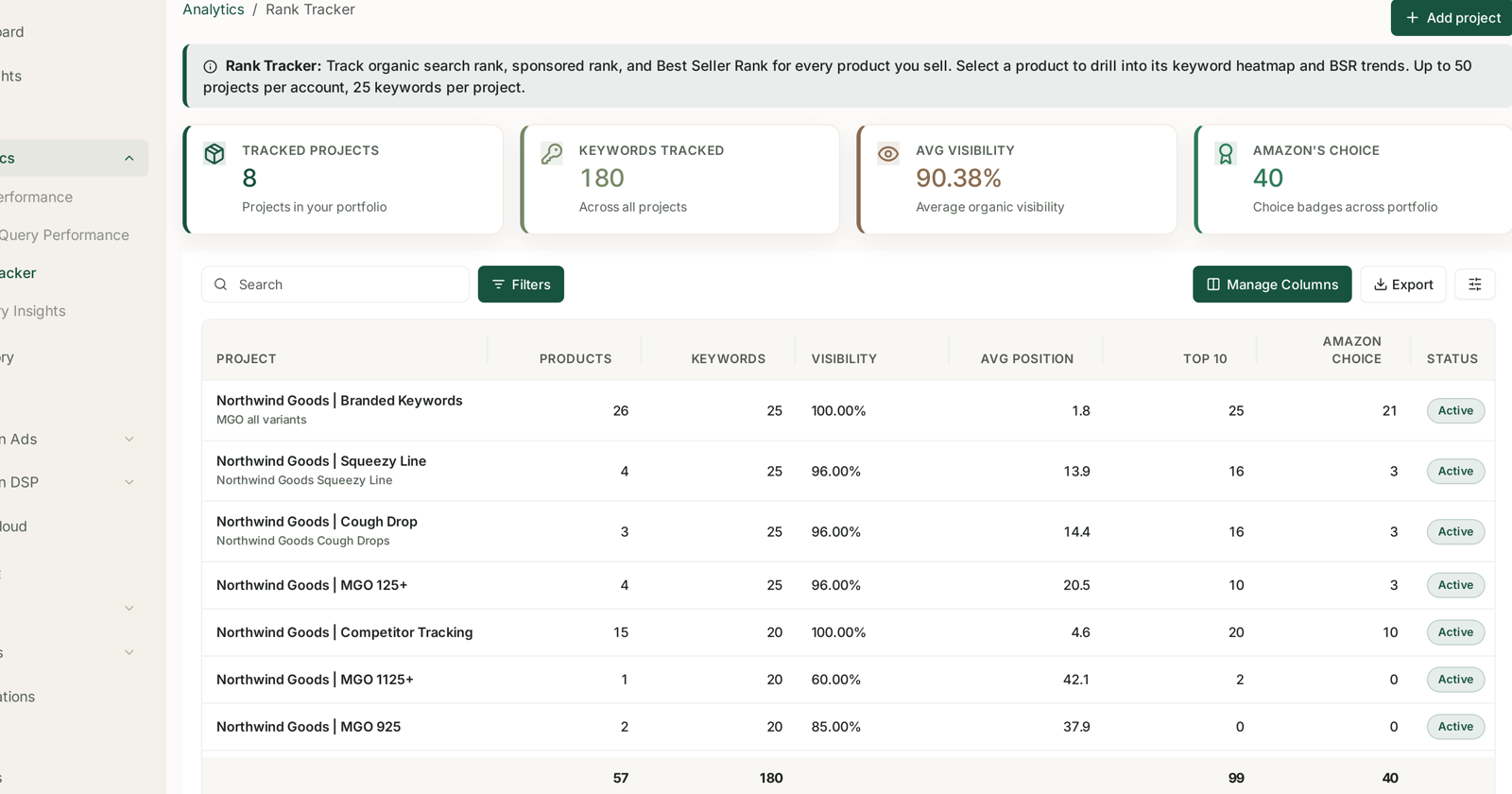
So the number in the Amazon's Choice column is a count of badges, not a yes/no. At portfolio level it is badges across everything you track; at project level, "Choice badges across products"; at product level, badges out of the keywords tracked for that product.
A product showing 15 in a 25-keyword project holds the badge on fifteen of those terms and not on the other ten.
Where it appears
| Level | What the count means |
|---|---|
| Portfolio | badges across every tracked project |
| Project | badges across the products in it |
| Product | badges out of that product's tracked keywords |
| Compare grid | a marker on the individual keyword × product cell |
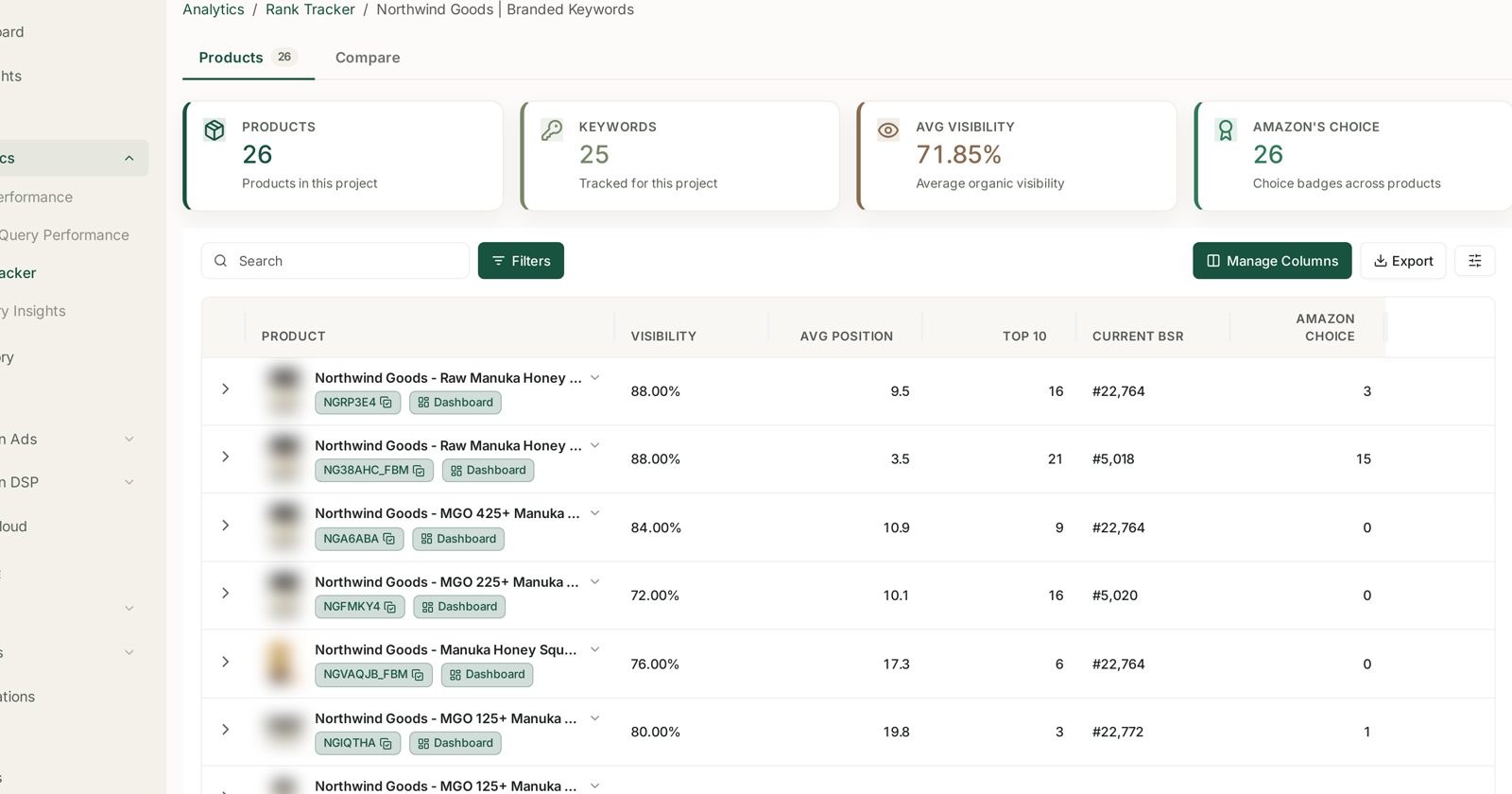
The per-product column is where the badge stops being a vanity metric. Three products in the same project holding 15, 3 and 0 is not a story about brand strength — it is a story about which listing Amazon currently considers the default answer.
Why you should care about the count
The badge is worth watching for a reason that has nothing to do with prestige:
It moves conversion on terms you may not be bidding on. Amazon's Choice sits in the organic result, and it disproportionately affects the shopper who is not comparing — the one typing a generic term and buying the first credible option. That is the traffic hardest to buy and easiest to lose quietly.
It signals what Amazon thinks the default is. Amazon awards it to a well-rated, well-priced, reliably in-stock product that ranks highly for the term. Losing it is therefore a symptom: something in that list changed before the badge did.
It is the cheapest early warning you have. A badge count that drops from 15 to 9 over a fortnight is usually the first visible consequence of a stock-out, a price move, or a review-rating slide — all of which show up here days before they show up in sales.
Reading a change
A badge count that falls is worth a specific sequence of checks, in this order:
1. Did you go out of stock? Even briefly. This is the most common cause by a distance, and the badge does not always come straight back. Check Inventory.
2. Did the price move? Yours or a competitor's. The badge is sensitive to price competitiveness within the term.
3. Did the rating slip? A drop below the neighbours on the same term is enough.
4. Did organic rank fall first? Open the Rank Heatmap for the product. If rank moved before the badge did, the badge is the consequence, not the cause — fix the rank.
5. Did a competitor take it? The badge is awarded per term, so somebody else generally now has it. A competitor project on the same terms answers this directly — see Tracking Competitor ASINs Alongside Your Own.
In the heatmap and the grid
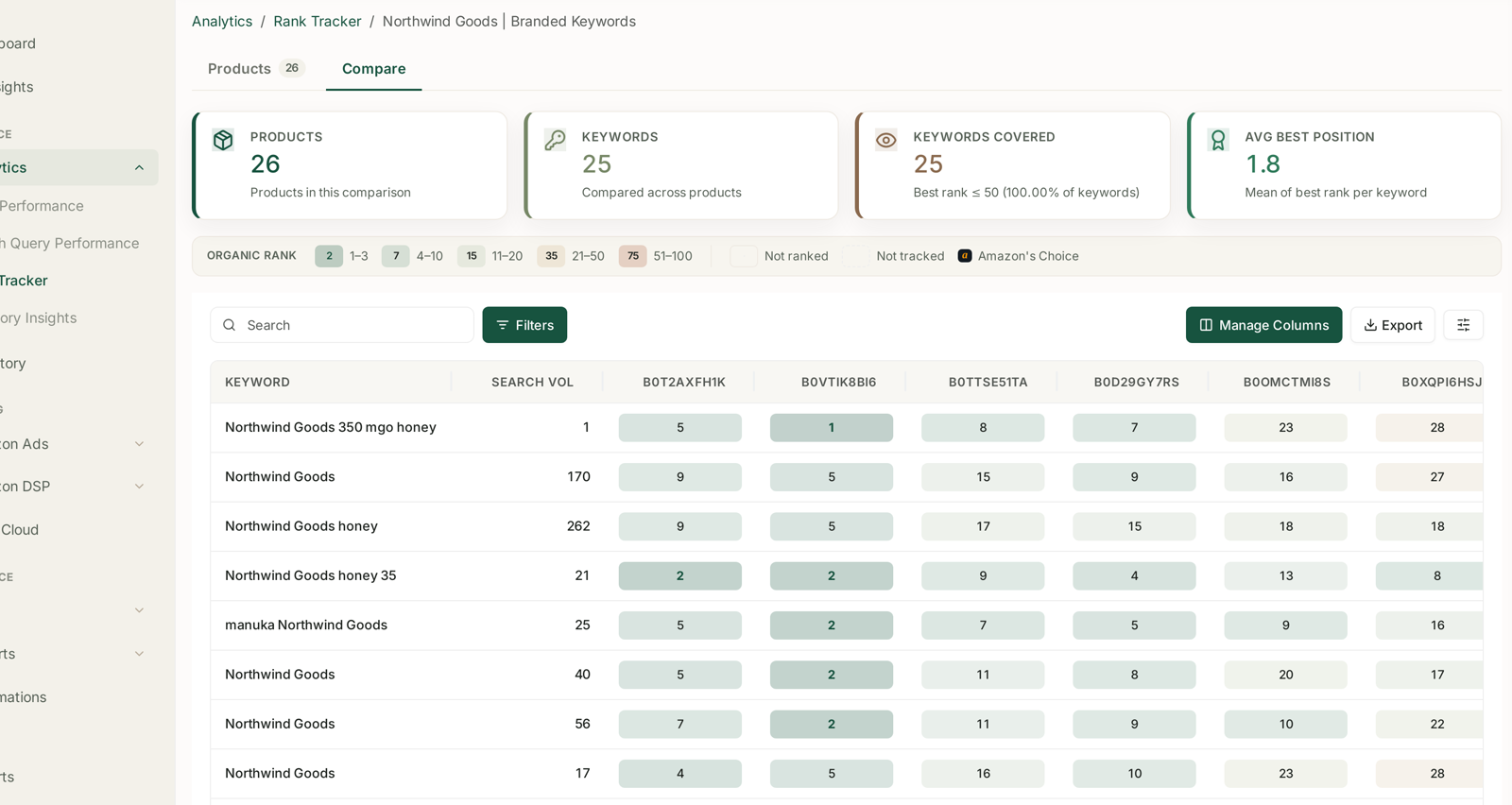
Both the Compare grid and the product Rank Heatmap carry an Amazon's Choice marker in the legend alongside the organic rank bands, so a badged cell is identifiable at the level that matters: this product, this keyword.
That is the view to use when the count changed and you need to know which term you lost.
What not to conclude
More badges is not automatically better. Badges on twenty-five low-volume long-tail terms are worth less than one badge on the term that carries your category. Read the count beside Search Vol.
The badge does not replace rank. A product can hold Amazon's Choice on a term and still be beaten on the page by sponsored placements above it. See Organic vs Sponsored Rank.
You cannot apply for it. There is no lever. Everything you can do is upstream — availability, price, rating, rank — which is exactly why the count is useful as a readout rather than a target.
It moves on Amazon's schedule. Day-to-day flicker is normal; a sustained fall over a week or more is the signal.
Related
- Reading Visibility, Average Position and Top 10 — the other three columns.
- Rank Tracker: Creating Your First Project — choosing terms worth holding a badge on.
- Best Seller Rank Tracking — the other Amazon-assigned marker on the same screen.
- Tracking Competitor ASINs Alongside Your Own — who has it now.