

Most of the dashboard tells you what happened. This panel tells you what to do about it, ranked by how much money is at stake.
It sits inside the Advertising card, collapsed behind a heading that looks like a label rather than a list — which is why plenty of people never open it.
Prefer to watch? Seventy seconds on reading a row, and what Potential savings does and does not mean.
Finding it
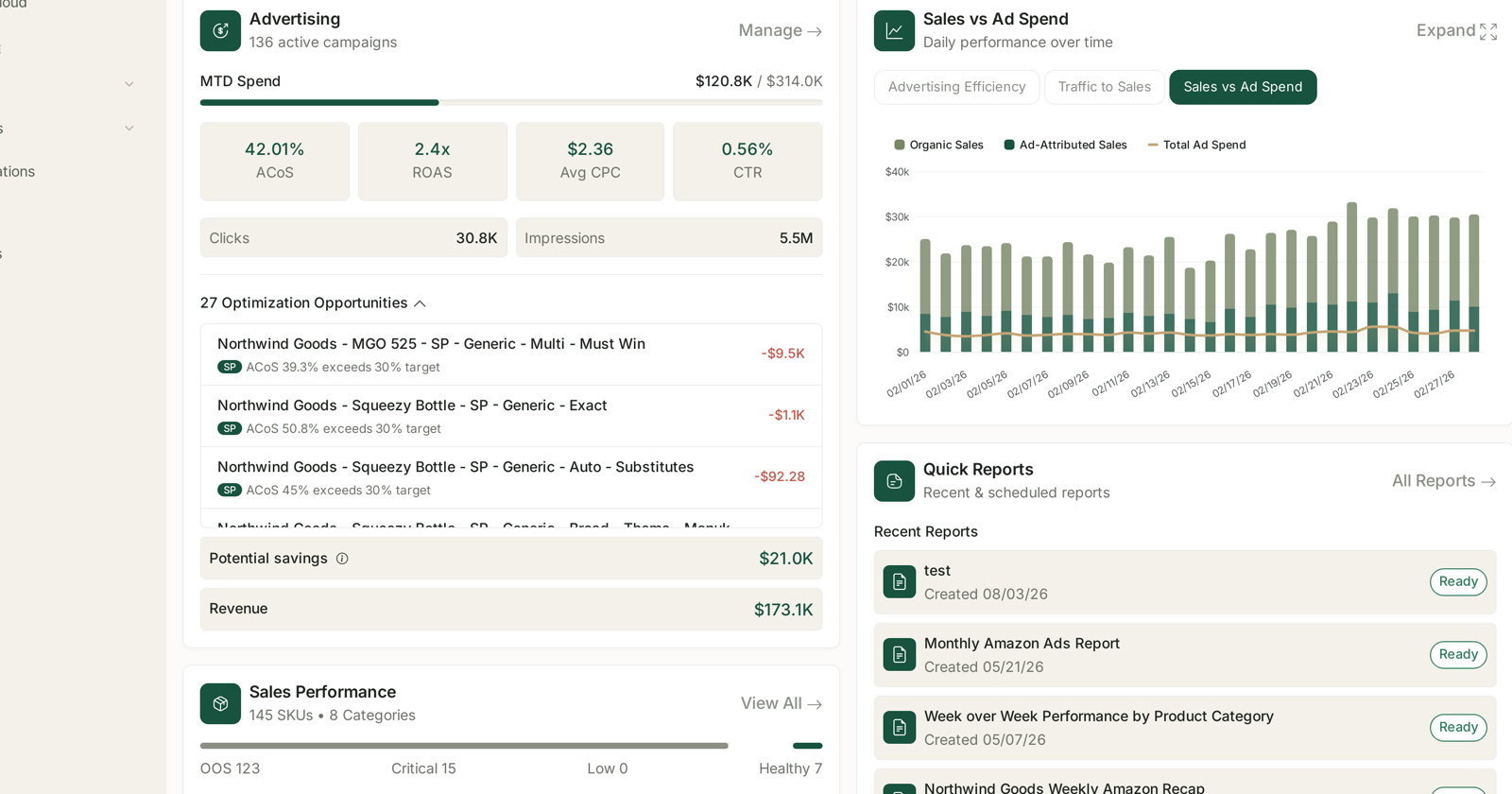
On the main dashboard, in the Advertising card, look for a heading like “27 Optimization Opportunities” with a chevron beside it. Click the heading to expand.
The number is the count of things the product currently thinks are worth changing. It moves on its own as your data does.
Reading one row
Every row carries four pieces of information, and together they are a complete instruction.
| Part | Example | What it tells you |
|---|---|---|
| Campaign name | Northwind Goods — MGO 525 — SP — Generic — Multi — Must Win | exactly where to go |
| Ad type badge | SP |
which console and which attribution window |
| The reason | ACoS 39.3% exceeds 30% target | the rule that flagged it, with your actual figure |
| The amount | −$9.5K | what it is costing you |
That third column is the part worth valuing. The panel names the threshold it used and your number against it, so you are never guessing why something appeared. An alert that cannot explain itself gets ignored; one that shows its working gets acted on.
Reading the two totals
Potential savings and Revenue sit below the list.
Potential savings aggregates what the listed opportunities are costing. Hover the info icon beside it for the precise definition — it is worth reading once so you know exactly what is being counted before you quote the figure to anyone.
Two cautions about it, both important:
It is potential, not banked. It is what you would stop wasting if you acted on everything listed — not money that appears if you do nothing, and not a forecast of profit.
Cutting spend is not free. A campaign at 39% ACoS against a 30% target is inefficient, not worthless. Pausing it removes the spend and the sales. See When a high ACoS is the right answer below.
How to work it
The list is already in the order that matters — money at stake, descending. So work top-down and stop when the amounts stop being worth your time.
- Read the reason before the name. “ACoS 39.3% exceeds 30% target” tells you this is a bid problem, not a listing problem.
- Check the ad type. An
SProw is judged on a 7-day window;SBandSDget 14 days, so a recent Brands campaign will look worse than it is. See Why SP, SB and SD Numbers Don't Add Up. - Decide the intent. Is this campaign supposed to be efficient, or is it defending a position?
- Act, or dismiss it deliberately. Either is fine. What is not fine is leaving 27 items unread every week.
When a high ACoS is the right answer
The target that flags these rows is a single number applied across campaigns that are doing different jobs.
- Defending a keyword you own — a higher ACoS can be entirely rational; you are paying to hold ground a competitor wants.
- Launching — ACoS is expected to be poor. You are buying sales history and rank.
- Harvesting — here the target genuinely applies, and an overshoot is real waste.
So the useful question is not “is 39% too high?” but “is this campaign doing the job I set it?” The panel cannot know your intent. You can.
From reading to not having to read
If the same rows keep reappearing, you are doing manually what the product will do unprompted.
Rule-Based Optimization has a Hit my Target ACoS recipe that scales each bid by how far it sits from target — which is the same judgement this panel is making, applied automatically and continuously rather than whenever you remember to look.
The panel is the diagnosis. A rule is the treatment. See Rule-Based Optimization.
Related
- Understanding ROAS and Key Amazon Advertising Metrics — what ACoS is and is not telling you.
- Understanding Your TrackIQ Dashboard — the rest of the screen.
- Advertising Efficiency, Traffic to Sales and Sales vs Ad Spend — the chart beside this panel.