

Every other advertising report in TrackIQ tells you what your ads did. Search Query Performance tells you what the whole market did, and how much of it you took.
That difference is what makes it the most strategically useful report in the product.
Prefer to watch? Fifty-four seconds on what makes this report different.
What makes it different
Your Search Terms report shows the searches your ads actually ran on. If you were not bidding, it does not appear.
Search Query Performance covers all search activity for your products, whether or not you were advertising. It shows the market total for each query — every impression, click, cart-add and purchase across all sellers — and your share of it.
Search terms show what you ran. SQP shows what was there to be won. The gap between those two is your opportunity, and it is invisible in every other report.
Your share of the market

The headline cards give your share, with the raw counts underneath — your clicks of the market's clicks.
Read Click Share beside Purchase Share. They are the diagnostic pair:
| Pattern | What it means |
|---|---|
| Purchase share below click share | you win the click and lose the sale — a listing or price problem |
| Purchase share above click share | you convert better than the market — you are under-bidding |
| The two roughly equal | you convert at market rate |
That second row is a buying signal. Converting better than the market on a query you barely appear for is the clearest case for spending more.
Change figures are in pp — percentage points. A move from 1.96% to 2.12% is +0.16 pp, not +8%.
The funnel, week by week
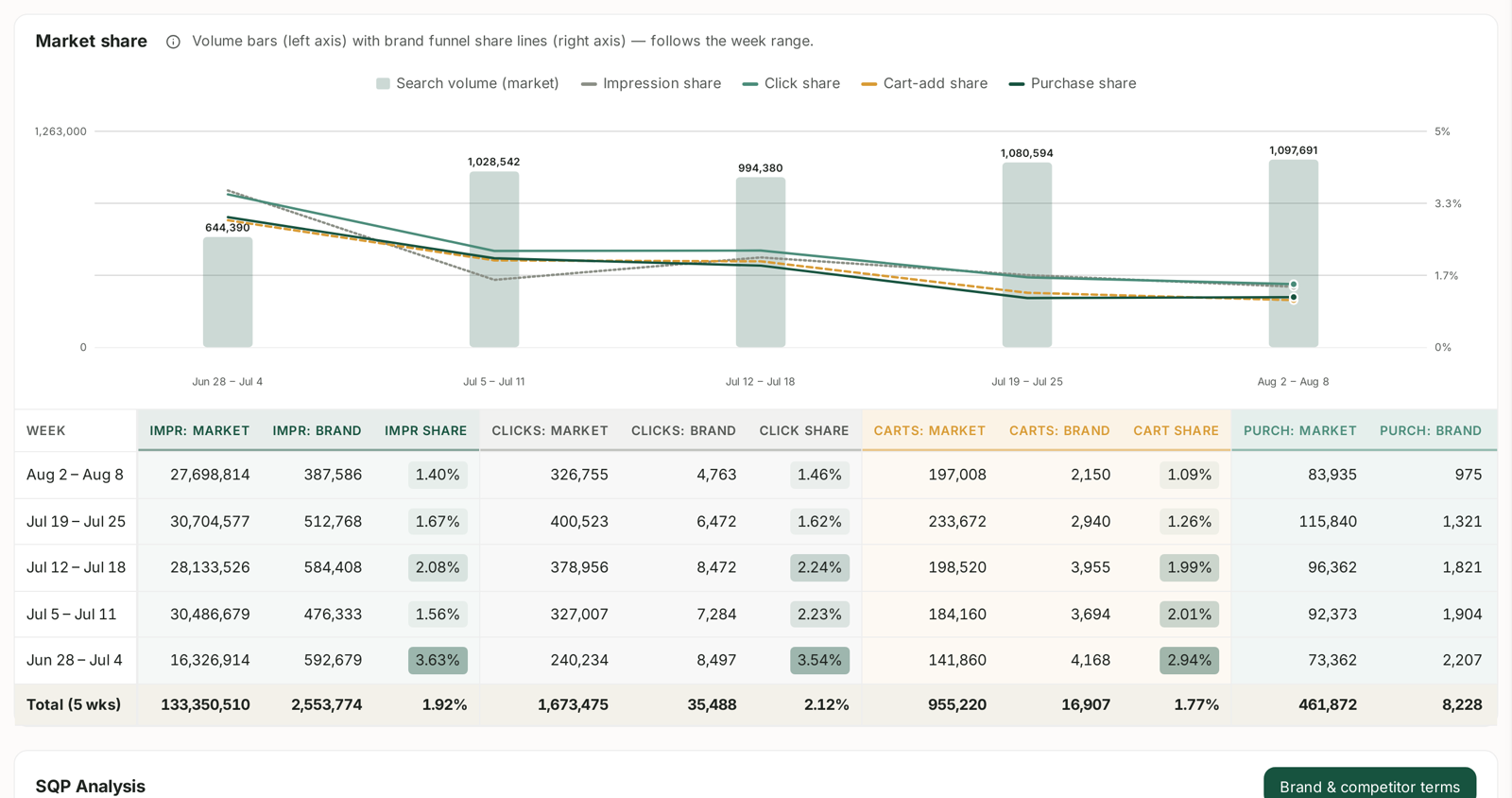
Bars are total market search volume; lines are your four funnel shares — impression, click, cart-add and purchase.
Read the lines against each other. The gaps between them are your funnel:
- Impression share above click share → shown but not clicked. Image, title or price.
- Click share above purchase share → clicked but not bought. The detail page.
- All four moving together → a visibility change, not a conversion change.
It is weekly, and that matters
Amazon publishes SQP in weekly cohorts, so the date control offers a span of weeks rather than free dates. Every table shows one row per week plus a blended total.
The share percentages are never added across weeks — 20% one week and 20% the next is not 40%. See Search Query Performance Is Weekly for how to read the Total row correctly.
Why your data may look sparse
Amazon suppresses low-volume query rows, so a brand with modest search volume will have many missing. It also lags — the most recent complete week is not available the moment the week ends.
Sparse data is a reporting threshold, not a fault. See SQP Data Is Sparse or Missing.
What to do with it
Three things, in order of value:
- Find demand you are not buying. Queries you convert on with no keyword against them — see Finding Queries You Convert On But Do Not Bid On.
- Work the Recommended actions list. The screen does this analysis for you and ranks it by money at stake.
- Watch branded share. Low share on your own brand name means someone is outbidding you on demand you created.
For a full tour of the screen itself, see The Search Query Performance Dashboard, Section by Section.
Related
- Search Query Performance Is Weekly: Reading Week Cohorts Correctly — the cadence that trips people up.
- How Much to Spend on Branded Keywords — branded market share, built from this report.
- Outlier and Trending Keywords — finding terms before the category does.
- Scoring Product Opportunities — search volume and growth as scoring inputs.
- Keyword Research from Search Query Performance — using this report to pick launch keywords.