

Two numbers get checked every week, per product, and in this order: TACOS first, then ACOS.
TACOS is the one that guarantees your profit. It is the share of total sales you are spending on advertising, and holding it inside a range you chose is how a monthly profit target actually gets hit rather than hoped for.
ACOS tells you whether the advertising itself is efficient. Which matters, because 75–100% of most Amazon businesses' marketing spend goes through it.
Prefer to watch? One hundred and eighty-two seconds on why TACOS is a range and gets checked first, the arithmetic for correcting a week, and the bleeder sweep when both numbers fail.
TACOS: hold it in a range, not at a number
Set a monthly target TACOS per product from your profitability review, based on the product's profit and the stage it is at — aggressive for growth, tight for profit. See Setting Target TACOS per Product.
Express it as a range of two or three points, not a single figure. 7–9%. 10–12%. 12–15% if you are pushing.
Then each week, check last week's TACOS against that range.
In range → do nothing. Move to the next product.
Above range → reduce spend.
Below range → increase spend.
That last case is the one people ignore, and it is a real miss. Target 10–12% and spending 7.8% means you have profit budget you are not using — see Optimisation as a Calculated Bet.
Correcting weekly is what makes the month land where you planned. Check monthly and you find out afterwards.
The arithmetic, worked
Target 12–14%. Last week: 16%. Sales $7,000. Spend $1,100.
Aim for 13.5%, just inside the range — 13.5% of $7,000 = $945.
$1,100 − $945 = $155 to remove from the week.
Divide by seven: about $22 a day.
Now decide where it comes from — the campaigns with the worst ACOS, or the outside traffic, promotion or deal spend that is performing worst. Whichever is returning least.
Going the other way, if you are under range, you have options beyond bids: raise budgets on campaigns hitting their cap, raise bids or placement adjustments on your best targets, test new targets, campaigns or ad types, or add a deal, promotion or outside traffic.
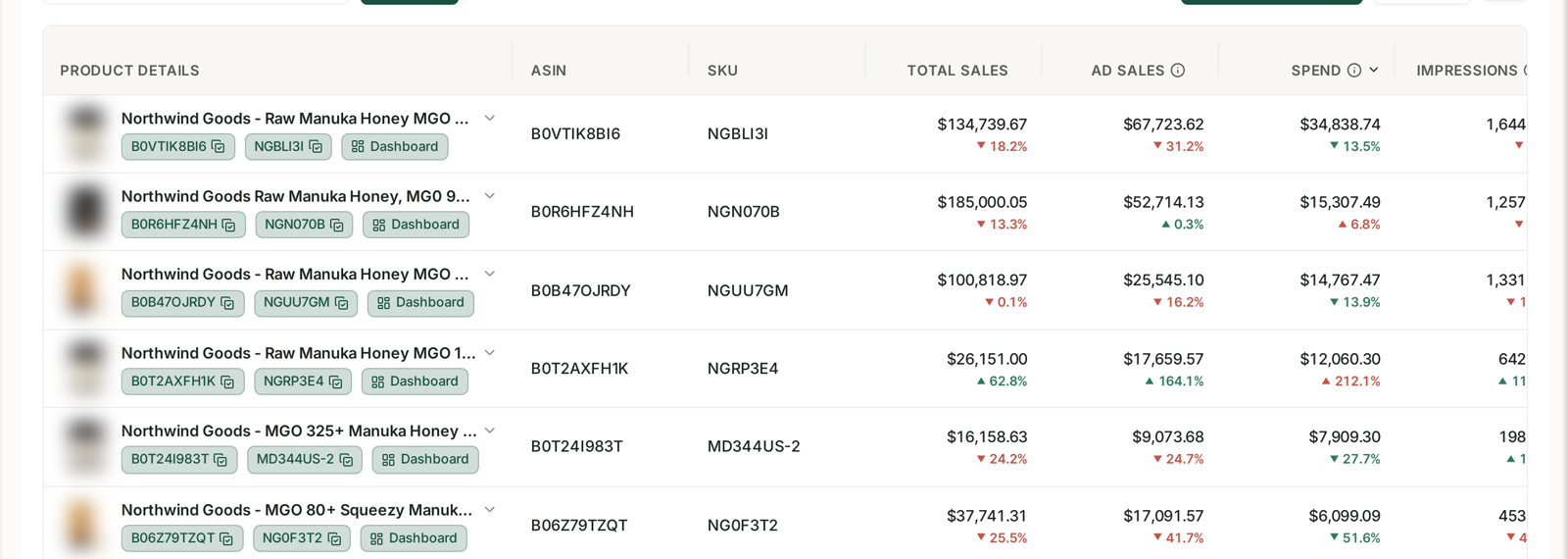
Doing this per product every week means holding target range, actual TACOS, spend and sales side by side for the whole catalogue — see Understanding Business Reports. Rebuilding that from an ads export and a sales report each Monday is most of why the check gets skipped.
ACOS: then check efficiency
Once TACOS is handled, look at PPC ACOS per product against its target.
A common general target is 30–35%, but higher-priced products legitimately run higher. Use your own number.
Within ±5% of target is fine. It will never sit still, and chasing normal variation wastes the week.
More than 5% above target is worth addressing. Target 30% and running 37–40% means recovering five points would be a substantial win.
Mark the one, two or three products where that is true, and work on those.
When both are wrong at once
High TACOS and high ACOS together is the situation that justifies aggressive action.
Because both of the main advertising metrics are failing, and the cause is usually the same: spend landing on targets that do not convert.
Run the full bleeder sweep — high-click zero-sale targets, targets converting above your threshold, and the lifetime pass. See The Bleeder Reports and Lifetime Bleeder Targets.
That attacks both numbers from the same side: cutting the waste lowers spend, which lowers TACOS, and removing poor targets lowers ACOS.
Why TACOS comes first
ACOS measures the advertising. TACOS measures the business.
A campaign at a beautiful ACOS on a product whose TACOS is 20% is not saving you — you are still spending a fifth of revenue on advertising.
And the reverse: a product comfortably inside its TACOS range does not need its campaigns interfered with, however imperfect they look.
So TACOS decides whether to act. ACOS decides what to do.
Common mistakes
Setting a single target rather than a range, and correcting constantly against noise.
Only acting when TACOS is too high, and leaving profit budget unspent when it is low.
Checking monthly, so the month is over before you can influence it.
Chasing ACOS variation inside the ±5% band.
Using one ACOS target across a catalogue with very different price points.
Cutting spend without deciding where from, and taking it off the campaigns that were working.
Related
- The Weekly Meeting — the meeting these two checks sit inside.
- Setting Target TACOS per Product — where the range comes from.
- The Bleeder Reports — what to run when both numbers are wrong.