

A rank drop is rarely one thing going wrong across the board. It is usually one product, or one cluster of related terms, and the rest of the noise is people looking in the wrong place.
Triage in this order and you will have the shape of it in about fifteen minutes.
Time: 15 minutes. Do it whenever visibility moves, and monthly regardless.
Prefer to watch? Eighty-eight seconds on narrowing it down, and the causality check people skip.
Step 1 — Is it everything, or one thing?
Rank Tracker → the portfolio.
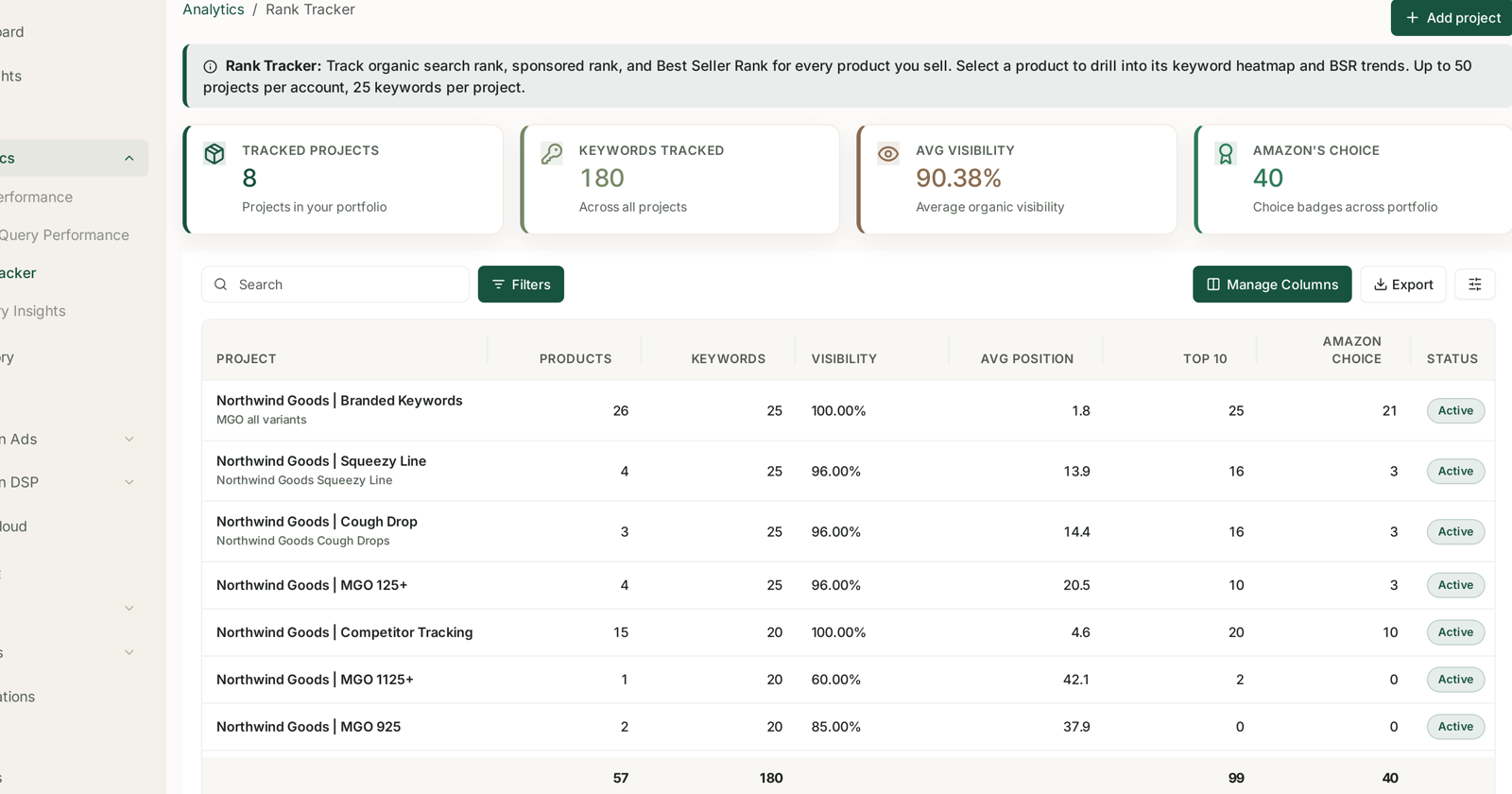
Look across your projects and read three columns together:
Visibility — higher is better. Avg Position — lower is better. Top 10 — a count, and the one that cannot be dragged by outliers.
Two of those move in opposite directions, which is the most common misreading of this screen. A project whose Avg Position went from 14 to 20 got worse.
If one project moved and the others did not, you have narrowed it already. If everything moved together, look for a cause that touches everything — an account-level issue, a seasonal shift in what people search, or an Amazon change.
Remember visibility is a mean of means: a project's figure is the average of its products'. One product going to zero drags the project down without anything else changing. Open the project before believing its headline.
Step 2 — Which product?
Open the project. The per-product table gives Visibility, Avg Position, Top 10, Current BSR and Amazon's Choice per ASIN.
Find the row that moved away from its siblings. If four products held and one fell, this is a product problem, and steps 3 to 5 are about that product. If all of them fell together, it is a brand or category problem — skip to step 6.
A row at 0.00% visibility is not a rank drop. That product is returning nothing at all, which is a different failure: a suppressed listing, a duplicate ASIN, or a product that never ranked for those terms. See Rank Data Shows Blank.
Step 3 — Which keywords, and when?
Open the product and take the Rank Heatmap.
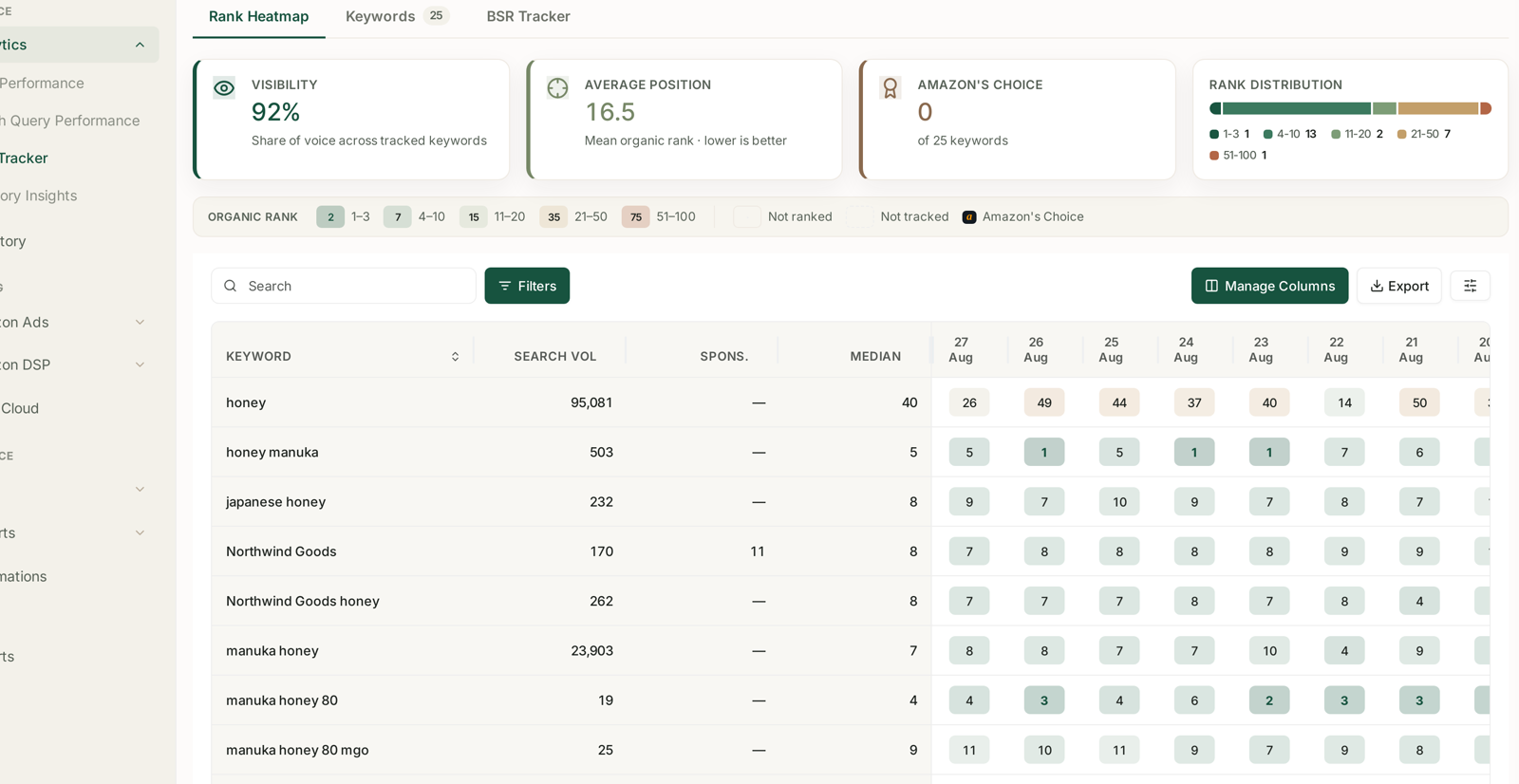
This is the screen that dates the problem. Every tracked keyword gets a row and every day gets a column, so you can read right to left and see exactly when each term started to slide.
Two shapes, two different causes:
All keywords fell on the same day. Something happened to the listing — it went out of stock, the price moved, the Buy Box was lost, or the content changed. Listing-level causes hit every term at once.
Some keywords fell and others held. That is competitive. Somebody moved on those specific terms, or the terms themselves changed in what they return.
Check Rank Distribution too. An average that got worse while the 1–3 and 4–10 bands held means you lost ground in the tail, which matters far less than the headline suggests.
Step 4 — Did sales cause it, or did it cause sales?
BSR Tracker, same product.
This is the causality check, and it is worth the thirty seconds. Best Seller Rank moves with sales velocity; organic rank follows it with a lag.
If BSR fell first and organic rank followed, the cause is upstream of search — you sold less, for a reason that has nothing to do with ranking. Availability, price, a review slide, a competitor promotion.
If organic rank fell first and BSR followed, you lost visibility and the sales decline is the consequence. Now it is a search problem.
Getting this backwards is how teams spend a month optimising listings when the real cause was a two-week stock-out.
Step 5 — Is the traffic still arriving?
Search Query Performance.
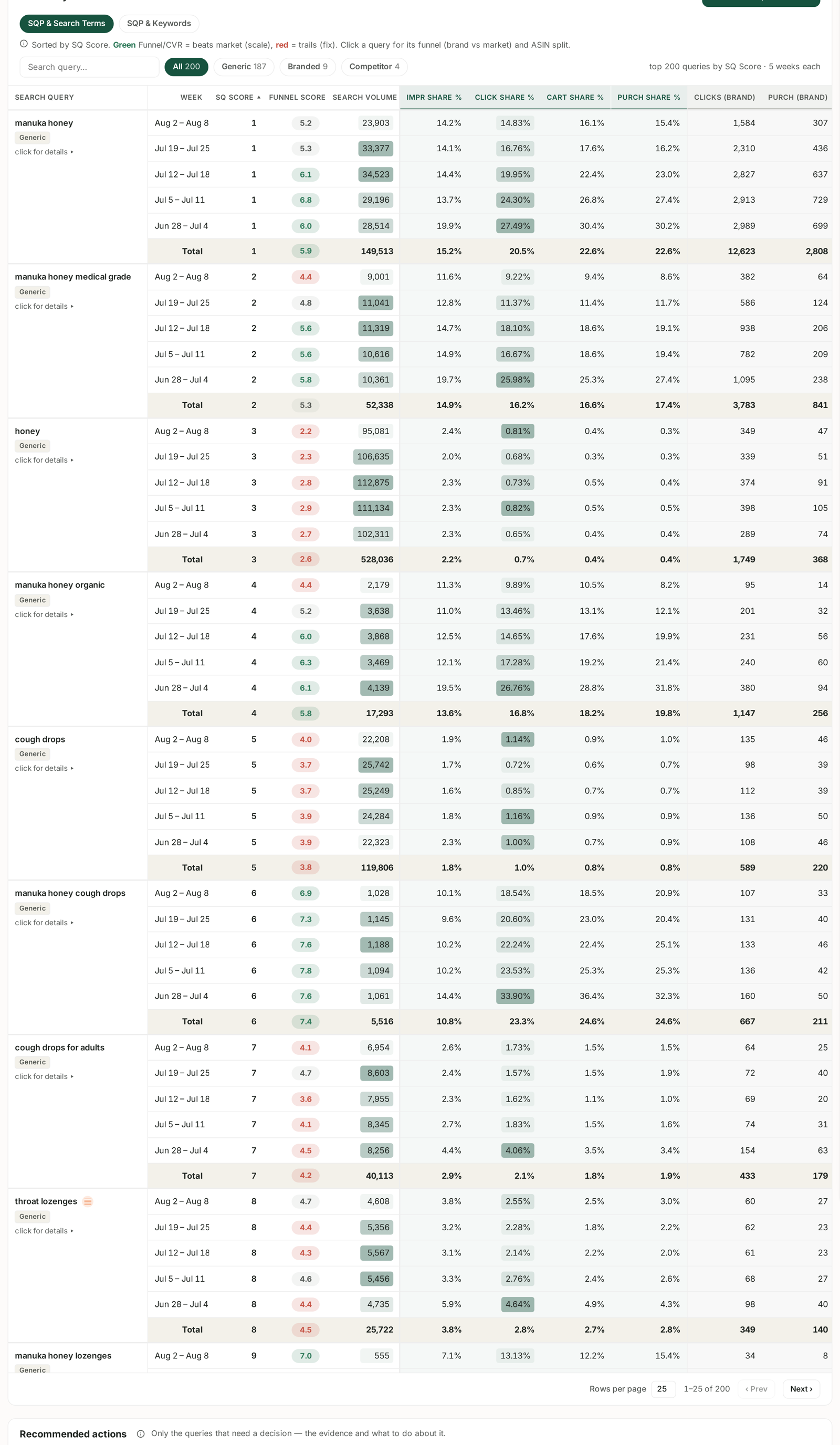
For the affected terms, compare your impression share, click share and purchase share week over week. SQP reports weekly cohorts, so use week-on-week rather than an arbitrary range. See SQP Is Weekly: Reading Week Cohorts Correctly.
| Pattern | Reading |
|---|---|
| Impression share fell | you lost position — a genuine rank problem |
| Impression share held, click share fell | you are still shown and no longer chosen — image, title, price, rating |
| Click share held, purchase share fell | they arrive and do not buy — a detail-page problem |
Only the first row is actually about rank. The other two are listing problems wearing a rank problem's clothes.
Step 6 — Check who took it
If you track competitors on the same keywords, the Compare tab settles it: your rank and theirs on the same terms, on the same day.
A competitor climbing into the positions you lost is a competitive answer, and it changes what you do next — you are now deciding whether to fight for that term, not why you slipped.
Also check Amazon's Choice. A badge count that fell on those terms usually moved to somebody, and losing it costs conversion on top of position. See Tracking the Amazon's Choice Badge.
What good looks like
You end with a scoped statement: "one product, six of its twenty-five keywords, starting on the 14th, and BSR fell first." That points straight at the fortnight when something changed in supply or price.
What not to do
Do not react to a single day. Amazon results are personalised and volatile. The heatmap exists because the trend is the signal — use the median column, not yesterday's cell.
Do not optimise the listing before step 4. If BSR fell first, the listing was never the problem.
Do not raise bids to compensate. Paid position does not restore organic position; it just costs more to be in the same place. See Organic vs Sponsored Rank.
Do not forget there is no backfill. Rank history starts the day tracking was enabled, so a project created last week cannot tell you what happened last month.
Related
- Reading Visibility, Average Position and Top 10 — step 1.
- Best Seller Rank Tracking — step 4, the causality check.
- Search Query Cart Analysis: Why a Query Doesn't Convert — when step 5 points at the page.
- Tracking Competitor ASINs Alongside Your Own — step 6.
- Profit Campaigns and Ranking Campaigns — the campaign type built to move rank back.
- What a Relaunch Is, and When to Run One — the deliberate way to move rank back.