

Amazon shows you that a campaign drove sales. What it does not show you is whether those sales came from new customers or the ones who already buy from you every month — and that difference decides whether your advertising is growing the brand or just harvesting it.
AMC Cloud answers that. It uses Amazon Marketing Cloud data to show you new-to-brand performance, how long shoppers take to convert, which sequences of ads actually lead to a purchase, and which products pull new customers into your catalogue. TrackIQ runs the queries for you and presents them as seven ready-made dashboards, so you never touch SQL or the AMC console.
Prefer to watch? A three-and-a-half minute tour of all seven dashboards.

The seven dashboards at a glance — each one answers a different question about where your new customers come from.
Step 1: Opening AMC Cloud
On the left-hand sidebar, under ADVERTISING, click AMC Cloud.
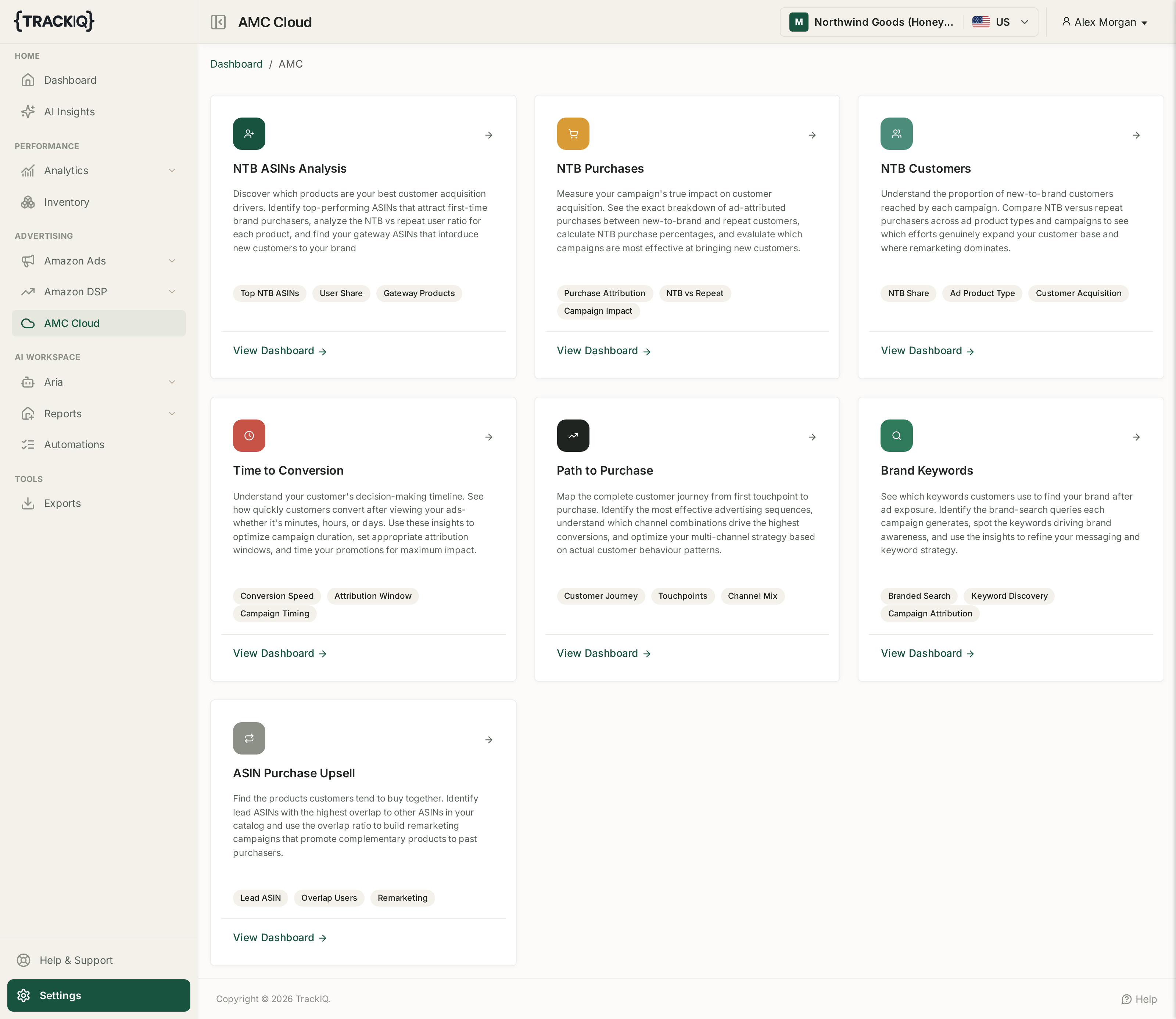
You will land on a page of dashboard cards. Each card describes what that dashboard answers and lists the topics it covers, and each has a View Dashboard → link that opens it.
Step 2: Knowing your way around any AMC dashboard
Every one of the seven dashboards follows the same layout, so once you can read one you can read them all.
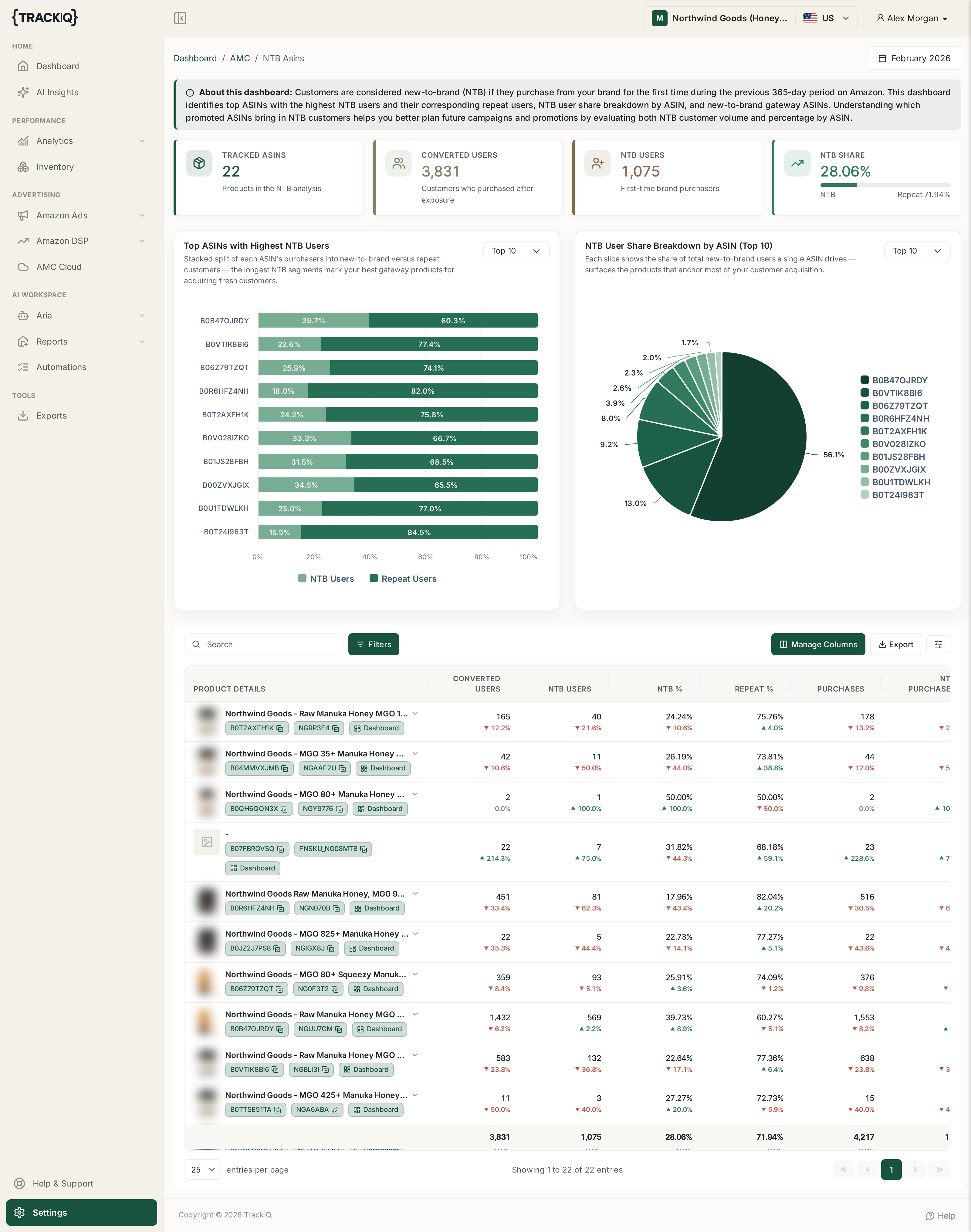
- Breadcrumb — Dashboard / AMC / [dashboard name], in the top left. Click AMC to get back to the card list.
- Month selector — top right. AMC data is reported by calendar month rather than a custom date range, so pick the month you want before reading anything else.
- About this dashboard — the grey banner under the breadcrumb. Read this once per dashboard; it defines the terms precisely. On NTB ASINs, for example, it tells you a customer counts as new-to-brand if they bought from your brand for the first time in the previous 365 days.
- Summary cards — the row of headline figures directly beneath.
- Charts — usually two panels, most with a Top 10 selector so you can widen or narrow the ranking.
- Data table — the full breakdown at the bottom of the page, which is what you export.
Step 3: Choosing the right dashboard
The seven dashboards answer quite different questions. This is the fastest way to pick:
| If you want to know… | Open |
|---|---|
| Which products win me new customers | NTB ASINs Analysis |
| Which campaigns bring new customers rather than repeat ones | NTB Purchases |
| How my audience splits between new and returning buyers | NTB Customers |
| How long people take to buy after seeing an ad | Time to Conversion |
| Which sequence of ads leads to a sale | Path to Purchase |
| What people type when they search for my brand | Brand Keywords |
| What customers buy alongside my lead products | ASIN Purchase Upsell |
NTB ASINs Analysis
Identifies the products that bring first-time buyers into your brand — your gateway products.

Tracked ASINs, Converted Users, NTB Users and NTB Share — the four figures every other number on the page breaks down.
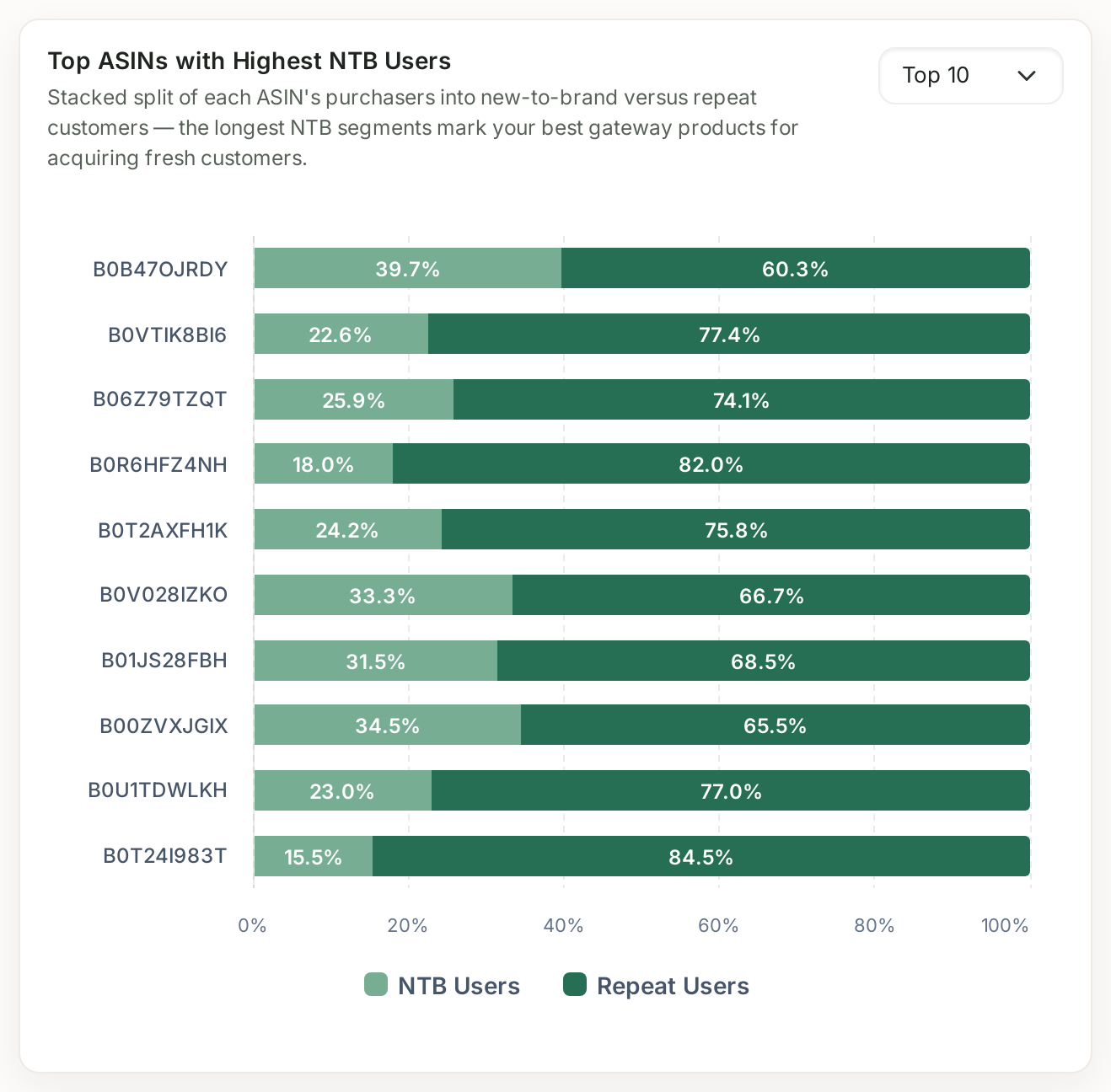
Summary cards cover Tracked ASINs, Converted Users, NTB Users and NTB Share, with the share card splitting new-to-brand against repeat. Two charts follow — Top ASINs with Highest NTB Users (a stacked split of each ASIN's purchasers) and NTB User Share Breakdown by ASIN.
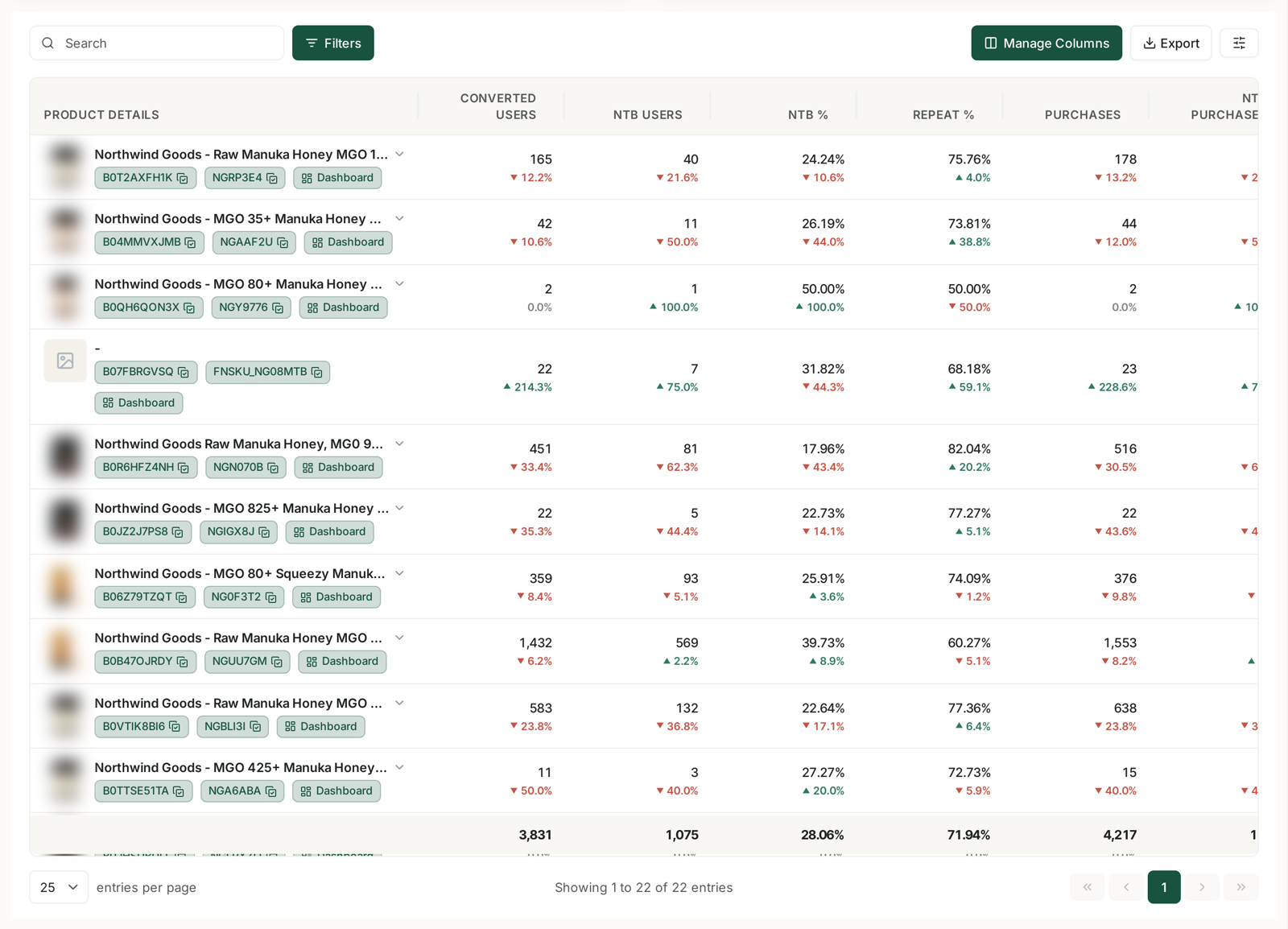
The table breaks it down per product: PRODUCT DETAILS, CONVERTED USERS, NTB USERS, NTB %, REPEAT %, PURCHASES, NTB PURCHASES, UNITS SOLD, NTB UNITS SOLD, SALES and NTB SALES.
How to use it: sort by NTB %. A product with a high NTB percentage is doing acquisition work — worth protecting with budget even if its ACoS looks unremarkable, because it is buying you customers rather than orders.
NTB Purchases
Shows, campaign by campaign, how much of what you bought was genuinely new business.
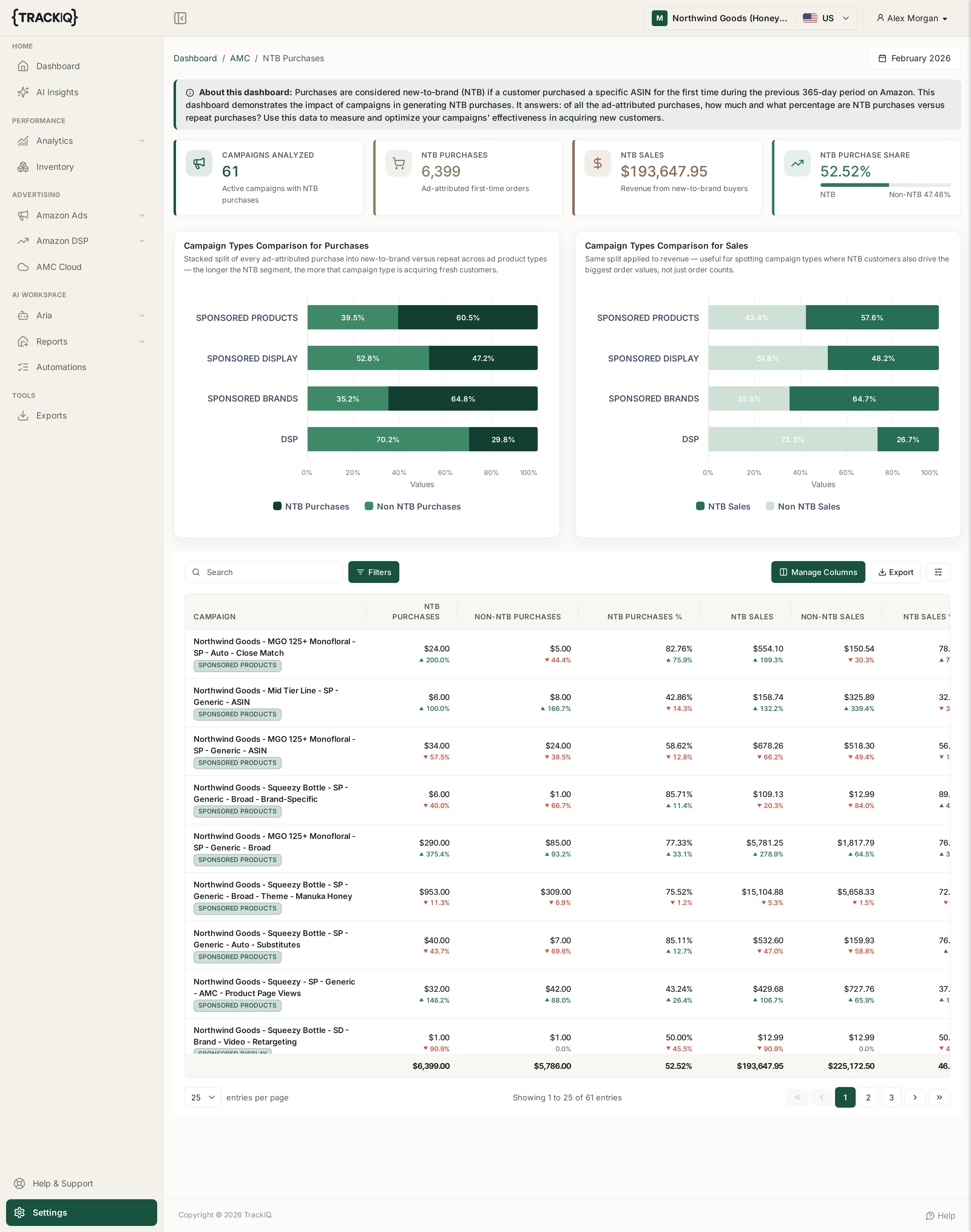
Columns are CAMPAIGN, NTB PURCHASES, NON-NTB PURCHASES, NTB PURCHASES %, NTB SALES, NON-NTB SALES and NTB SALES %.
How to use it: compare two campaigns with similar ROAS. If one has a far higher NTB SALES %, it is expanding the customer base while the other is being paid for sales you would likely have made anyway.
NTB Customers
The same new-versus-repeat split, counted as people rather than purchases.
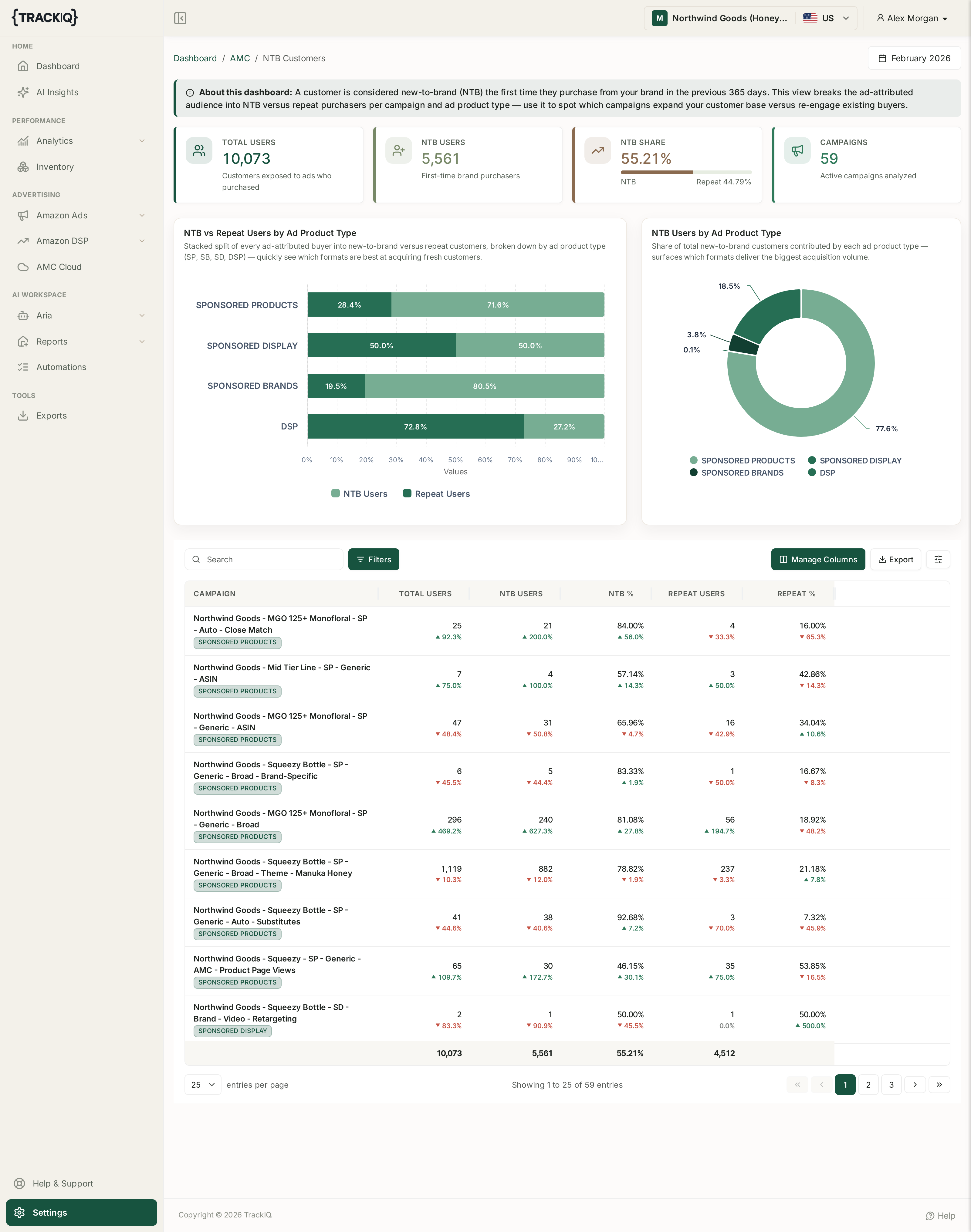
Columns: CAMPAIGN, TOTAL USERS, NTB USERS, NTB %, REPEAT USERS, REPEAT %.
How to use it: read it alongside NTB Purchases. A campaign that reaches many new users but converts few new purchases has an offer or listing problem, not a targeting problem.
Time to Conversion
How long shoppers take to buy after being exposed to an ad.
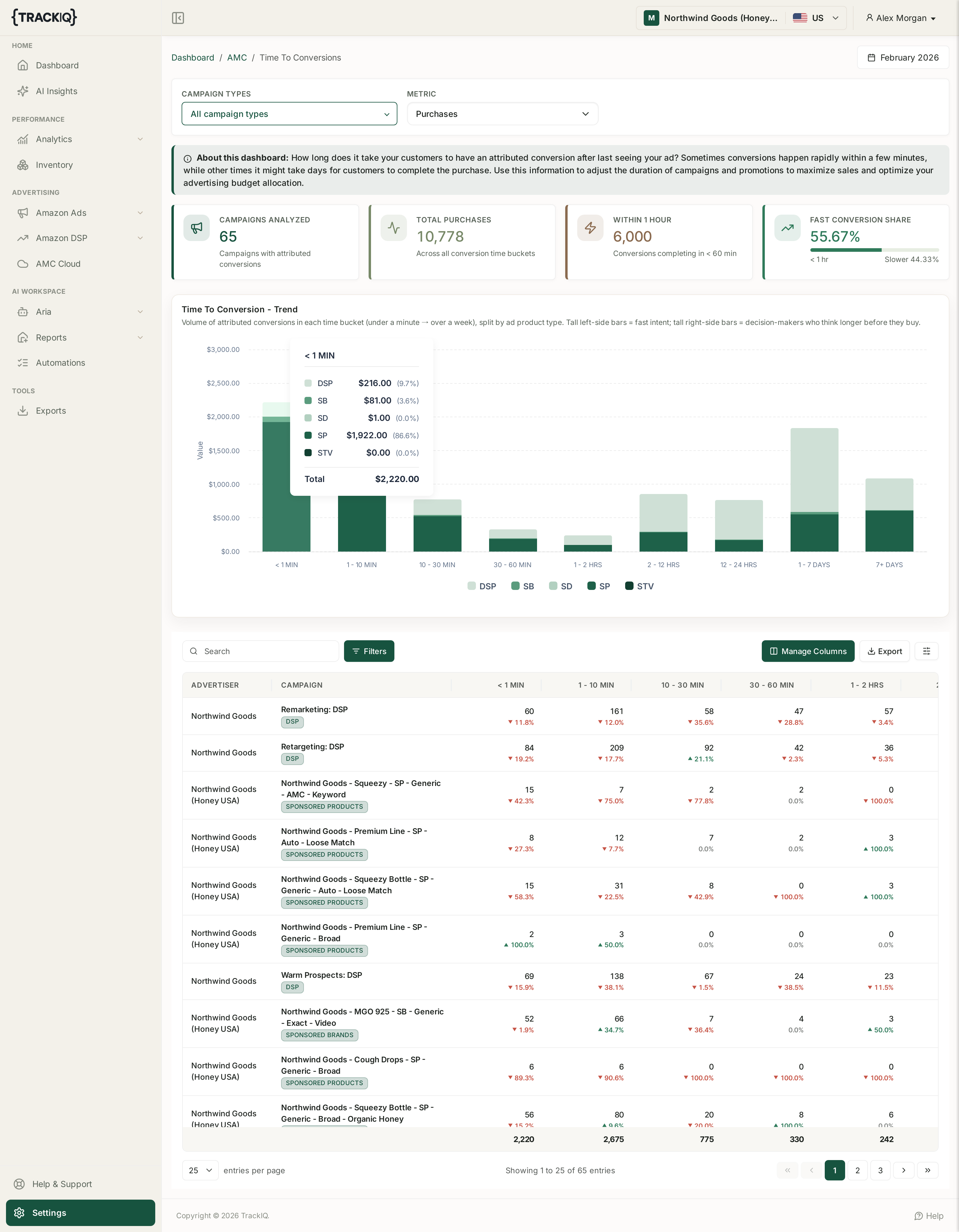
Purchases are bucketed across the row: < 1 MIN, 1 - 10 MIN, 10 - 30 MIN, 30 - 60 MIN, 1 - 2 HRS, 2 - 12 HRS, 12 - 24 HRS, 1 - 7 DAYS and 7+ DAYS, alongside ADVERTISER and CAMPAIGN. The page also carries CAMPAIGN TYPES and METRIC filters at the top.
How to use it: this is your attribution-window sanity check. If most conversions land in 1 - 7 DAYS or 7+ DAYS, short lookback windows are under-crediting your upper-funnel campaigns — and any decision to cut them based on same-day numbers is being made on bad information.
Path to Purchase
The actual sequences of ad exposures that ended in a sale.
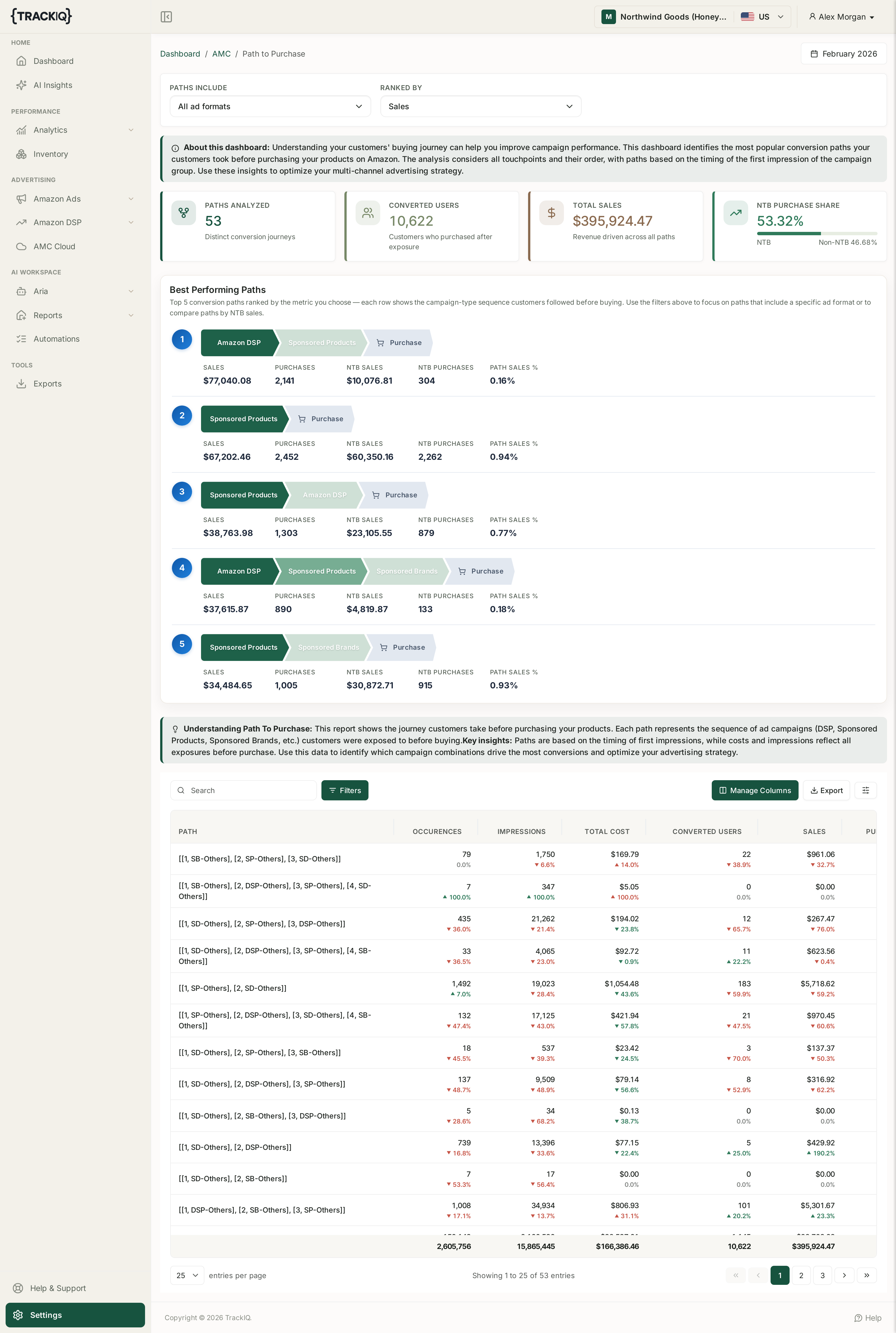
Columns: PATH, OCCURENCES, IMPRESSIONS, TOTAL COST, CONVERTED USERS, SALES, PURCHASES, USER PURCHASE RATE, NTB CONVERTED USERS, NTB SALES, NTB PURCHASES and NTB PERCENTAGE. PATHS INCLUDE and RANKED BY controls sit above the table.
How to use it: sort by USER PURCHASE RATE rather than OCCURENCES. The most common path is usually just your highest-spend channel; the most effective path is the combination worth funding.
Brand Keywords
The branded search terms your advertising generates.
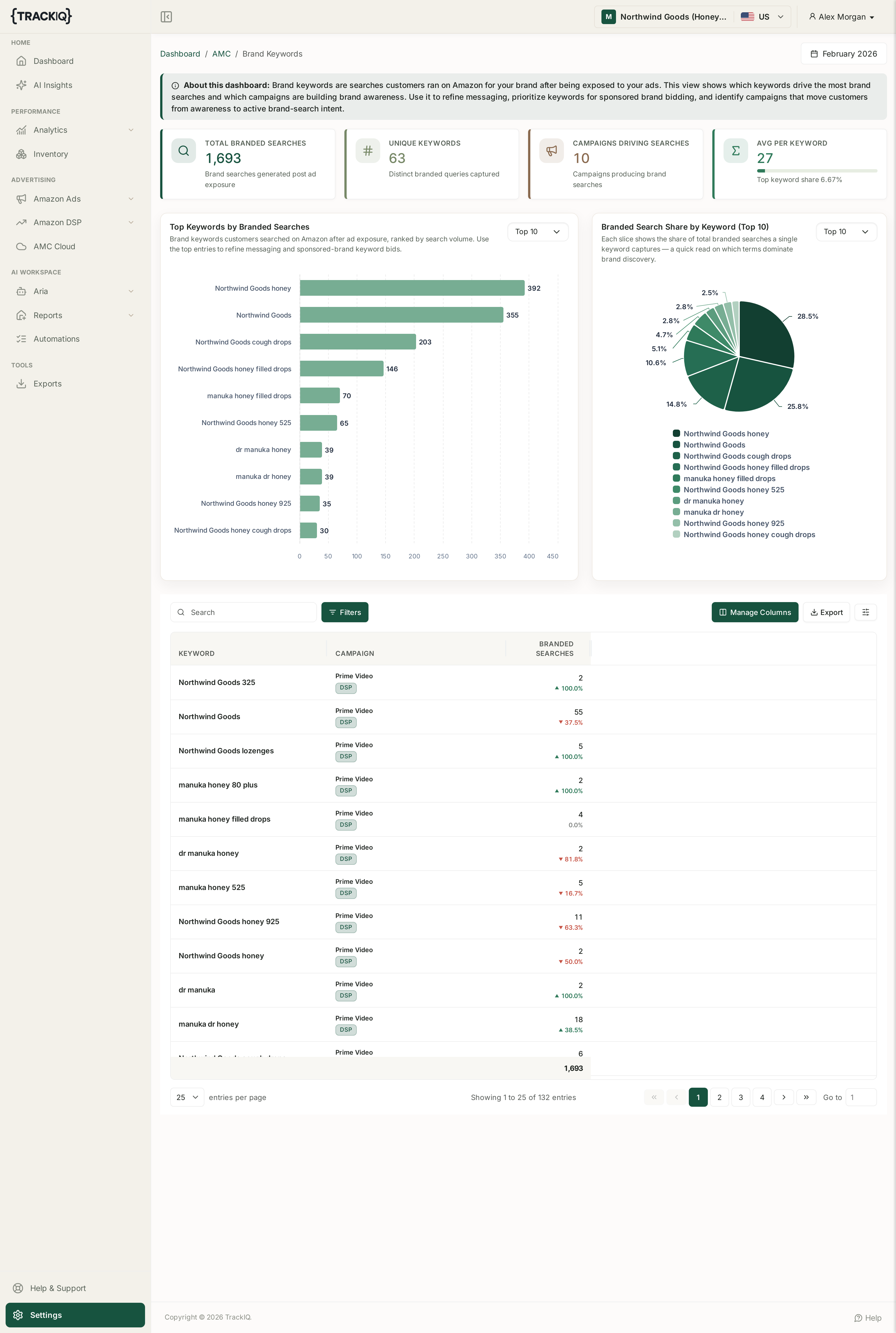
Columns: KEYWORD, CAMPAIGN, BRANDED SEARCHES.
How to use it: this is where upper-funnel spend shows its work. Display and video rarely convert on the click, but if branded searches climb after a campaign runs, it created demand that your Sponsored Brands campaigns then captured.
ASIN Purchase Upsell
Which products customers buy together.
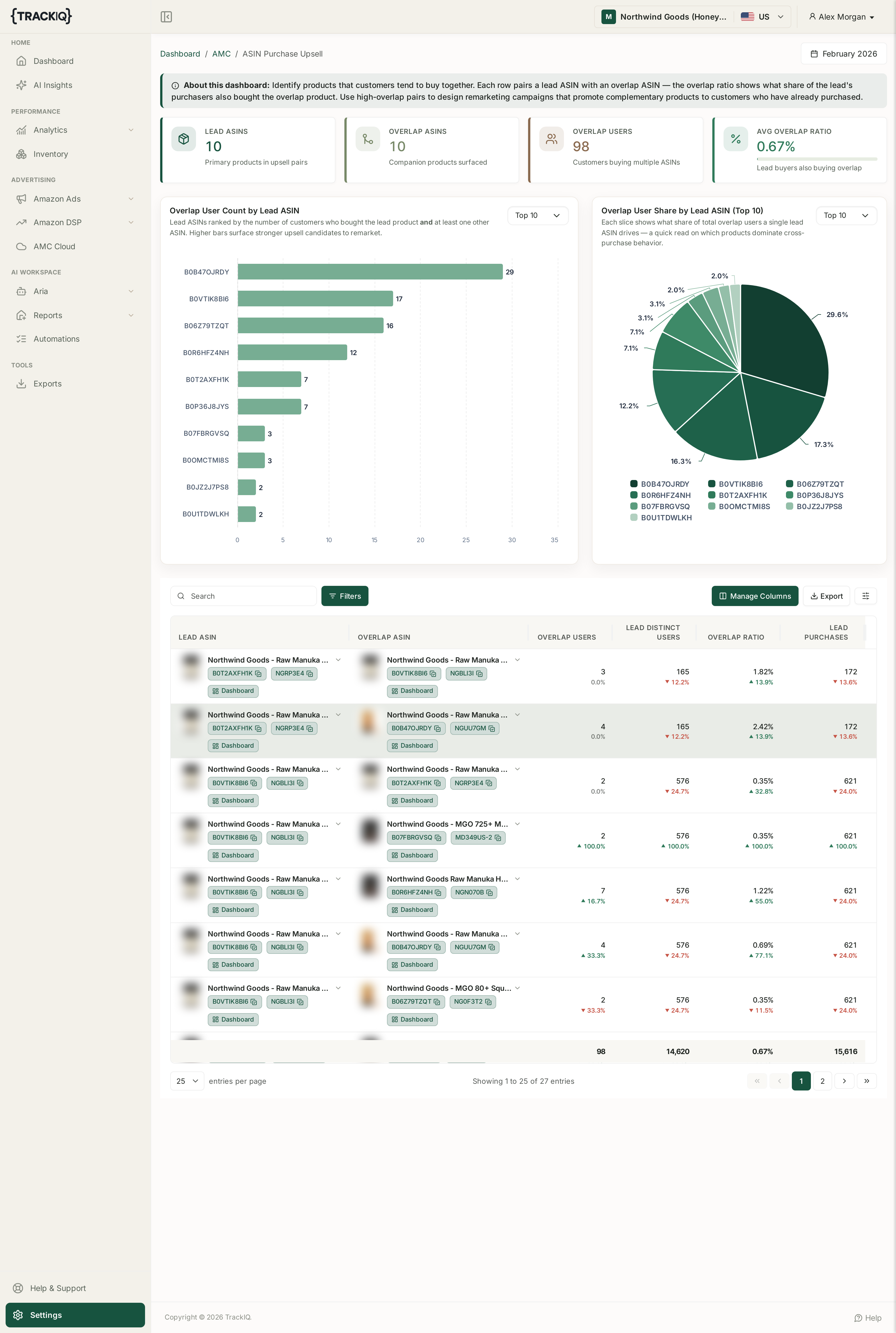
Columns: LEAD ASIN, OVERLAP ASIN, OVERLAP USERS, LEAD DISTINCT USERS, OVERLAP RATIO, LEAD PURCHASES.
How to use it: a high OVERLAP RATIO is a ready-made remarketing audience — target buyers of the lead ASIN with the overlap ASIN, and build your bundles from pairs that already sell together.
Step 4: Getting the data out
Every AMC dashboard's table can be exported the same way as the rest of TrackIQ — use the Export control on the table, or manage recurring exports from Exports in the sidebar under TOOLS.
A note on timing. AMC data arrives on Amazon's schedule and is reported by calendar month, so the current month will look incomplete until it closes. If a dashboard looks emptier than you expect, check the month selector before assuming something is broken.
A note on requirements. AMC dashboards need an AMC instance connected to your account. If a dashboard is empty across every month, check Settings > Connections to confirm the AMC data source is linked for that brand.
Related
- What 'New to Brand' Actually Means — the metric every AMC dashboard turns on.
- Why AMC Data Is Monthly and Sometimes Empty — why a dashboard can be legitimately empty.
- NTB ASINs Analysis: Finding Your Gateway Products — the gateway-product dashboard.