

ACoS is a ratio, so it moves when either half moves. Spend up and sales down look identical on the headline number and need opposite responses — which is why the first step is never "look at the campaigns".
This is a fixed order. It takes ten minutes and it ends with a cause, not a suspicion.
Prefer to watch? Eighty-six seconds on splitting the ratio before you open a single screen.
Step 0 — Split the ratio
Before opening anything, answer one question: did spend rise, or did sales fall?
Any screen with the Values / % change toggle will tell you. Set the range to the spike, compare against the previous period, and look at spend and ad sales separately.
| What moved | Where to go |
|---|---|
| Spend rose, sales roughly flat | step 1 — a bidding or budget change |
| Sales fell, spend roughly flat | step 3 — a conversion or availability problem |
| Both moved | do step 1 first, then step 3 |
Skipping this step is how people spend an afternoon auditing keywords when the actual cause was a listing that went out of stock.
Step 1 — Check what you changed
Automations → the rules list.
Scroll right to Last Run and Changed. A rule that touched several hundred entities the night before the spike is your first suspect, and it takes fifteen seconds to check.
Open its Run History, find the run covering that date, and View it. Every changed entity is listed with the branch that fired and the value before and after. If bids across a group went up 15% that morning, you have your answer without leaving the screen.
See Scheduling: Last Run, Next Run and Run History.
Also check the Change Log for anything a person did. Between the two, most spend-side spikes are explained inside two minutes.
Step 2 — Find where the spend went
Amazon Ads → Campaigns.
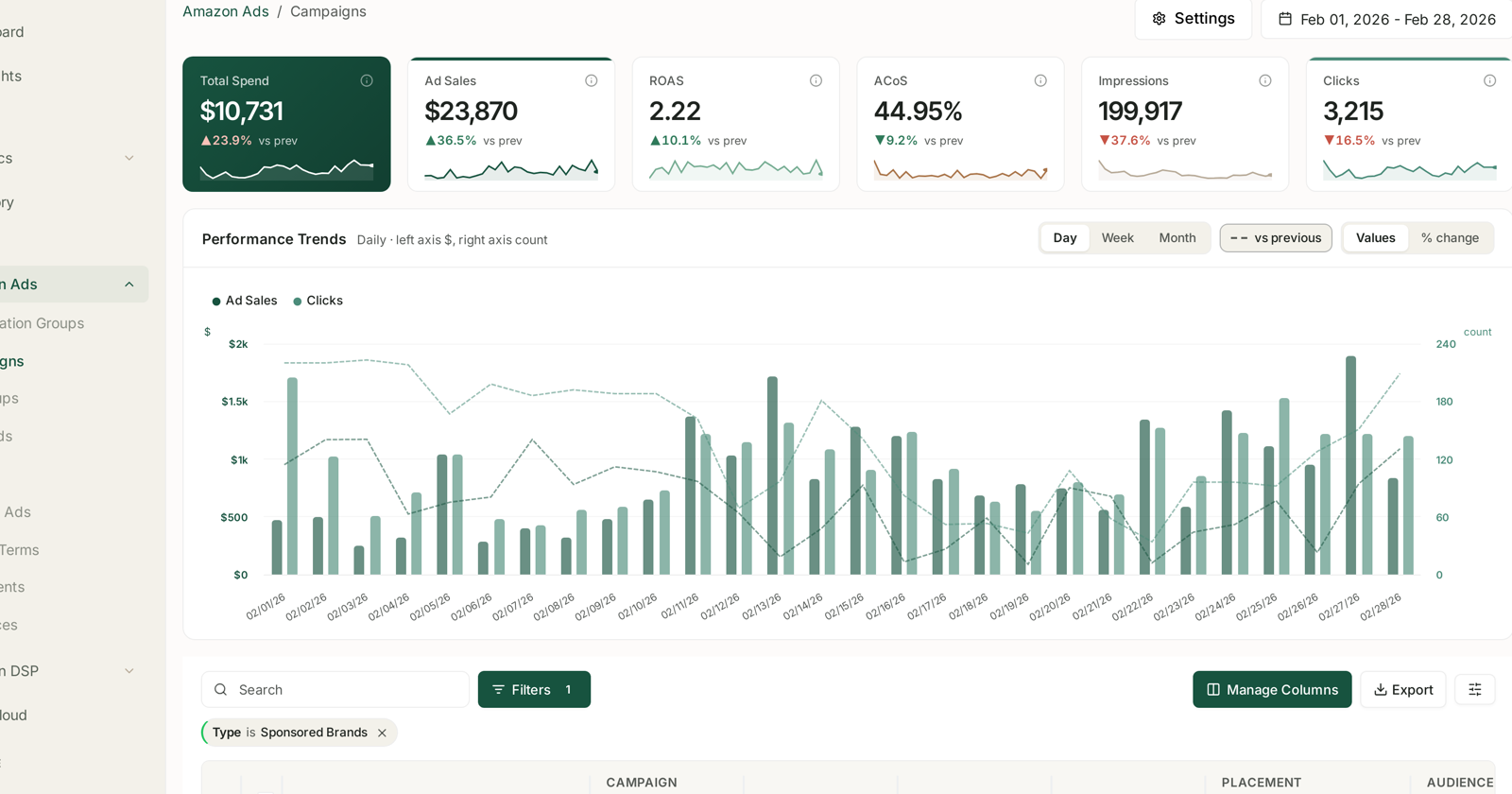
Set vs previous and switch to % change. Sort by spend change, descending.
You are looking for concentration. Almost always, one or two campaigns account for most of the increase. If the rise is spread evenly across everything, that is a market-level change — competitors bidding up, or a seasonal shift — and it is a different conversation.
Once you have the campaign, go one level down to its ad groups, then to keywords and targets. Keep asking the same question: is this concentrated or spread?
Step 3 — If sales fell instead
Spend-side causes are easy. Sales-side causes are the ones that matter more, and they are rarely in the advertising at all.
Check availability first. An out-of-stock or suppressed listing stops converting while the ads keep spending. This is the single most common cause of a sales-side ACoS spike. See Catch a stockout before it costs you rank.
Then check conversion. In Search Query Performance, look at your click share against your purchase share on your main terms. Clicks holding while purchases fall means people are arriving and leaving — a price change, a review slide, a competitor promotion. See Search Query Cart Analysis.
Then check rank. A slide in organic position means you are paying for traffic you used to get free. Rank Tracker dates it.
Step 4 — Look at the query mix
Amazon Ads → Search Terms, aggregated.
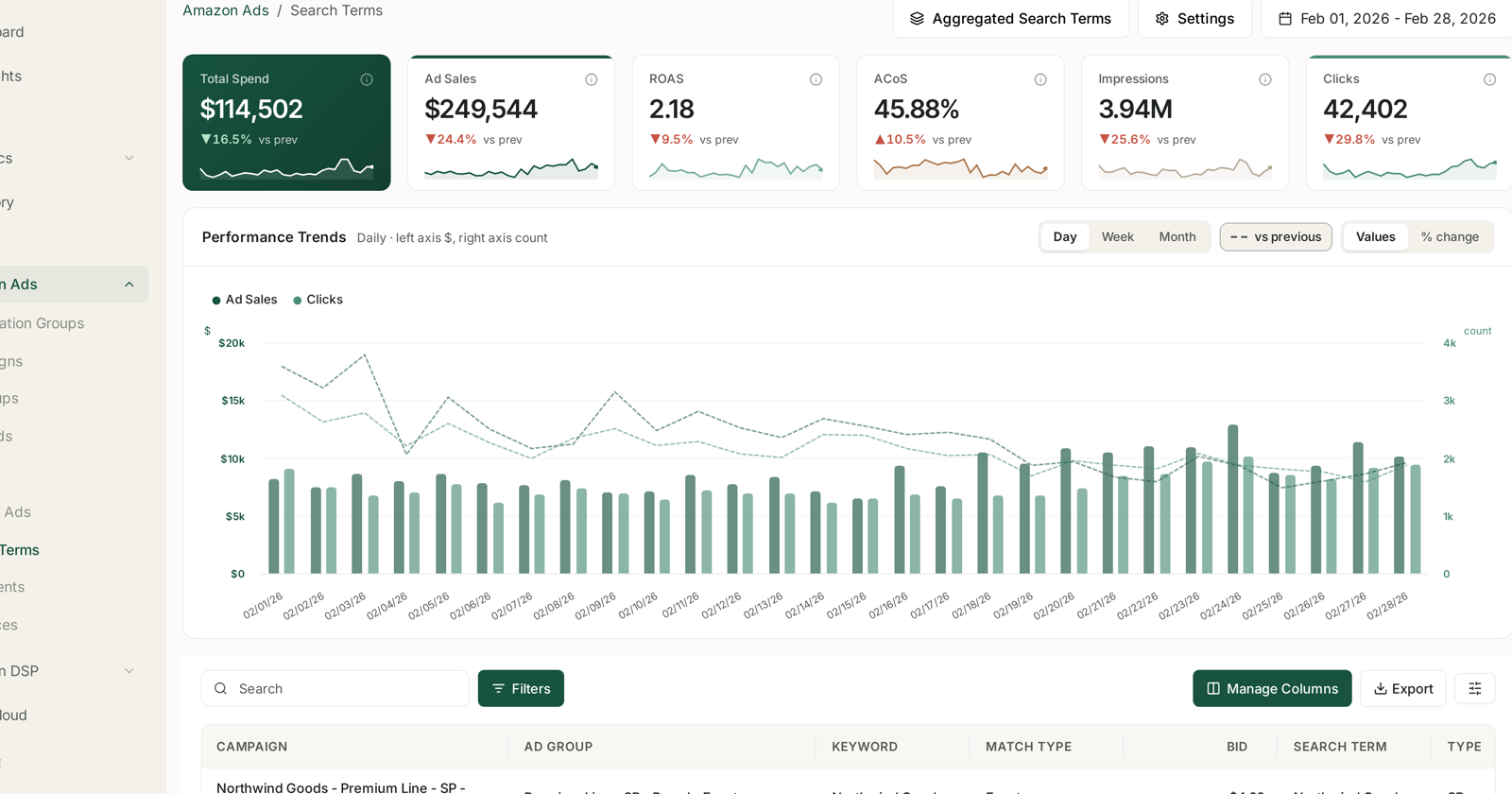
A spike with no obvious campaign cause is often a mix change: broad or auto targeting started matching new queries, and those queries convert worse than the ones you were getting.
Sort by spend change. New high-spend terms that did not exist last period are the tell. Negative-match the ones that clearly do not fit, and check whether a match-type change or a bid rise widened the net.
Step 5 — Confirm before you act
Two checks that stop you fixing the wrong thing:
Attribution lag. Recent days under-report sales — up to 7 days for Sponsored Products, 14 for the other formats. A "spike" in the last two days is very often incomplete data. Re-check with the freshest days excluded before touching anything. See Why SP, SB and SD Numbers Don't Add Up.
Is it actually a spike? Compare to the same period last month and, if you have it, last year. Some of what looks like a spike is a weekday pattern or a seasonal one.
What good looks like
You finish with a sentence, not a feeling: "spend rose 40% because the bid rule raised bids on the generic group on Tuesday, and those terms convert below break-even."
If you cannot write that sentence, you have not finished — and changing bids before you can is guessing with money.
What not to do
Do not cut budgets first. It lowers spend and ACoS while lowering sales too. It hides the cause rather than fixing it.
Do not blame the rule without checking it. Open the run. The rule may have done exactly what you asked; the problem may be the threshold you set.
Do not react to one day. Daily ACoS is noisy on any account below serious volume.
Do not fix two things at once. You will not learn which one worked.
Related
- Understanding ROAS and Key Amazon Advertising Metrics — what ACoS is measuring.
- Scheduling: Last Run, Next Run and Run History — step 1.
- Values vs % Change: The Comparison Toggle — step 0.
- Cut wasted ad spend in an afternoon — what to do once you have found it.
- The Bleeder Reports — when the cause is a target bleeding rather than a market shift.
- Placement Bid Optimisation — when the cause is spend sitting on the wrong placement.