

The SQP dashboard opens on two tabs, Account and Products, and they answer different questions with the same numbers. Reading the wrong one is how people conclude their share is fine when one product is quietly losing its category.
Prefer to watch? Eighty-three seconds on what changes when you switch tabs, and why the denominator is the whole story.
The difference in one line
Account measures your brand against the market across every tracked query.
Products measures one ASIN at a time against the market on the queries that reach it.
The chart caption changes with the tab, which is the clearest tell: brand funnel share lines on Account, product funnel share lines on Products.
Account — the portfolio view

Five tiles, all computed across your whole tracked query set for the window:
| Tile | Reads |
|---|---|
| Click Share | your clicks as a share of the market's, with the change in pp |
| Purchase Share | your purchases as a share of the market's |
| Keywords Tracked | how many queries, and how many are new |
| PPC on Tracked Queries | SP + SB search-term spend, with its ACoS |
| Actions | how many recommendations are waiting, split by type |
This is the tab for "how are we doing?" — the one you read weekly, and the one that belongs in a report.
Watch the units. Share changes are in percentage points, not percent. A move from 2.12% to 2.28% is +0.16 pp, not +7.5%. Reporting it the second way overstates it dramatically.
Products — the diagnostic view
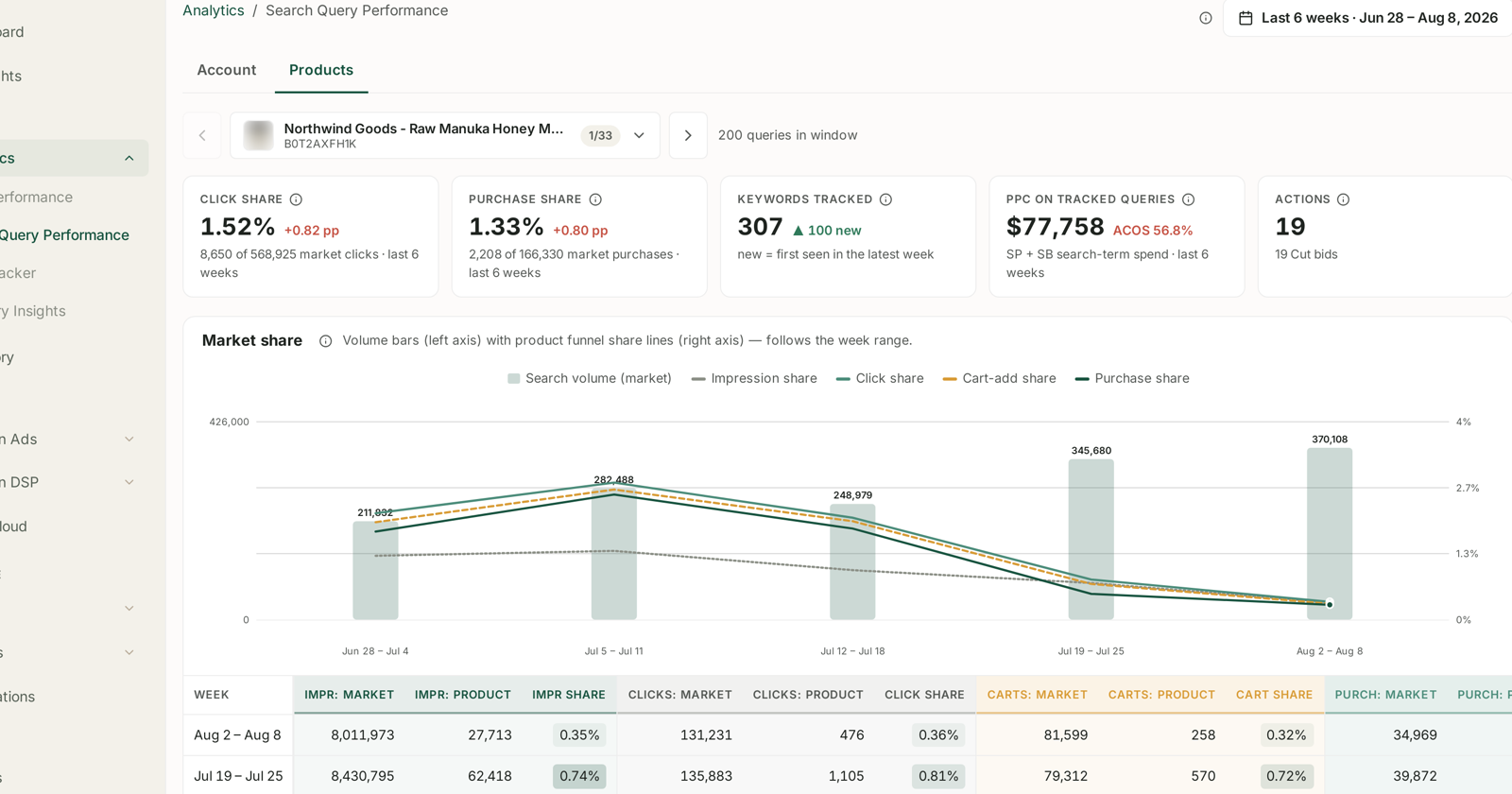
Switch to Products and a product pager appears — prev, next, a dropdown, and a position counter like 1/33 — with the number of queries in the window beside it.
Every tile then recomputes for that one ASIN. A product with a 1.52% click share sits inside an account at 2.12%: the account figure is an average, and this is one of the things being averaged.
This is the tab for "why?" You come here after Account tells you something moved.
Why the two disagree, and what that means
The account figure is a blend. Divergence between the tabs is the finding, not an error:
| Pattern | Reading |
|---|---|
| Account flat, one product falling sharply | a product problem hidden by the average |
| Account falling, all products falling similarly | something account-wide — brand, price, category |
| Account rising, driven by one product | concentration risk — check what happens if it stocks out |
| Product strong, account weak | the rest of the catalog is dragging |
The first row is the one that costs money, because nothing on the Account tab will ever show it. A catalog of thirty products can absorb one falling badly without the headline moving at all.
How to use them together
Weekly, read Account. Click share and purchase share against last week. That is your five-minute check.
When something moves, open Products. Page through the ASINs and find the ones that moved most. The pager makes this quicker than it sounds — you are scanning for outliers, not reading each one.
When you find the product, open the query. Clicking a query gives its funnel against the market and the ASIN split. That is where the cause lives. See Search Query Cart Analysis: Why a Query Doesn't Convert.
Account → product → query is the same narrowing discipline as the rank triage playbook, and it works for the same reason: averages hide, specifics explain.
The Actions tile is a shortcut
On both tabs, Actions counts the waiting recommendations and breaks them down by type — Fix listing, Cut bids, Scale up, Fix conversion, Add as keyword.
On the Products tab this is unusually useful, because it tells you what kind of problem a specific ASIN has before you read a single chart. A product whose actions are all Cut bids has an efficiency problem; one whose actions are all Fix listing has a conversion problem. See Recommended Actions: The Queries That Need a Decision.
What not to conclude
A low share is not automatically bad. In a large category, single-digit share is normal. Read the direction and the rates, not the absolute.
Products is not your whole catalog. It covers ASINs with tracked query data. A product with no SQP data will not appear.
The market is everybody. All sellers on those queries, not just your competitors.
SQP is weekly. Both tabs report weekly cohorts across the window, so compare week to week. See SQP Is Weekly: Reading Week Cohorts Correctly.
Related
- Understanding Search Query Performance — the dashboard overall.
- Impression, Click, Cart-Add and Purchase Share — what the four shares mean.
- Search Query Cart Analysis: Why a Query Doesn't Convert — the level below Products.
- Triage a Rank Drop Across Your Top Keywords — the same narrowing discipline.