

Prime Day rewards preparation and punishes improvisation. Demand arrives faster than you can react, budgets cap out at nine in the morning, and the products that sell out on day one stop selling for the fortnight that follows.
Almost all of the work happens before the event.
Time: a day, spread over the four weeks before. Then very little on the day.
Prefer to watch? Eighty-six seconds on the four weeks before, and the three days after.
Four weeks out — inventory decides everything else
Inventory.
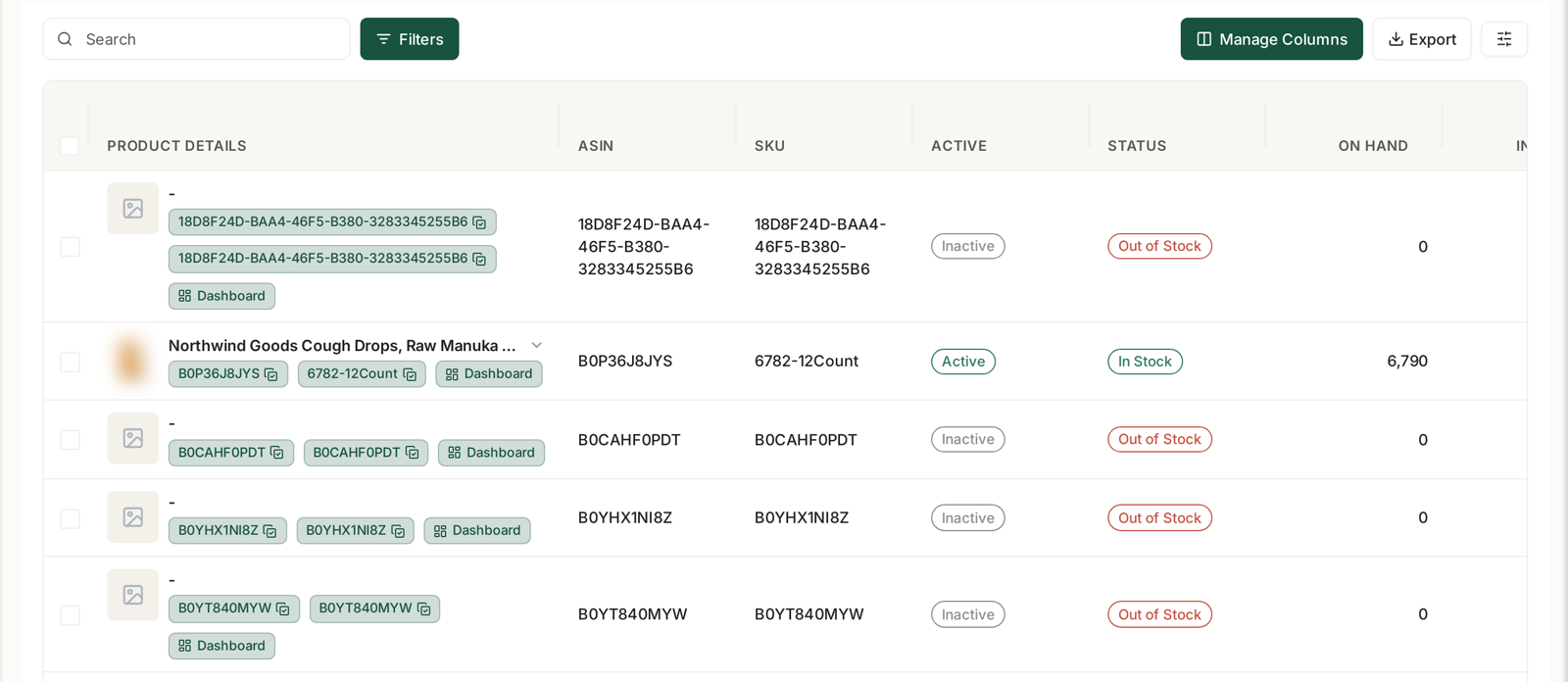
Nothing else on this list matters if you run out. Work the arithmetic properly:
cover needed = normal velocity × event multiplier × (lead time + transit + Amazon receiving)
Assume the multiplier is higher than last year on your best products and lower than you hope on the rest. Event demand concentrates: a handful of ASINs take most of the lift.
Protect the gateway products hardest. A stock-out on the product that recruits your new customers costs you the acquisition, not just the sales — and Prime Day is when the most first-time buyers are looking. See Protect the products that bring you new customers.
Get stock in early. Receiving times stretch before a major event; stock that arrives in the week before may not be checked in for it.
Two weeks out — decide the budget shape
Not just how much, but what happens when it runs out.
A capped campaign at 9am is the single most expensive Prime Day mistake. The traffic keeps arriving and you are not in it, and the auction is at its most valuable precisely then.
Raise daily budgets on the campaigns you actually want to win, and be honest about which those are — usually your best-converting exact terms and your hero products, not everything.
Check Campaign Daily Budget Capped alerts in the run-up. Anything routinely capping on a normal day will cap by breakfast on the day itself. See Alert Categories, Priorities and What Actually Triggers Them.
One week out — put the rules in a safe state
Automations.
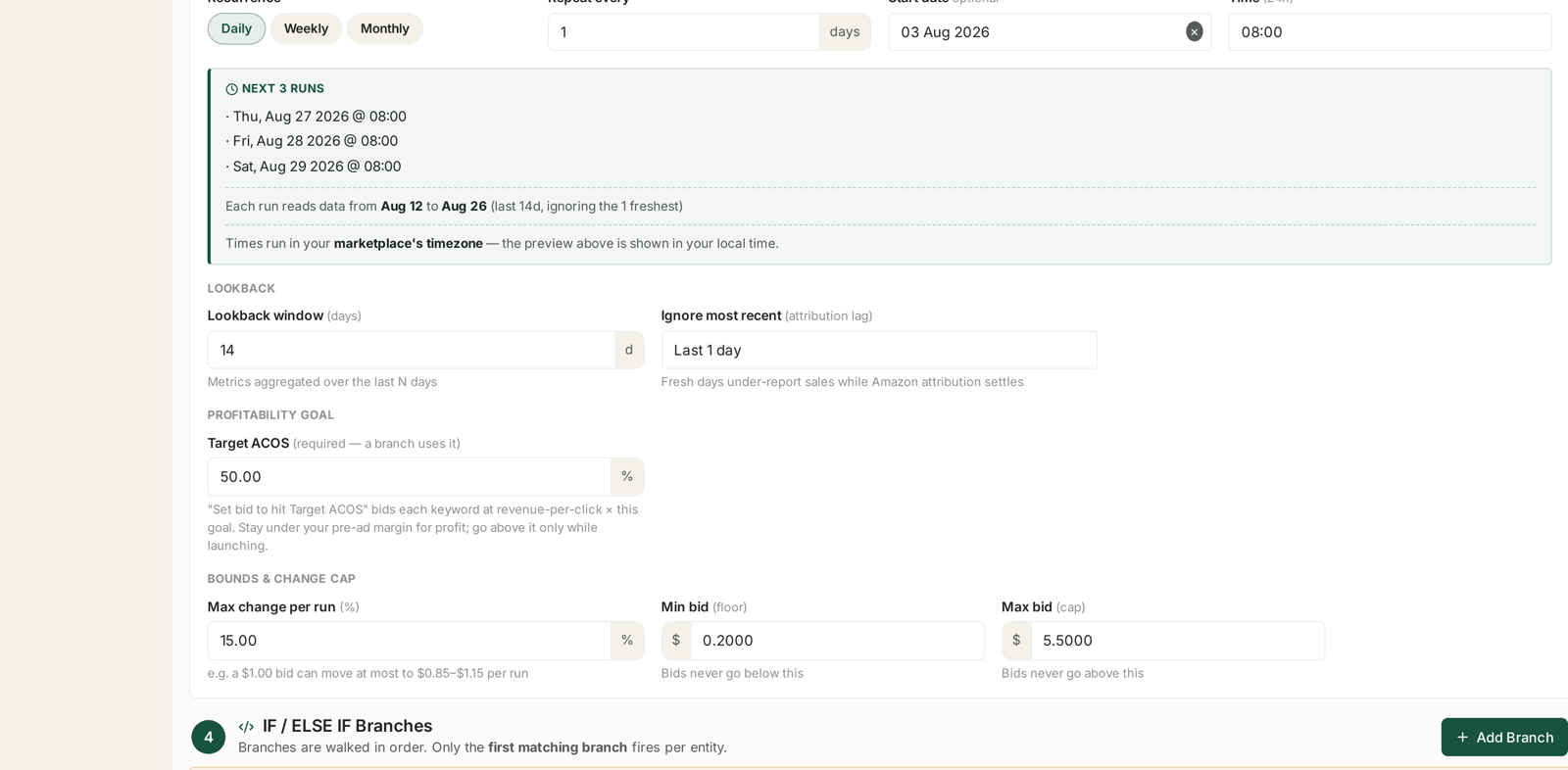
This is the step teams forget, and it does real damage.
Rules do not know an event is happening. A pause rule reading a 14-day look-back through Prime Day sees an enormous spike in clicks and spend, and days later it sees the post-event slump. Both make it behave badly.
Three specific adjustments:
Pause rules — turn them off, or raise their thresholds. During the event, spend and clicks climb far faster than orders are attributed, which is exactly the shape that triggers a pause on something that is working.
Bid rules — tighten the change cap. Cut max change per run to something small. A goal-seeking bid rule reacting to event-week ACoS will make large corrections based on a week that will not repeat.
Check "ignore most recent" is at least 1–2 days. Attribution lags hardest when volume is highest, so fresh days under-report sales more than usual. See Look-back Windows and Adjustment Frequency.
Dry-run anything you leave enabled. The preview computes every change and applies none. See Dry-Run Preview.
The day — watch three things, change almost nothing
Resist the urge to optimise hourly. You do not have enough data to be right, and you will be reacting to attribution that has not landed.
Budget caps. The only genuinely urgent thing. A capped campaign is lost traffic, and it is the one problem that gets worse every hour you leave it.
Stock cover. Sell-through rates that looked comfortable can halve in an afternoon.
Nothing else. ACoS on the day is meaningless — spend is complete and sales are not. Anything you conclude from it will be wrong in three days' time.
Aria in Slack is the right tool for the day. Ask "which campaigns are capped?" and "anything below a week of cover?" rather than sitting in dashboards. See Get your daily number in Slack without opening TrackIQ.
The three days after — do nothing
The most important instruction in this playbook.
Attribution is still landing. Sponsored Products credits sales for up to 7 days after the click, and the other formats for 14. Event-day ACoS looks catastrophic on the day and normal by the end of the week.
Rules stay off or capped until the numbers settle. Turning them back on into a distorted look-back window is how a good event becomes a bad fortnight.
Expect a slump. Demand pulled forward into the event is not there afterwards. That is normal, it is not a problem to fix, and cutting budgets in response to it just deepens it.
Then teardown
Once attribution has settled — a week or so — the numbers are worth reading properly. That is a separate exercise, and it is where the value of the event actually gets banked. See Run a post-event teardown.
What not to do
Do not raise every budget. Money spread evenly across everything buys nothing in particular.
Do not leave pause rules running. They will pause things that are working.
Do not judge anything on event-day ACoS.
Do not launch new products for the event. A listing with no history and no reviews will not win an auction against established ones, and you will conclude the product is bad when the timing was.
Do not forget to turn the rules back on. Put a reminder somewhere, because a month of unmanaged bids costs more than the event made.
Related
- Catch a stockout before it costs you rank — the inventory half, in detail.
- Guardrails to Set Before You Automate Anything — the settings to check in week three.
- Run a post-event teardown — what to do when the dust settles.
- Why SP, SB and SD Numbers Don't Add Up — why the day-after numbers lie.
- Designing the Offer — the offer mechanics deals depend on.
- Preparing a Launch: CTR and CVR Tactics — deals as a launch instrument rather than a promotion.
- Inventory Forecasting and Purchase Orders — ordering and capacity ahead of the event.
- Reimbursements, COGS and FBA Capacity — requesting storage before it is refused.
- Bulk Auto Campaigns for Peak Season — five auto campaigns per product, checked daily.