

A Campaign Rule adjusts budgets or pauses whole campaigns based on performance. Where a Targeting Rule tunes individual bids, this one moves money between campaigns — or stops one outright.
Six recipes come with it, and one of them does something none of the others do: it moves budget from losers to winners in a single rule.
Prefer to watch? Sixty-three seconds on the six recipes, and the one that finds capped campaigns.
Two actions
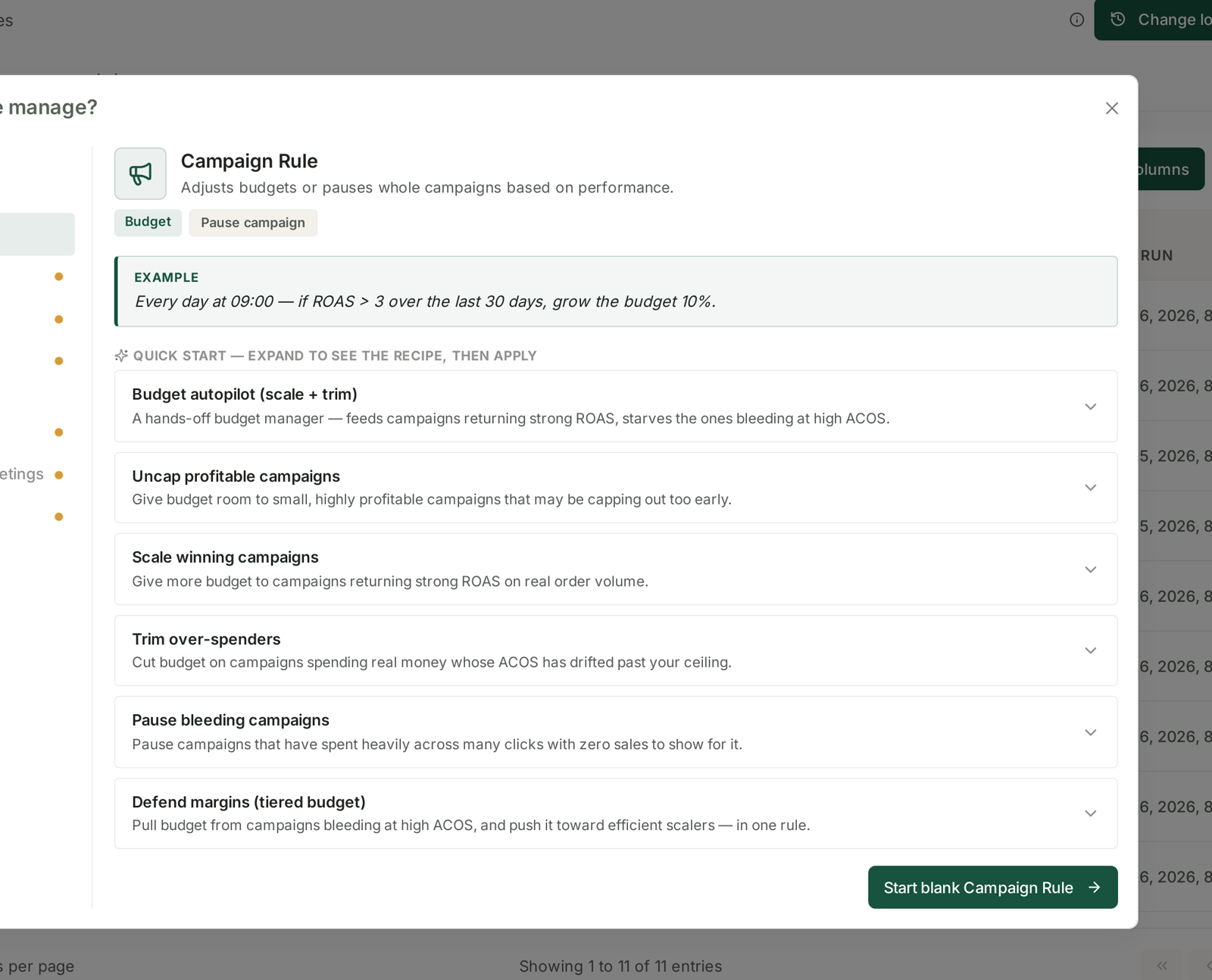
Budget — grow or cut the daily budget by a percentage.
Pause campaign — stop the whole campaign.
The example on the screen shows the shape:
Every day at 09:00 — if ROAS > 3 over the last 30 days, grow the budget 10%.
Note it uses ROAS rather than ACoS. Both appear across these recipes, and they are the same relationship from opposite ends — ROAS above 3 is ACoS below 33%. Use whichever your team thinks in, but be consistent inside one account or the rules become hard to read.
The six recipes
Budget autopilot (scale + trim) — a hands-off budget manager. Feeds campaigns returning strong ROAS, starves the ones bleeding at high ACoS.
Defend margins (tiered budget) — pulls budget from campaigns bleeding at high ACoS and pushes it toward efficient scalers, in one rule.
That second one is the interesting one. Most budget rules only push in one direction, so you end up running a “grow winners” rule and a “cut losers” rule and hoping they balance. This does both sides in a single decision, which is what an experienced manager actually does when budget is finite.
Growing
Uncap profitable campaigns — gives budget room to small, highly profitable campaigns that may be capping out too early.
Worth naming what this catches. A campaign hitting its daily budget by lunchtime is invisible in every performance report, because its numbers look fine — it is simply not spending what it could. This is the rule that finds them.
Scale winning campaigns — more budget to campaigns returning strong ROAS on real order volume.
The “on real order volume” is the guard. Scaling a campaign with three orders and a flattering ROAS is how you turn a fluke into a spend problem.
Cutting
Trim over-spenders — cuts budget on campaigns spending real money whose ACoS has drifted past your ceiling.
Pause bleeding campaigns — pauses campaigns that have spent heavily across many clicks with zero sales.
Pause is the only irreversible-feeling action here, so it is the one to be most careful with. A campaign paused by a rule stays paused until somebody notices — and a paused campaign disappears from the default view of every table, because tables show enabled entities by default.
Choosing between them
| If you want to | Use |
|---|---|
| One rule that manages budget both ways | Budget autopilot or Defend margins |
| Find campaigns capping out too early | Uncap profitable campaigns |
| Grow proven performers | Scale winning campaigns |
| Rein in drift | Trim over-spenders |
| Stop clear waste | Pause bleeding campaigns |
Campaign rules and targeting rules do different jobs
Run both. They are not alternatives:
| Targeting Rule | Campaign Rule | |
|---|---|---|
| Acts on | keywords and product targets | whole campaigns |
| Changes | bids | budgets |
| Answers | am I paying the right price? | is this campaign worth funding? |
A campaign can be efficient at the keyword level and still be the wrong place for your money — and no amount of bid tuning fixes that. Equally, a well-funded campaign full of bad keywords just spends the budget faster.
Where they can conflict is on pausing. A targeting rule pausing every keyword in a campaign leaves an active campaign with nothing to run. Check the Change log after your first week of running both.
The settings that matter
Look-back window — longer than for bids. The example uses 30 days, and that is reasonable: budget is a bigger, slower decision than a bid, and you want it made on settled data.
Adjustment frequency — once a day is plenty. A budget changed more often than the data can respond is just noise with consequences.
Before you switch one on
Budget rules move real money faster than bid rules do, so read Guardrails to Set Before You Automate Anything first, and check The Change Log after the first run.
Related
- Targeting Rules: Adjusting Bids and Pausing Targets — the other rule type.
- Prepare for Prime Day: Budget Rules and Inventory Cover — budget rules under load.