

Search Query Performance behaves differently from every other report in TrackIQ, and knowing why will save you from misreading it.
Prefer to watch? Fifty-nine seconds on reading week cohorts without doing the arithmetic wrong.
The data arrives one week at a time
Amazon publishes Search Query Performance in weekly cohorts, and TrackIQ shows those weeks as they are published. That is why the date control on this screen offers a span of weeks — Last 6 weeks — rather than the free date range you get everywhere else.
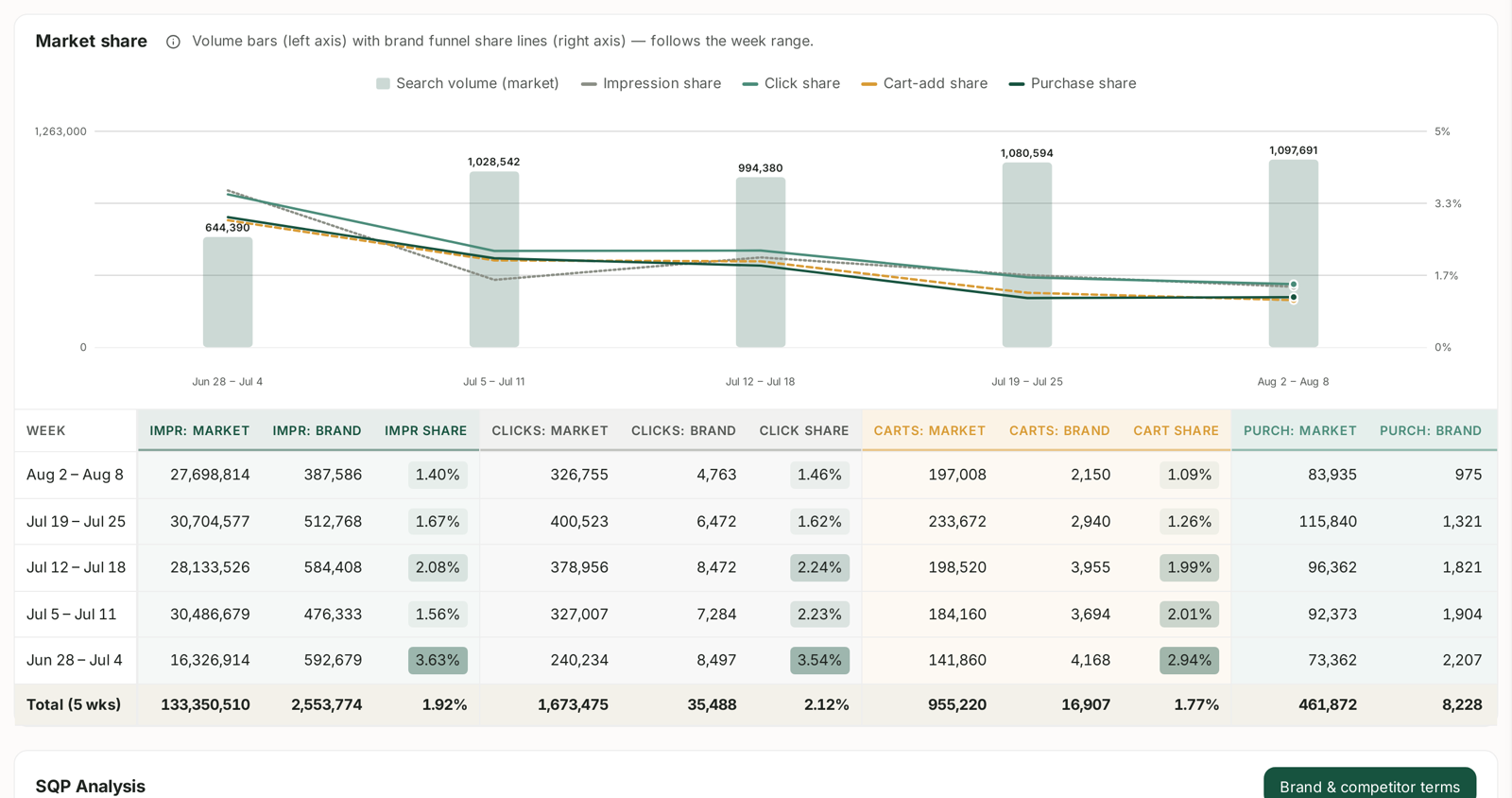
Every table on the screen is built the same way: one row per week, then a Total row.
What the Total row is, and is not
The Total row sums the raw counts — market impressions, brand impressions, clicks, carts, purchases — across the whole window, and then works out your share of those combined totals.
That is a legitimate figure, but it is worth being precise about what it means:
- It is your share of the window, calculated once from the summed counts.
- It is not the average of the weekly shares. A week with far more market volume pulls the total towards its own share.
- The share percentages themselves are never added together. A 20% share one week and a 20% share the next is not 40%.
So read the Total for “how did we do overall across these weeks”, and read the weekly rows for “which way is it going”. They answer different questions.
Comparing weeks is the point
Because the data is cohorted, week-over-week is the natural comparison, and the dashboard is built for it. The Market share chart draws your impression, click, cart-add and purchase share as four lines across the weeks, with market volume as bars behind them.
A query that appears in one week and not the next has not necessarily collapsed. It may simply have fallen below Amazon's reporting threshold for that week.
“New” means new to the latest week
The Keywords Tracked card counts how many queries are in the report and flags how many are new. Its own footnote is precise about this: new = first seen in the latest week.
It does not mean newly created on Amazon, and it does not mean new to your catalogue. A query can appear as new, drop out, and appear as new again later.
It is still a useful signal. A query that has just started producing impressions for your products is worth looking at before your competitors do.

Percentage points, not percent
The change figures on the summary cards are in pp. A click share moving from 1.96% to 2.12% shows as +0.16 pp. That is the arithmetic difference between two percentages, not a percentage change — as a percentage change it would be over 8%.
Mixing these up is the easiest way to over-report a result.
Why your data may look sparse
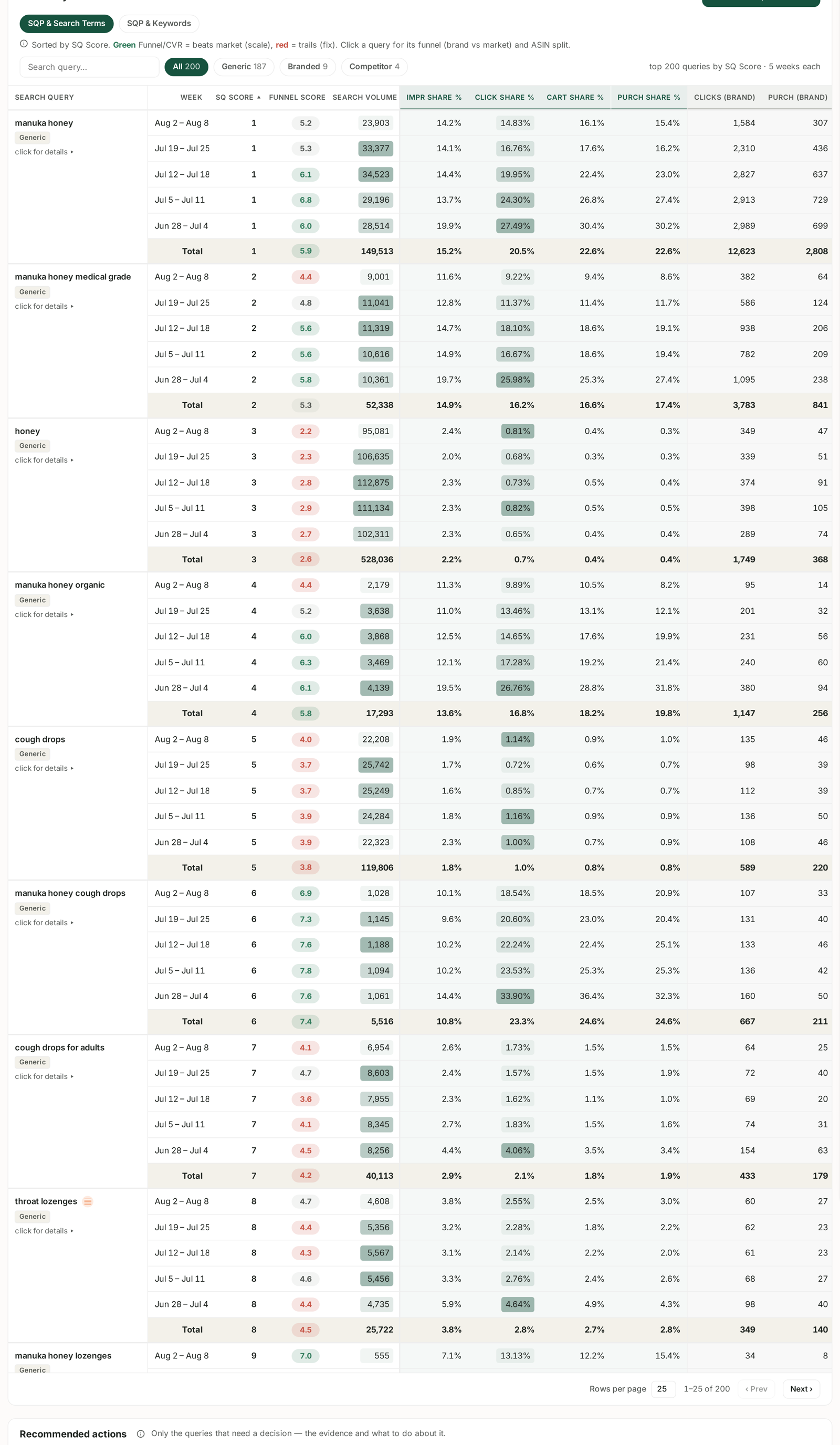
Search Query Performance is a separate ingestion from your sales and advertising data, and it depends on Amazon publishing it.
- Amazon suppresses low-volume rows. A brand with modest search volume will have many missing.
- It lags. The most recent complete week is not available the moment the week ends.
- It is not tied to your advertising. SQP covers all search activity for your products, whether or not you were bidding.
That last point is what makes the report valuable. It is the basis of the single most useful thing you can do with it: finding queries you convert on but do not bid on.
In short
Read the weekly rows for direction, the Total row for the window, and never add two share percentages together.
Related
- SQP Data Is Sparse or Missing — the most common consequence.
- Spotting New Search Queries Week Over Week — what the latest cohort adds.
- Date Ranges, Granularity and Comparing Against the Previous Period — how every other screen behaves.
- Narrowing Fifteen Ideas to Seven — reading seasonality without misreading the cohorts.