

A query that spends money and does not convert is not one problem. It is four possible problems, and they need four different fixes — only one of which is anything to do with bidding.
This is how to find which one you have, query by query, in about an hour.
Time: an hour. Do it monthly, or whenever ACoS drifts on a term that used to work.
Prefer to watch? Eighty-two seconds on the four places a query breaks, and why only one of them is bidding.
Step 1 — Let the product pick the queries
Search Query Performance → Recommended Actions.
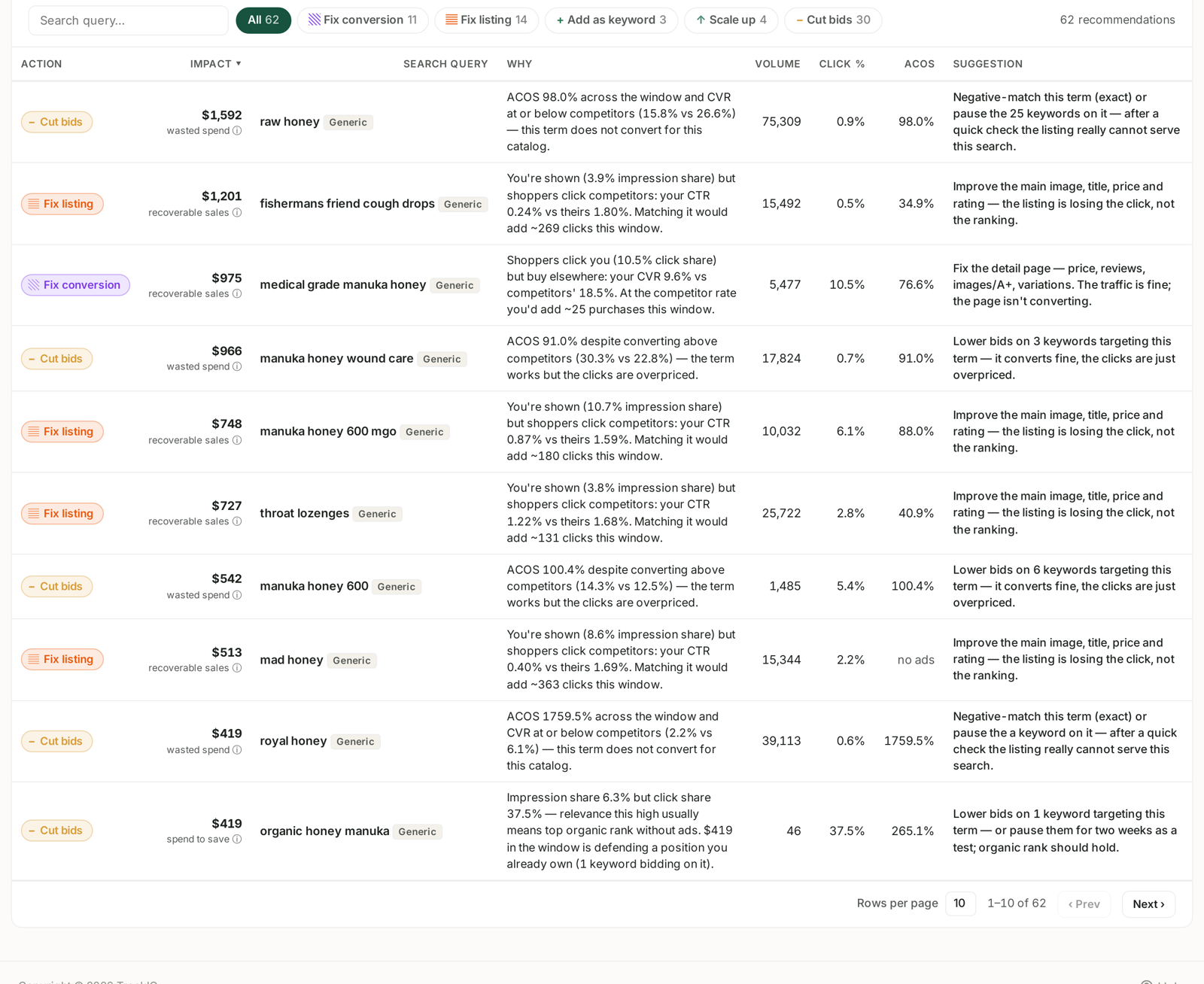
Filter to Fix conversion and Fix listing. Those two categories are exactly the population this playbook is about — queries where traffic arrives and the sale does not.
The Why column already tells you which of the two it is:
"You're shown but shoppers click competitors" — a click problem. Your listing is losing the search result.
"Shoppers click you but buy elsewhere" — a conversion problem. Your page is losing the visit.
Take the top five by money. Do not try to fix twenty.
Step 2 — Open the funnel and find the break
Back on SQP Analysis, click the query.

Four stages, each with your rate against the market's rate at that step. Walk them in order and find the first stage where you fall behind:
| Your rate vs market | Broken at | The fix is in |
|---|---|---|
| impression share low | visibility | rank and bids |
| CTR below market | the search result | main image, title, price, rating |
| cart rate below market | the detail page | content, A+, reviews, price |
| CVR below market at cart | checkout | price, delivery, stock, Buy Box |
The comparison is what makes this usable. A 2% CTR is neither good nor bad until you know the market is at 1.5% or at 4%.
Stop at the first break. Later stages inherit the problem from earlier ones, so fixing stage three while stage two is broken achieves nothing.
Step 3 — Check it is the query, not the product
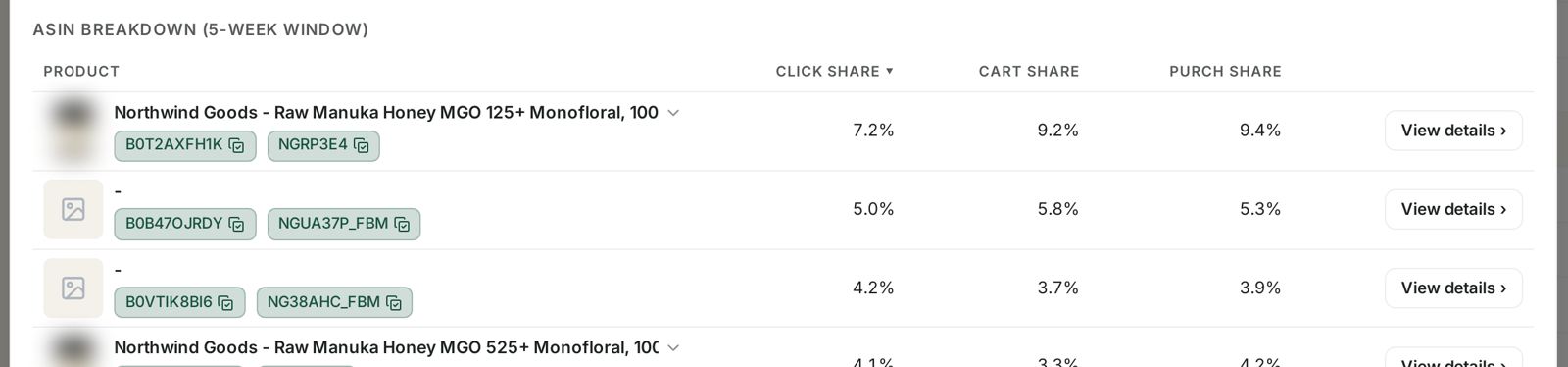
The ASIN breakdown shows which of your products the query actually reached, with click, cart and purchase share each.
This is the step that saves you from fixing the wrong thing:
One ASIN dragging the rest — the query is fine. Fix or exclude that product.
The query landing on a product it should not — a targeting problem, not a listing one. Negative-match it in the campaign sending it there.
All ASINs performing similarly — now it genuinely is the query, and step 2's diagnosis stands.
Step 4 — Act on what you found
Losing the click. The main image does most of the work in a search result, then price, then rating. Look at the sellers winning the query and be honest about how yours compares at thumbnail size.
Losing the cart. The detail page. Bullets, A+ content, images beyond the first, and the review count relative to the competition.
Losing the purchase after the cart. The narrowest and most fixable set: price, delivery promise, availability, Buy Box. Check stock first — see Catch a stockout before it costs you rank.
Losing on volume alone, winning on rates. The happy case. You convert better than the market and are not shown enough. This one is a bid and rank problem, and it is the only one where spending more is the right answer.
Step 5 — Decide what not to fix
Some queries should be abandoned rather than repaired, and saying so is part of the job:
Competitor-brand queries. A better page cannot win a shopper who wants somebody else's brand. TrackIQ deliberately excludes these from Fix listing and Fix conversion recommendations for exactly that reason — provided the rival is in your competitor list. See Generic, Branded and Competitor Terms.
Queries for a product you do not really sell. Adjacent terms that your broad match caught. Negative-match them.
Queries where the market rate is also poor. If everybody converts badly on a term, it is a browsing query rather than a buying one.
Step 6 — Re-check after a fortnight
Listing changes take time to show. SQP reports weekly cohorts, so compare the two weeks after your change against the two before — not an arbitrary range. See SQP Is Weekly: Reading Week Cohorts Correctly.
The measure of success is the rate against market at the stage you fixed, not the query's total sales. Sales move for many reasons; the rate tells you whether the change worked.
What not to do
Do not raise bids on a click or conversion problem. More impressions on a listing people do not click costs more money to be ignored.
Do not change the listing and the bid in the same fortnight. You will not know which one moved the rate.
Do not fix twenty queries at once. Five is enough to learn from and few enough to attribute.
Do not read a single week on a low-volume query. The five-week window exists for a reason.
Related
- Search Query Cart Analysis: Why a Query Doesn't Convert — the screen, in full.
- Recommended Actions: The Queries That Need a Decision — step 1.
- Generic, Branded and Competitor Terms — why some queries are excluded.
- SQP Is Weekly: Reading Week Cohorts Correctly — step 6.