

On a listing with variations, the one shown first gets a disproportionate share of the clicks and the conversions. It is pre-selected, it is what the main image shows, and most shoppers never touch the swatches.
Amazon sorts variations alphanumerically. So unless you have intervened, the order is an accident of naming — and your best seller may be sitting at the bottom.
Prefer to watch? One hundred and forty-four seconds on why the first variation gets the clicks, how to control the order, and choosing by conversion rather than by units sold.
What this actually costs
Say you sell baby towels in four designs, and White Puppy is comfortably your best converter.
Alphabetically, the order runs Brown Puppy, Grey Puppy, Pink Puppy, White Puppy — last.
Every organic shopper who lands on that listing sees Brown first. Your highest-converting option is three clicks away, and most people never make them.
The product is fine. The listing is fine. The ordering is quietly taxing both.
You can control the order
Because the sort is alphanumeric, changing the variation name changes the position.
Prefix the name with a number: 1. White Puppy, 2. Pink Puppy, and so on.
Or use an allowed leading character — - White Puppy, ~ White Puppy — in categories that permit it.
Numbers are the safer choice. They read as intentional to a shopper, they sort predictably, and they are accepted everywhere. Special characters are cosmetically cleaner but not universally allowed, so check your category before relying on them.
How to do it
- Open the listing's variations in Seller Central.
- Identify the genuine best performer — by sales, click-through rate and conversion rate, not by intuition or by what you personally like.
- Edit the variation name so it begins with a number or an allowed character.
- Save, then refresh the live listing.
- Confirm it now appears first.
- Monitor conversion afterwards.
Step 2 is the one people get wrong. The variation you think sells best and the variation that actually converts best are frequently not the same, and promoting the wrong one makes the listing worse.
Picking the right variation
Compare your variations against each other, not against the parent. Parent-level numbers average across children and hide exactly the differences you are trying to act on.
Look at three things per child ASIN: units sold, click-through rate, and conversion rate.
Prefer the best converter over the biggest seller when they differ. A variation that sells more only because it has been shown first is not evidence of anything — that is the bias you are trying to correct. Conversion rate is the cleaner signal.
And check the rating too. Promoting a variation with a weak rating puts your worst reviews in front of every visitor — see Find the Variation Dragging Your Rating Down.
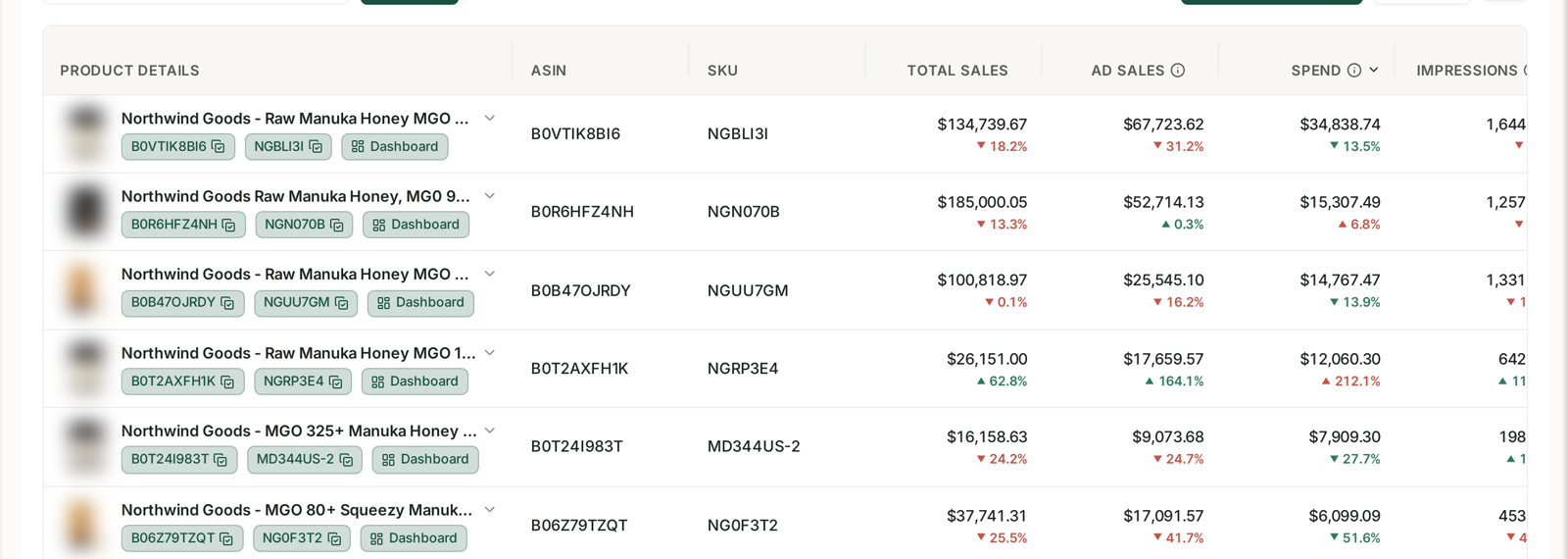
Pulling child-level sales, CTR, conversion and rating side by side is exactly what the product table is for — see Understanding the Product Details Insights Page. Doing the same comparison by exporting reports per child ASIN is an afternoon of assembly for a number you should be able to read at a glance.
Then verify it worked
Watch the parent's conversion rate for the following two to four weeks.
Expect a modest, real improvement, not a step change. You have not changed the product or the traffic — you have changed which option the traffic meets first.
If conversion falls, change it back. That is a legitimate outcome: it means the variation that was leading really was the right one, and your performance read was wrong.
When to revisit it
Seasonally, where variation demand shifts — colours and sizes rarely perform evenly across the year.
After adding a new variation, which will otherwise slot in wherever the alphabet puts it.
After a price change on one child, which moves its conversion rate relative to the others.
Common mistakes
Never having looked. By far the most common — the order is a default that no one chose.
Promoting the biggest seller when it is only the biggest seller because it was already first.
Reading parent-level data and missing the differences between children entirely.
Promoting a variation with a poor rating, putting your weakest reviews in front of everyone.
Using special characters in a category that rejects them, and having the change silently fail.
Not checking the live listing afterwards. The edit is not the outcome; the displayed order is.
Related
- Find the Variation Dragging Your Rating Down — the rating side of the same comparison.
- Understanding the Product Details Insights Page — where the per-child numbers live.
- Understanding Business Reports — session and conversion data per ASIN.