

Best Seller Rank is the one number on this screen that has nothing to do with search. It is Amazon's ordering of every product in a category by recent sales velocity — so it moves when you sell, not when you rank.
That makes it the closest thing you have to a competitor's sales figure, and the fastest read on whether something you did actually worked.
Prefer to watch? Eighty-three seconds on the inverted axis, the arrows, and what BSR is actually for.
Where it lives
Open a project, open a product, and take the BSR Tracker tab.
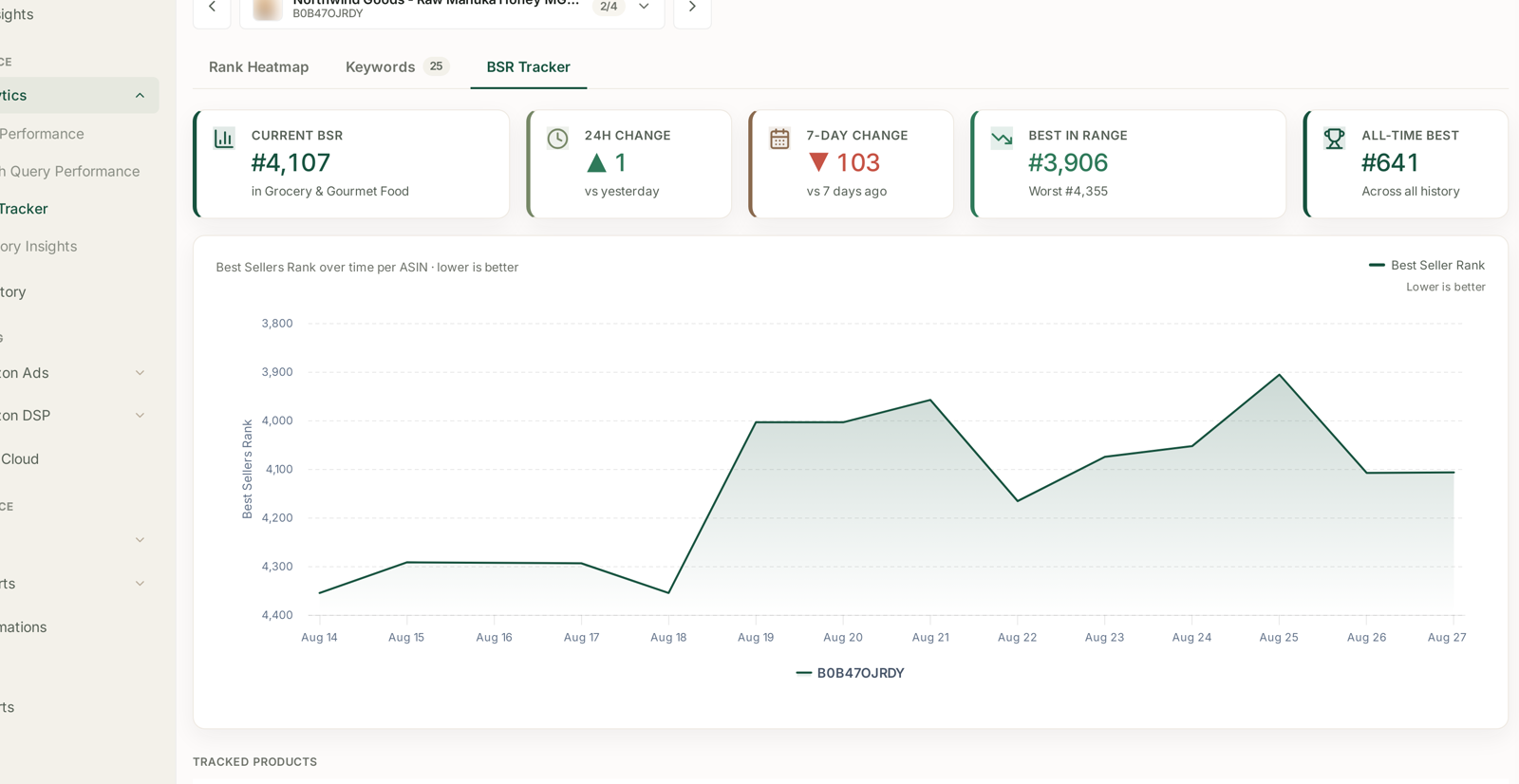
| Tile | Reads |
|---|---|
| Current BSR | today's rank, and the category it is ranked in |
| 24h change | vs yesterday |
| 7-day change | vs seven days ago |
| Best in range | best rank in the window, with the worst beside it |
| All-time best | the high-water mark across all history |
Lower is better, and the screen means it
BSR is a position, so #641 beats #4,107. Two things on this screen are built around that, and both are easy to misread:
The chart's axis is inverted. The y-axis runs 3,800 at the top to 4,400 at the bottom, and the panel says so — "Best Sellers Rank over time per ASIN · lower is better". A line going up is good. It is the opposite of every other chart in TrackIQ, and it is deliberate: it makes improvement look like improvement.
The arrows track the outcome, not the number. A green ▲ means the rank improved — the numeric rank went down. A red ▼ means it got worse. So a green ▲ 1,695 on the 30-day column means the product climbed 1,695 places over the month.
The category is part of the number
Current BSR names the category it is measured in — "in Grocery & Gourmet Food". That matters more than it looks:
- #4,107 in a huge category can represent far more sales than #600 in a small one. BSR is a rank within a pool, and the pools are wildly different sizes.
- Comparing two products' BSRs is only meaningful in the same category. Across categories it is not a comparison at all.
- Amazon can re-categorise a listing, and the rank will step change overnight with no sales change behind it. A sudden jump of thousands of places with a flat sales line is a category move, not a demand move.
The tracked products table
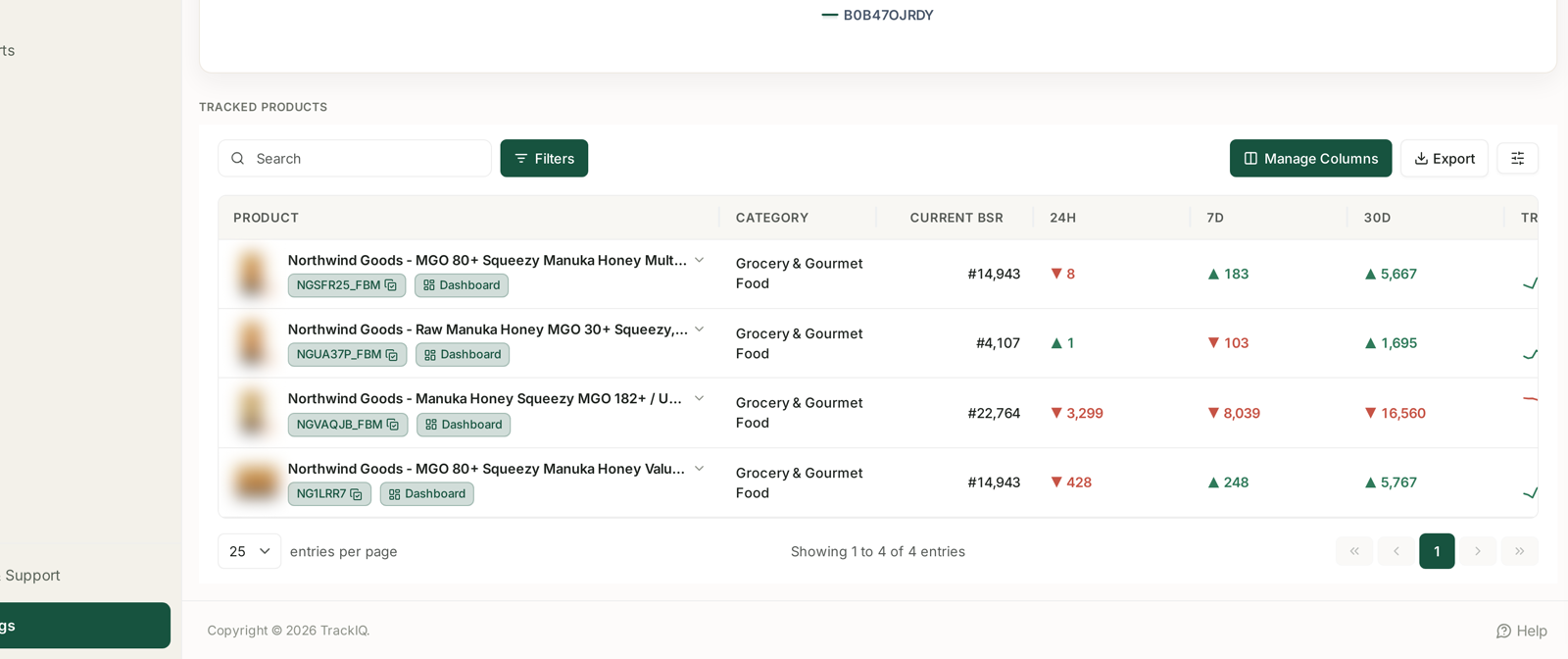
Below the chart, Tracked Products puts every product in the project side by side with Category, Current BSR and the 24H / 7D / 30D movement columns, so you can see which listing is carrying the line.
Read the three windows together rather than one at a time:
| Pattern | Reading |
|---|---|
| 24h down, 7d and 30d up | ordinary daily noise on a rising product |
| 24h and 7d down, 30d up | something changed this week — look at price, stock, reviews |
| all three down | a sustained decline, not a blip |
| 24h up, 7d and 30d down | a bounce inside a downtrend — do not celebrate yet |
The 30-day column is the one to trust. BSR is recalculated frequently against a rolling sales window, so a single day says very little.
What it is actually good for
Reading a launch. A new listing's BSR falls fast and then plateaus. Where it plateaus is your real velocity, and you know it weeks before the sales reports settle.
Testing a price change. Price moved on Tuesday; watch the 7-day column on Friday. BSR responds to units, so it answers the volume half of the question before revenue data does.
Watching a competitor. A tracked competitor ASIN gives you their BSR too. You cannot see their sales — but a competitor whose BSR is climbing steadily while yours is flat is taking share in your category right now. See Tracking Competitor ASINs Alongside Your Own.
Catching a stock-out you did not notice. BSR decays quickly with no sales. A cliff in the chart with no marketing change behind it is very often availability.
What not to conclude
BSR is not sales. It is a rank derived from sales relative to everyone else. Your BSR can worsen in a week you sold more, because the category grew faster.
It is not linear. The gap between #100 and #200 is enormous; the gap between #20,000 and #20,100 is nothing. Treat percentage moves at high ranks with suspicion.
Advertising moves it indirectly. Ads sell units, units move BSR. But the same ad spend on a different product moves BSR by a different amount, because the categories differ. Do not use BSR to compare ad efficiency — use ROAS and TACoS.
All-time best is context, not a target. It may have been set during Prime Day, a promotion, or a competitor stock-out.
Related
- Reading Visibility, Average Position and Top 10 — the search-side ranks.
- Tracking Competitor ASINs Alongside Your Own — getting their BSR too.
- Tracking the Amazon's Choice Badge — the other Amazon-assigned signal.
- Inventory — the availability that BSR reacts to first.