

The alerts screen tells you what is wrong now. Alert History tells you what has been wrong, how often, and for how long — which is a different and usually more useful question.
It is also the only place the product prints the exact condition that fires each alert.
Prefer to watch? Eighty-seven seconds on priority, the exact triggers, and the trailing-average trap.
Priority, before history
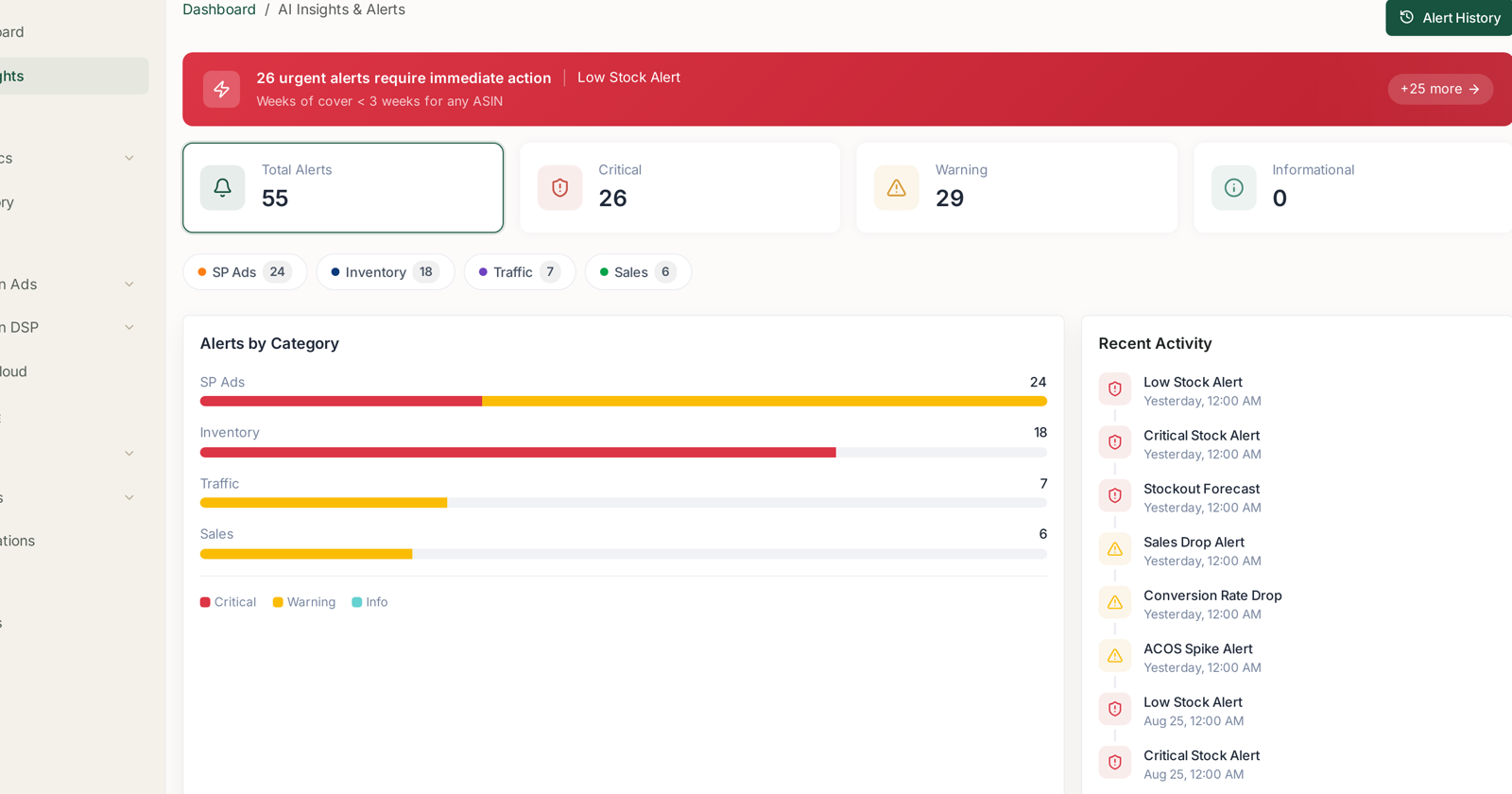
Every alert carries one of three priorities, and the four tiles across the top count them:
| Priority | Means |
|---|---|
| Critical | money or availability is being lost right now |
| Warning | a trend has broken and will cost you if it continues |
| Informational | worth knowing, not worth interrupting your day |
Beneath them, the same alerts split by category — SP Ads, Inventory, Traffic, Sales — and Alerts by Category stacks each category's bar by priority.
Read the stack, not the count. A category with many alerts that are nearly all warnings is noisy. A category with fewer alerts that are nearly all critical is where your attention belongs. Inventory frequently looks like the second; SP Ads like the first.
The red banner at the top names the single most urgent alert and how many others share its urgency — a shortcut into the worst of it.
What actually triggers each one
Open Alert History and every alert carries the rule that produced it. This is the reference worth keeping:
| Alert | Category | Fires when |
|---|---|---|
| Low Stock Alert | Inventory | weeks of cover < 3 weeks for any ASIN |
| Critical Stock Alert | Inventory | weeks of cover < 1 week for any ASIN |
| Stockout Forecast | Inventory | projected to stock out within 14 days based on velocity |
| Sales Drop Alert | Sales | daily sales > 30% below the trailing 7-day average |
| Conversion Rate Drop | Traffic | CVR dropped > 20% vs the trailing 7-day average |
| ACOS Spike Alert | SP Ads | ACoS increased > 25% vs the trailing 7-day average |
| Ad Spend Spike | SP Ads | daily spend > 35% above budget/average |
| Spend Without Sales | SP Ads | campaign spent > $50 with zero attributed sales |
| Keyword Bleeding Money | SP Ads | keyword spent > $100 with ACoS > 100% |
| Campaign Daily Budget Capped | SP Ads | campaign hitting daily budget before end of day |
Two things follow from reading these together.
Most of them compare against a trailing 7-day average. So a quiet week raises the bar and a busy one lowers it — the same absolute drop can fire in one week and not the next. That is why alerts cluster after a promotion ends.
The inventory rules are the only absolute ones. Weeks of cover is measured against stock, not against last week, which is why inventory alerts are the ones to trust without context.
Reading the history
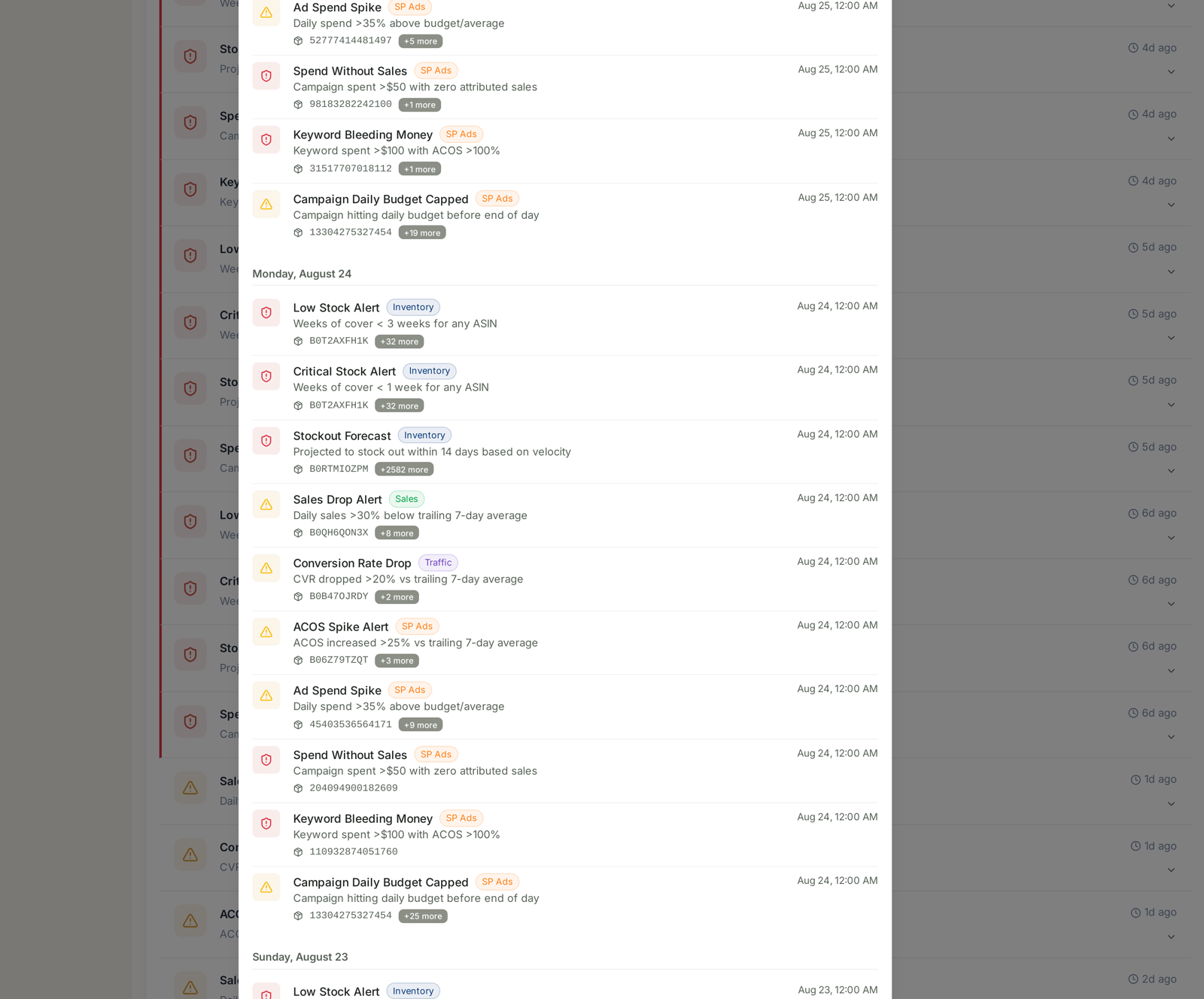
History groups by day, most recent first. Each entry shows the alert, its category chip, the trigger condition, the affected ASINs or campaign IDs with a +N more chip, and the time it fired.
That affected-entity list is what makes history actionable rather than archival. Three questions it answers that the live screen cannot:
Is this the same problem every day? The same alert on the same ASIN for five consecutive days is one unresolved issue, not five alerts. The live count treats them as five.
Is it spreading? A Low Stock Alert that named three ASINs on Monday and thirty by Friday is a supply problem, not a product problem.
Did it stop? The absence of an alert is the only confirmation that a fix worked. Scroll back to the day after you acted.
Using priority properly
Critical does not always mean act. A Critical Stock Alert on a discontinued line is noise. Priority is assigned by rule, not by knowledge of your plans.
Warning on a gateway product outranks critical on a long-tail one. The rules do not know which of your ASINs recruits customers. You do — see NTB ASINs Analysis.
Recurring warnings deserve a rule, not attention. If Keyword Bleeding Money fires on the same terms weekly, that is a job for automation rather than a person. See Building a Rule from Scratch.
Recurring criticals deserve a threshold change. If Low Stock fires constantly because three weeks of cover is unrealistic for your lead times, the alert is right and your reorder point is wrong.
What not to conclude
An alert is not a diagnosis. ACOS Spike says the number moved; it does not say whether a competitor raised bids, your conversion fell, or a rule fired.
Zero informational alerts is not a clean account. It usually means nothing crossed that band.
The trailing-average rules need history. A new campaign or a new ASIN will not fire comparison-based alerts until there is a week to compare against.
Related
- Alert Categories, Priorities and What Actually Triggers Them — the categories in full.
- Setting Up Smart Alerts and Real-Time Notifications — where delivery is configured.
- Building a Rule from Scratch — turning a recurring alert into an automation.
- Catch a stockout before it costs you rank — the playbook the inventory alerts feed.
- Understanding Your AI Insights & Alerts — the overview these sit under.