

Every number in TrackIQ is scoped to one brand and one marketplace. The control that sets both sits in the top bar of every screen, and it is easy to use for months without noticing it has two levels.
Prefer to watch? Ninety-six seconds on a control with two levels, and why switching disturbs nothing.
The control
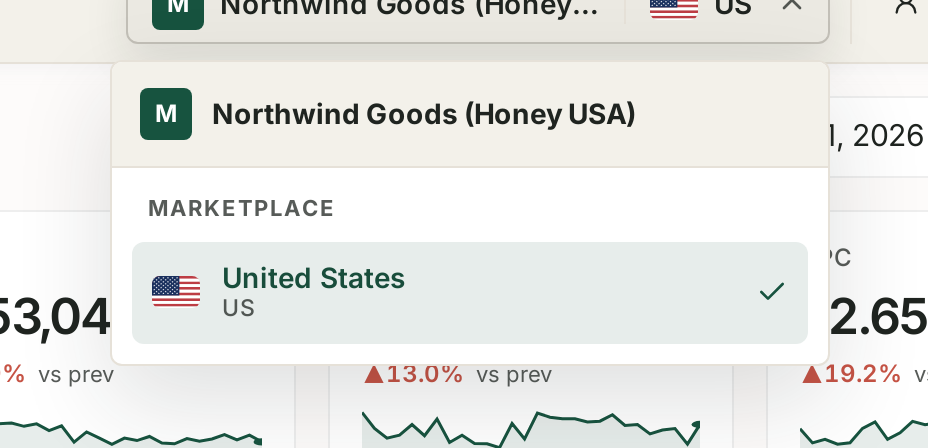
The chip in the top bar shows your current scope: the brand, then a flag and the marketplace code. Click it and the picker opens in two parts.
The brand sits at the top.
MARKETPLACE is a separate section beneath it, listing each marketplace with its country name, its code, and a checkmark on the active one.
Marketplace is chosen within a brand, not alongside it. That is the part worth understanding — switching brand and switching marketplace are two different actions on one control, and a brand's marketplace list is its own.
What changes when you switch
Everything reads the current scope, so a switch re-scopes the whole application:
| Area | What it shows after a switch |
|---|---|
| Dashboard and Analytics | that brand + marketplace only |
| Sponsored Ads, DSP, AMC | campaigns and reporting for that scope |
| Search Query Performance | that scope's tracked queries |
| Rank Tracker | projects belong to a marketplace |
| Alerts | scoped to the brand |
| Automations | rules are scoped, and a rule cannot act outside its scope |
Nothing aggregates across the picker. There is no "all brands" or "all marketplaces" view. If you want a combined number you produce it yourself, and see the warning below before you do.
The scope is why a number "changed"
Before investigating a figure that moved unexpectedly, check the chip.
The three things that most often explain a surprising number, in order:
1. The date range.
2. The brand or marketplace in the picker.
3. Something genuinely changed.
The first two account for most of it. Both are visible in the top bar, and checking takes two seconds.
Switching does not disturb anything
A switch is a view change:
Nothing is saved or lost. Filters and date ranges generally carry over; the data underneath does not change.
Rules keep running in every scope, whether or not you are looking at it. Switching away from a brand does not pause its automations.
Alerts keep firing for brands you are not currently viewing.
The only control that actually stops data flowing is the sync toggle on Connections, which is a different thing entirely. See Turning Brand Sync On and Off.
If a brand is missing from the picker
Three causes, in order of likelihood:
It is not connected. Add it in Settings → Connections. See How to Connect Your Amazon Accounts.
Its sync is switched off. Set the Connections filter to All, not Active, and look for it there.
Your role does not have access to it. See I Can't See a Menu Item Other People Can.
If a marketplace is missing
A marketplace appears when there is a connected Amazon account for it under that brand.
Each marketplace is a separate Amazon account grant. A US seller account does not give TrackIQ access to your Canadian or Mexican listings — those are separate connections.
Check you are on the right brand first. Marketplaces are listed per brand, so the list changes when the brand does.
A habit worth having
Say the scope out loud when you report a number. "US, Northwind, last 6 weeks" takes a second and prevents the single most common reporting error there is — two people comparing figures read at different scopes and concluding the data is broken.
Related
- Marketplaces and Currency — what changes below the marketplace line.
- Managing Multiple Brands — running several at once.
- Turning Brand Sync On and Off — the control that does stop data.
- Date Ranges, Day/Week/Month Granularity and Period Comparison — the other half of scope.