

Four shares run through every SQP screen, and they are the same four at every level — account, product, and individual query. Together they describe a funnel; individually each one answers a different question.
Once you can read the four as a sequence, most SQP diagnosis is a matter of finding where the sequence breaks.
Prefer to watch? A hundred and six seconds on reading four shares as one funnel, and the two traps in reporting them.
The four
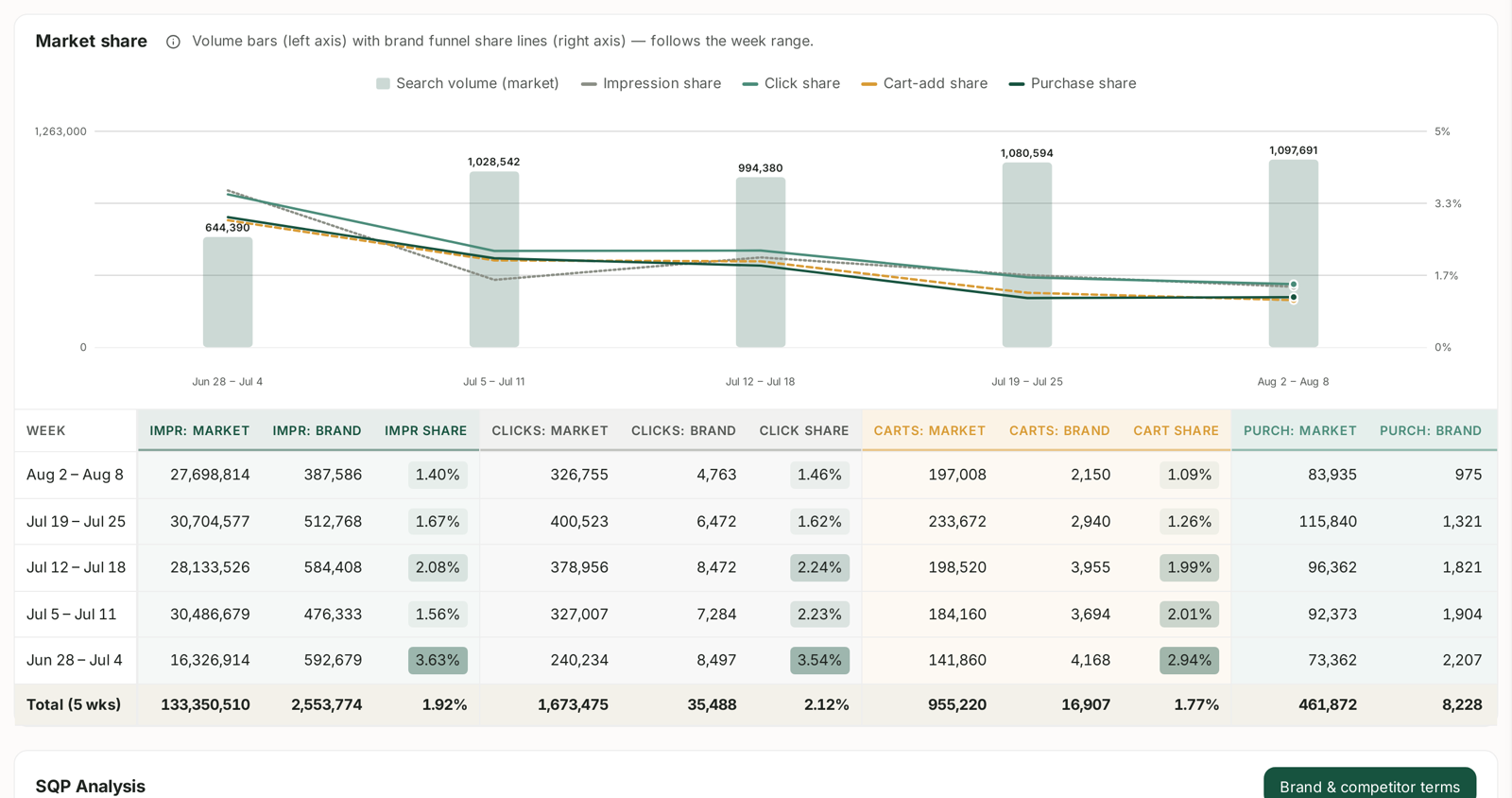
Every share is yours as a proportion of the whole market's for the same queries:
| Share | Counts | Answers |
|---|---|---|
| Impression share | how often you were shown | are you visible? |
| Click share | how often you were clicked | are you chosen? |
| Cart-add share | how often you reached the basket | does the page work? |
| Purchase share | how often you were bought | does the sale close? |
The Market share panel plots all four as lines against search-volume bars, and the table beneath gives the raw figures.
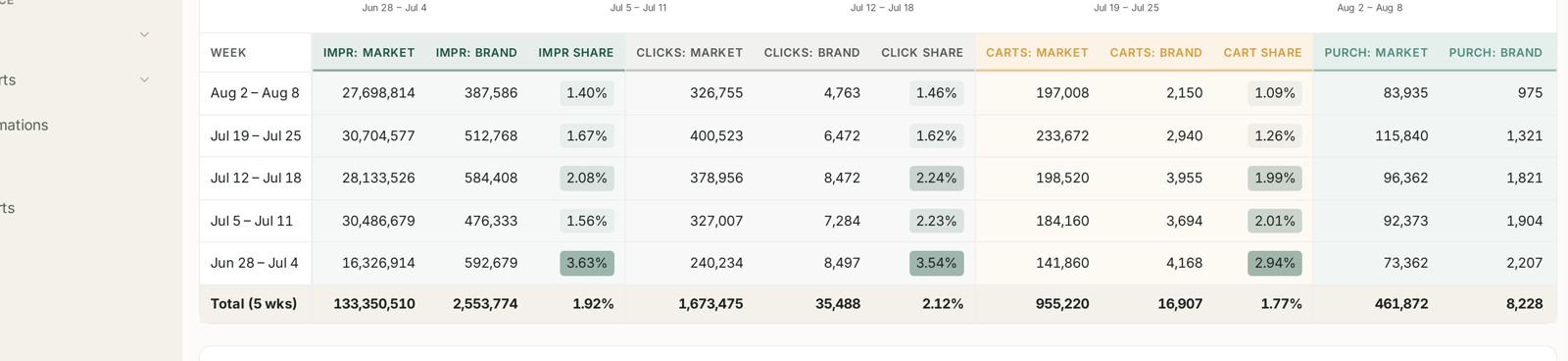
The table is the clearest statement of what a share actually is. Each stage gets three columns — the market's number, your number, and the share between them. Impressions, clicks, cart-adds, purchases, week by week, with a total row.
The middle column is named for the scope you are on. On Account it reads BRAND; on Products it reads PRODUCT. Same arithmetic, different denominator population. See Account vs Products: Two Ways to Read SQP.
Read them as a sequence, not four numbers
The four are cumulative. Each one starts from the population the previous stage produced, so a weakness early carries forward whether or not the later stages are healthy.
So find the first stage where your share drops relative to the one before it. That step is the problem; everything after it is a symptom.
| Where the drop is | What it means | The fix lives in |
|---|---|---|
| impression share already low | you are not being shown | rank, bids, budget |
| impression → click | shown and not chosen | image, title, price, rating |
| click → cart | visited and not added | detail page, content, reviews |
| cart → purchase | added and not bought | price, delivery, stock, Buy Box |
Shares that hold flat across all four are good news, even if the absolute number is small. It means you convert like the market and simply need more visibility — which is the one case where spending more is the right response.
Percentage points, not percent
The single most common reporting error on these screens.
Share changes are shown in pp — percentage points. A click share moving from 2.12% to 2.28% is +0.16 pp. Describing that as "up 7.5%" is technically a relative change but reads as a much bigger move than it is, and in a board pack it is misleading.
Report shares in pp. If somebody wants the relative figure, give both.
Small shares are normal
A single-digit share — often a low single-digit one — is ordinary for most sellers on most queries. The market includes every seller on that search, including large ones you do not compete with in any meaningful sense.
So do not read the absolute number as a grade. Read:
Direction. Is it moving, and which way?
Consistency across the four. Where does it break?
Rates against market, which the query-level funnel gives you. A 2% click-through rate against a market at 1.5% is a listing that wins the click, whatever your share of the category. See Search Query Cart Analysis: Why a Query Doesn't Convert.
Cart-add share is the underused one
Impression, click and purchase get the attention. Cart-add sits between click and purchase and isolates a stage most reporting skips entirely.
A healthy cart share with a poor purchase share is a narrow, tractable problem: people wanted it, put it in the basket, and something at checkout stopped them. Price, delivery promise, availability, Buy Box.
A poor cart share with a healthy click share is the detail page. They arrived, looked, and left without ever intending to buy.
Those two get treated as the same problem constantly, and they are not.
Where the same four appear
| Screen | Scope |
|---|---|
| SQP → Account | your brand, all tracked queries |
| SQP → Products | one ASIN, its queries |
| Query funnel (click a query) | one query, with rates against market |
| Market share table | week by week, market and brand side by side |
The query funnel is the most useful of the four because it adds the market's rate at each step, not just your share. See Account vs Products: Two Ways to Read SQP.
What not to conclude
Share is not conversion rate. Share compares you to the market; a rate compares outcomes to inputs. You can hold share while your conversion falls, if the whole market falls with you.
Impression share is not rank. It is how often you appeared, paid and organic combined.
Weekly cohorts. SQP reports whole weeks. Comparing an arbitrary date range against another is how phantom movements appear. See SQP Is Weekly: Reading Week Cohorts Correctly.
Purchase share does not include everything you sold. Only purchases tied to the tracked queries.
Related
- Understanding Search Query Performance — the dashboard overall.
- Account vs Products: Two Ways to Read SQP — the same shares at two scopes.
- Search Query Cart Analysis: Why a Query Doesn't Convert — the four with market rates attached.
- Work out which queries lose you the sale at the cart — the playbook.