

One ACoS target across a whole portfolio is the most common bad idea in Amazon advertising. Products have different margins, different lifecycles and different jobs, and a single number holds all of them to the standard of the average one.
This is how to set targets that mean something — and then let rules hold them without you.
Time: half a day to set up, then it maintains itself.
Prefer to watch? Eighty-six seconds on grouping by job, and letting the formula size the correction.
Step 1 — Work out your break-even, once
Before any target, you need the ceiling:
Break-even ACoS = your contribution margin before advertising
If a product sells for $30 with $19 of product, fee and shipping cost, you have $11 — roughly 37%. At 37% ACoS that product makes nothing. Above it you are buying revenue with your own money.
Everything else in this playbook is expressed as a position relative to that number, per product. Do this per product family, not per SKU, unless your margins genuinely differ by variant.
Step 2 — Group by the job, not the product
Automations → Rule Groups.
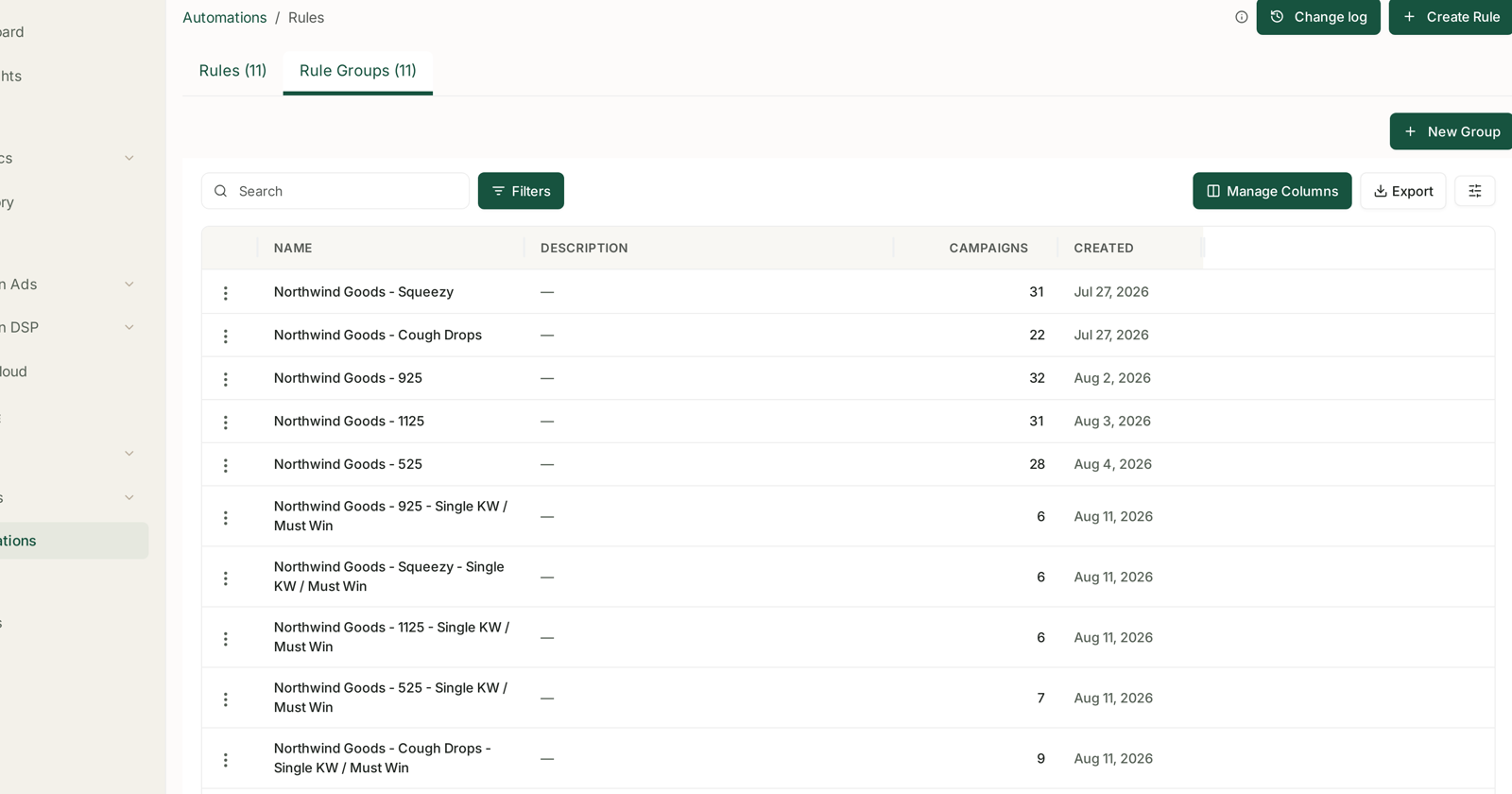
A portfolio target only works if the portfolio is divided by what you want each part to do. Four groups cover most accounts:
| Group | Job | Target, relative to break-even |
|---|---|---|
| Defend | branded terms, hold what is yours | far below — these convert cheaply |
| Harvest | proven exact terms, make money | comfortably below |
| Grow | generic terms, win new customers | at or slightly below |
| Launch | new products, buy rank and reviews | above — deliberately |
Launch above break-even is not a mistake. You are buying velocity and reviews for a period you have decided in advance, and you should decide the end date at the same time as the target.
Gateway products belong in their own group too, with a deliberately looser target — you are buying a customer, not a transaction. See Protect the Products That Bring You New Customers.
The campaign count on each rule group is your blast radius. Check it before attaching a rule.
Step 3 — Set the target where the rules can read it
Automations → the rule → Cadence & Guardrails.
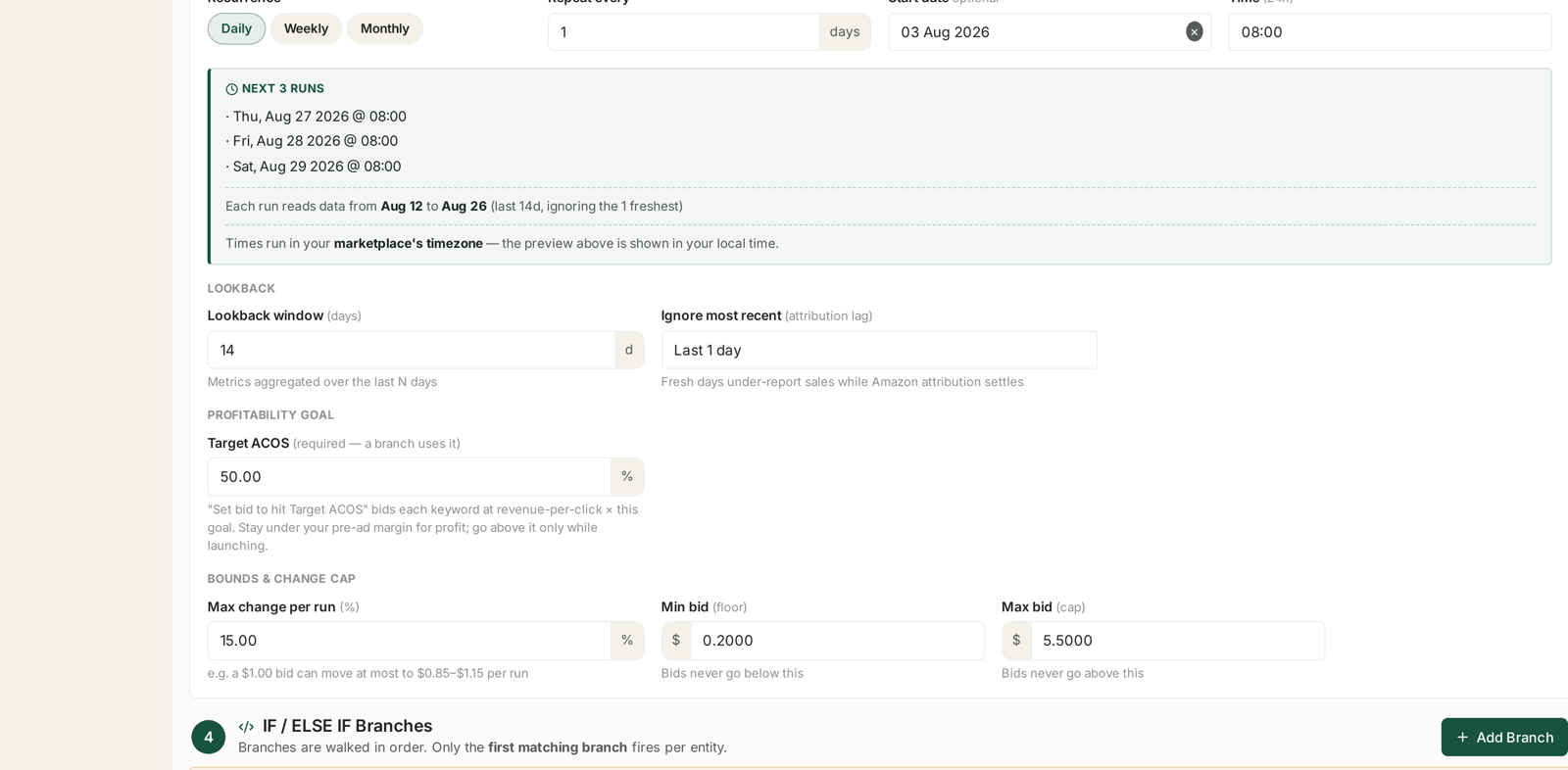
Target ACOS is a field on the rule, and the Set bid to hit Target ACOS action reads it:
new bid = current bid × (Target ACOS ÷ actual ACOS)
This is why goal-seeking beats a fixed percentage nudge across a portfolio. A target at 100% ACoS against a 50% goal halves; one at 55% barely moves. The size of the correction matches the size of the problem, which is exactly what you want when one rule is managing hundreds of targets at once.
The panel's own guidance is worth heeding: stay under your pre-ad margin for profit; go above it only while launching.
Step 4 — Bound what the rule may do
Same panel, Bounds & Change Cap:
Max change per run — 10–15% for a daily rule. The formula can want a large correction; this stops it taking one in a single step.
Min bid and Max bid — absolute floors and ceilings. These are the backstop against a bad calculation on thin data. A target with two clicks and a freak conversion will produce an enormous suggested bid, and the cap is what stops it being applied.
Look-back 14 days, ignore the freshest day. Fourteen days holds two complete weekly cycles; ignoring the newest day keeps the rule from reacting to sales Amazon has not attributed yet. See Look-back Windows and Adjustment Frequency.
Step 5 — Build the rule as a branch list
One rule per group, and the branch order does the work. A shape that holds up:
| # | When | Then |
|---|---|---|
| IF 1 | Clicks > 50 and Orders = 0 | Pause targeting |
| ELSE IF 2 | Spend ≥ $50 and Orders = 0 | Pause targeting |
| ELSE IF 3 | Orders > 1 | Set bid to hit Target ACoS |
| ELSE IF 4 | Clicks < 50 or Orders ≤ 1 | Increase bid by 15% |
Read it as a decision list: kill what has proved it does not work, steer what has proved it does, and give everything else room because it has not been tested yet.
Branch order is the logic — branches are walked in order and only the first match fires. The catch-all belongs last, or it swallows the entities the specific branches were meant to catch. See Building a Rule from Scratch.
Step 6 — Dry-run every group before enabling
Dry-run preview computes every change and applies none, and it shows which branch claimed each target.
Two things to check per group:
Is the changed count plausible? Half of everything, every day, means the thresholds are too loose. Zero means the rule is decoration.
Is the branch distribution what you expected? If every row says branch 4, branches 1–3 are unreachable and the order is wrong.
See Dry-Run Preview.
Step 7 — Review monthly, not daily
Once running, the review is short:
Changed count per rule. A rule changing nothing is not protecting you.
Actual ACoS per group against its target. Consistently above means the target is unreachable at your conversion rate, not that the rule is failing.
Launch groups against their end date. A launch target that nobody switched off is just an expensive group.
What not to do
Do not set one target for everything. That is the problem this playbook exists to fix.
Do not set a target above break-even outside a launch, and write the end date down when you set it.
Do not run daily on a 30-day window with a large cap. Every run re-reacts to the same month and the changes compound on evidence that has not moved.
Do not let a pause rule touch gateway products or launches. Put them in groups your pause rules do not run on.
Do not change target and cadence in the same week. Move one, watch, then the other.
Related
- Rule Groups: Applying One Rule Across Many Campaigns — step 2.
- Building a Rule from Scratch — steps 3 to 5.
- Guardrails to Set Before You Automate Anything — step 4 in full.
- Understanding ROAS and Key Amazon Advertising Metrics — the break-even maths.
- Spot Cannibalisation Between Sponsored Brands and Sponsored Products — before you blame one ad type for another.