

Company information is the least interesting screen in TrackIQ and one of the few worth getting right the first time, because it is what appears on things you send to other people.
Prefer to watch? Ninety-three seconds on legal name versus brand name, and why the billing email should not be a person.
Where it is
Settings → Profile, second section, below Account.
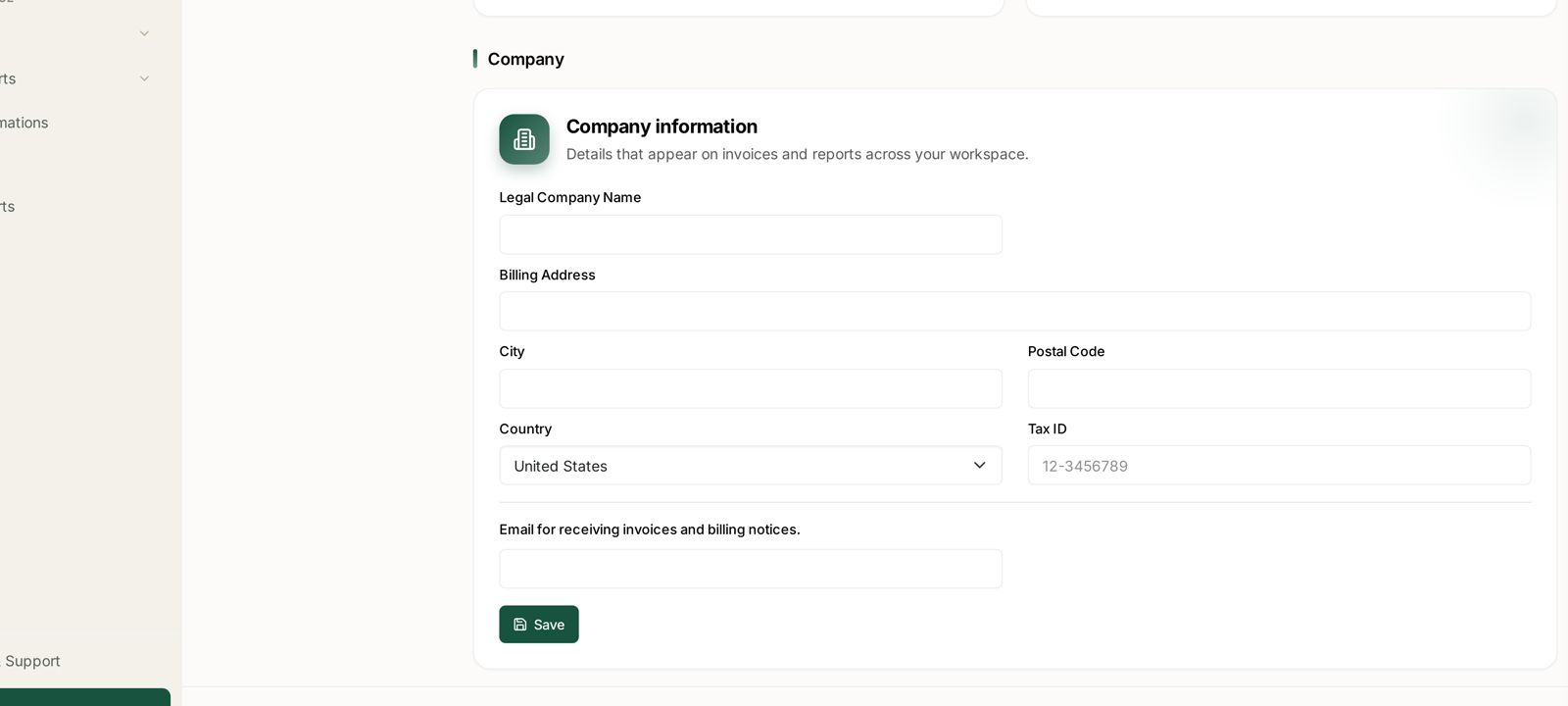
The card states its own purpose:
Details that appear on invoices and reports across your workspace.
Two audiences, then: your finance team, and anyone you send a report to.
The fields
| Field | What it is for |
|---|---|
| Legal Company Name | the entity on the invoice — not your trading or brand name |
| Billing Address | street address for the invoice |
| City | |
| Postal Code | |
| Country | a dropdown, and it drives tax treatment |
| Tax ID | VAT number, EIN, ABN — whatever your jurisdiction uses (12-3456789 is the placeholder, not a value) |
| Email for receiving invoices and billing notices | where billing mail goes |
Save commits the section.
Legal name, not brand name
The most common mistake on this screen.
Your brand is what customers see on Amazon. Your legal company name is what your accountant and the tax authority recognise. They are frequently different, and an invoice made out to the brand name can be rejected or need reissuing.
If you are unsure, use the name on your company registration.
The billing email is a separate address
The email on the Account section above is your sign-in identity. This one is where invoices and billing notices are sent, and they should usually be different:
Point it at finance or accounts payable, not at the person who happens to administer the tool.
Use a shared mailbox, not an individual. People leave; accounts@ does not.
Check it is monitored. A failed payment notice sitting in an unread inbox is how access gets interrupted.
Tax ID and Country belong together
The Country dropdown is not decoration. Between them, Country and Tax ID determine how your invoice is treated — whether tax is charged, and at what rate.
Fill in the Tax ID if you have one. A registered business without its number on file can end up paying tax it could have accounted for itself.
Set Country before you worry about the Tax ID format. The country establishes which identifier is expected.
When to fill it in
During setup, before your first invoice. Retroactive invoice corrections are a nuisance for everyone and often cannot be done at all for a closed period.
When your company details change — a change of registered address, a new entity, a new tax registration.
Before you send reports outside your own team, since these details also carry through to reports.
This is not the billing screen
Worth separating the two:
Company information is your identity — who the invoice is made out to.
Payment methods, plan and usage live in the billing area, which is a separate part of Settings and needs billing permission to reach.
Changing your address here does not change your card, your plan, or when you are charged.
A note on scope
The Profile page's strapline reads "your account stays in sync across every workspace" — and the Company card sits on that page, described as applying "across your workspace".
If you work across more than one workspace, check the company details on each rather than assuming the block you filled in yesterday applies here too.
Related
- Managing Account Settings — where this page sits.
- How Revenue-Based Pricing Works — what you are being invoiced for.
- Getting Help from the TrackIQ Team — if an invoice needs correcting.