

Raising a price is a completely different exercise from lowering one. A price cut rarely does anything sudden. A price rise can halve your sales overnight — and take your organic rank down with it.
So the goal is not just to raise the price. It is to raise it in a way the algorithm and the shopper barely notice.
Prefer to watch? One hundred and sixty-three seconds on pricing against where competitors actually sell volume, softening an increase, and raising margin without touching your ranking listing.
When to do it
Gross margin before PPC below 32% — worth testing.
Below 25% — you almost certainly need to, and you can usually pull off at least part of it.
See Pricing and Gross Margin for the full bands.
How much: read the market, not the calculator
Find competitors priced above you who still sell a lot of units. Those prices are proven to work in your niche.
Example. You sell at $10.99 with a 23% margin. The niche runs $9.99–$14.99. Several competitors at $11.99 and $12.99 sell heavily. Test $12.99 — customers demonstrably buy at that price with an offer like yours. Do not jump to $14.99, where nobody is selling volume.
Or price to a target margin. Set the price that produces 35–36% and see what happens. Both approaches are valid; test both.
The gap play
Sometimes the niche has a hole in it.
You sell a chair at $19.99, with competitors clustered $18–21. Then nothing until $24.99, where another cluster sells well.
Price at $23.99 — just under the expensive segment. You are now competitive with a completely different set of buyers, and you took $4 of margin doing it.
Map where the customers actually are before choosing a number.
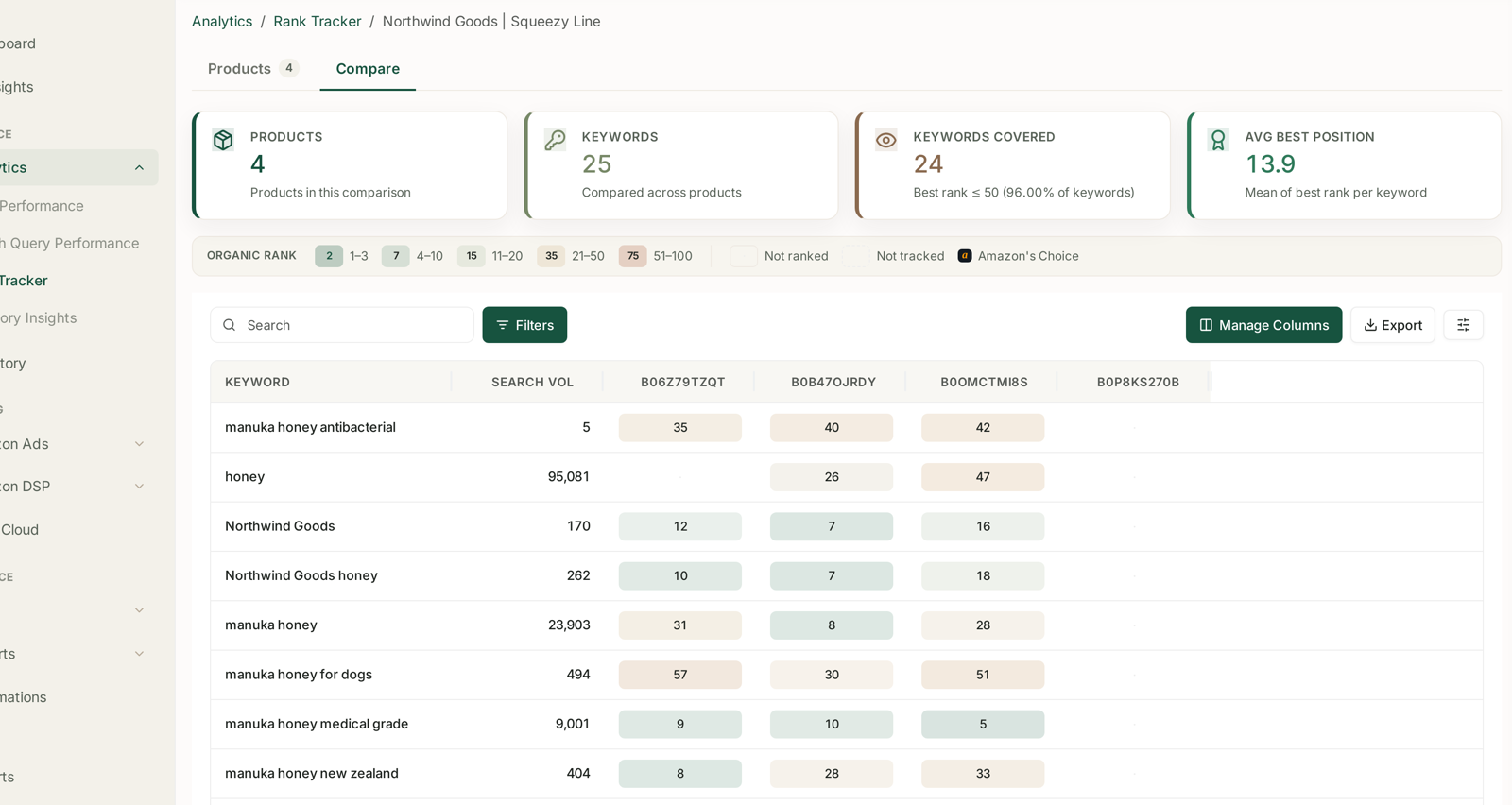
Seeing competitor prices next to competitor sales volume is what makes this a decision rather than a guess — see Tracking Competitor ASINs Alongside Your Own. A price map assembled by hand goes stale in days, and the whole point is to price against where volume is now.
Four ways to soften the increase
1. Raise the price and add a coupon that cancels it.
$19.99 → $24.99, with a $5 coupon the same day. The visible price barely moves.
Only 50–60% of customers redeem a coupon — check your own rate — so the other 40–50% pay the full $24.99 immediately. Then taper the coupon down over the following weeks.
And occasionally CTR and CVR rise during this. A larger coupon is itself a conversion signal. Do not count on it, but it happens.
2. Raise the price and use a Prime Exclusive Discount.
Same shape: $19.99 → $24.99 with a $4 discount, so the effective rise is $1. Then reduce the discount by $0.50–1 every few weeks.
3. Small increments.
$0.50 every one or two weeks. Soft, and it works most of the time.
Its real value is that it finds your ceiling. $19.99 → $21 with no effect, then $21.50 and $22 where sales start falling — so you go back to $21 and keep a $1 gain you would not otherwise have found.
4. Raise it an hour before a 7-Day Deal or Best Deal starts.
This is the strongest of the four.
Raise from $19.99 to $24.99 about an hour before the deal begins at midnight PST. The deal runs its discount off the new price, everything looks normal, and when the deal ends the higher price is simply what is there.
The algorithm does not register a price increase happening now — it sees one that happened before a strong deal week. That makes for a much softer landing, because a fresh price rise otherwise attracts scrutiny and reduced traffic. See Amazon Deals: Lightning and Best.
Measure it — and watch far more closely than on a price cut
Same metrics as a price cut: units, dollar profit, percentage margin, Top of Search CTR and CVR, and organic rank — see Testing a Lower Price.
But check every single day, first thing.
Revert immediately if any of these appear:
Sales down ~50% within a day or two.
Organic rank falling across the board — 10 → 20 → 30 → 40.
CTR and CVR down substantially.
Those mean your offer is not strong enough to hold the higher price, and the fix is the offer, not the price.
Crashing inside 48–72 hours → revert now. Soft but not crashing → give it another 48–72 hours, watching daily.
Because this is the negative flywheel, and it compounds: sales fall, rank falls, conversion falls, and each makes the next worse.
Three ways to raise margin without raising your hero price
Often better than a price rise, and lower risk.
1. Cut back-end cost. COGS, freight, FBA fees, storage, warehousing. This is the highest-value place to look when margin is very low, and it costs you no conversion at all — see Negotiating Lower COGS and Reducing FBA and Referral Fees.
2. Raise every variation except the hero.
Leave the hero ASIN alone — the one ranking across your generic keywords, carrying the CTR, CVR and rank.
Raise the others by $1, $2, $5, whatever fits. The parent's blended margin improves and the ranking ASIN is untouched.
This is the loss-leader structure, and large brands use it deliberately. Even a $1 rise across the non-hero variations is worth having — see Optimising Your Variation Order.
3. Launch larger pack variations.
2-packs, family packs, XL sizes, priced at a normal ~36% margin.
They raise the listing's average revenue per sale without touching the hero price at all, and they give you somewhere to send customers who want more.
Common mistakes
Raising to a price where no competitor sells volume.
Raising the hero ASIN when the non-hero variations would have done the job.
Raising price before looking at back-end cost, which is usually the cheaper fix.
Checking weekly. A price rise needs daily attention.
Waiting out a crash because the test "needs a week".
Forgetting to taper the coupon or discount, so the increase never actually lands.
Related
- Testing a Lower Price — the same measurement, opposite direction.
- Where Your Margin Actually Goes — the back-end costs to attack first.
- Amazon Deals: Lightning and Best — the deal cover that softens an increase.