

A query can be doing well at every stage except the one that matters. Plenty of impressions, a healthy click rate, and then people put it in the basket and never buy — or never reach the basket at all.
Click a query on the SQP Analysis table and TrackIQ opens its funnel, stage by stage, with the market beside you at every step.
Prefer to watch? Eighty-five seconds on the four funnel stages, and the classic misdiagnosis.
Opening it
Search Query Performance → SQP Analysis, then click for details under any query. The note above the table says what you get:
Click a query for its funnel (brand vs market) and ASIN split.
The table is sorted by SQ Score and shows the top 200 queries, five weeks each, with chips filtering to Generic, Branded and Competitor. Those three come from your own term list — see Generic, Branded and Competitor Terms.
The window summary
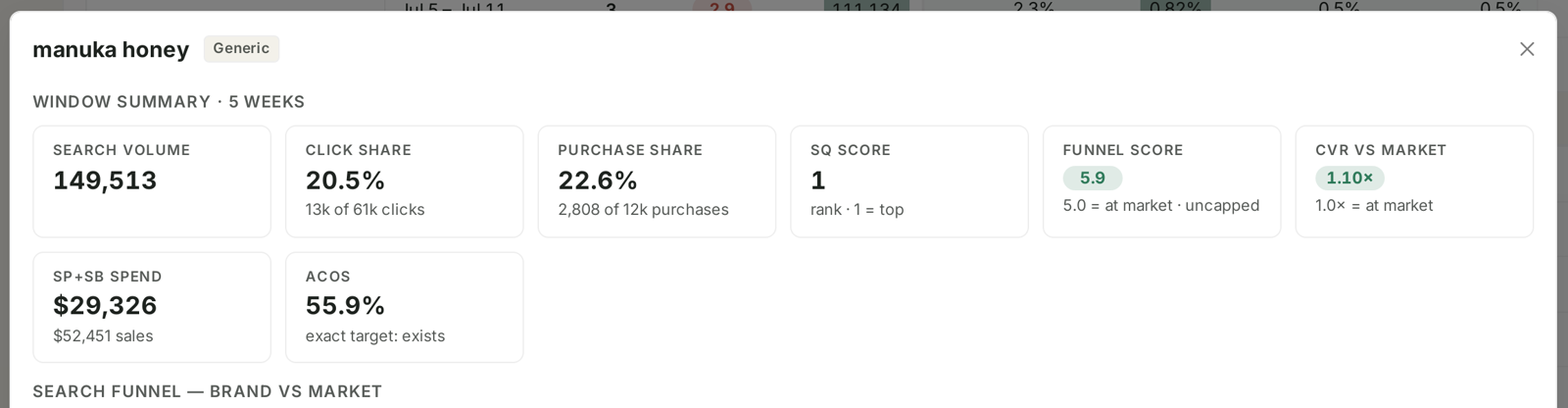
Eight tiles across a five-week window:
| Tile | Reads |
|---|---|
| Search Volume | total market searches for the query |
| Click Share | your clicks as a share of the market's |
| Purchase Share | your purchases as a share of the market's |
| SQ Score | the query's rank in your list — 1 is top |
| Funnel Score | 5.0 = at market, uncapped |
| CVR vs Market | 1.0× = at market |
| SP+SB Spend | what you paid on this query, with sales beside it |
| ACoS | for the query, and whether an exact target exists |
Funnel Score and CVR vs Market are the two to read first, because both are calibrated against the market rather than against a target you invented. A funnel score above 5.0 and a CVR multiple above 1.0× mean you are beating the average seller on this query. Below means you are not, and the funnel below tells you where.
The ACoS tile also flags "exact target: exists" — whether you are already bidding on this query with an exact-match keyword. A query performing well with no exact target is a harvest candidate. See Harvest Winning Search Terms into Exact-Match Campaigns.
The funnel, brand against market

Four stages, each showing your share, your absolute figure beside the market's, and from the second stage on, your rate against the market's rate:
| Stage | Shows | Rate compared |
|---|---|---|
| Impressions | share of all impressions for the query | — |
| Clicks | share of all clicks | CTR vs market CTR |
| Cart Adds | share of all cart adds | Cart rate vs market |
| Purchases | share of all purchases | CVR vs market |
Rates compare your brand with the full market (all sellers) at each funnel step.
That comparison is the whole point. A 2% CTR means nothing on its own; a 2% CTR against a market at 1.5% means your listing is winning the click. The same number against a market at 4% means it is losing badly.
Reading where it breaks
Walk the four stages and find the first one where your share drops relative to the stage before it. That drop is the problem, and each one has a different fix:
| Pattern | What it means | Where the fix is |
|---|---|---|
| Impression share low | you are barely shown | rank and bids |
| Impression share fine, click share drops | shown and not chosen | main image, title, price, rating |
| Click share fine, cart share drops | they arrive and leave | the detail page — content, A+, reviews, price |
| Cart share fine, purchase share drops | they abandon at checkout | price, delivery, availability, Buy Box |
The last row is the rarest and the most annoying, because it is furthest from anything advertising can influence.
The classic misdiagnosis is treating a click-share problem as a bid problem. If you are already being shown as often as your share of the category warrants and people are not clicking, more impressions just costs more money to be ignored at a larger scale.
The ASIN breakdown
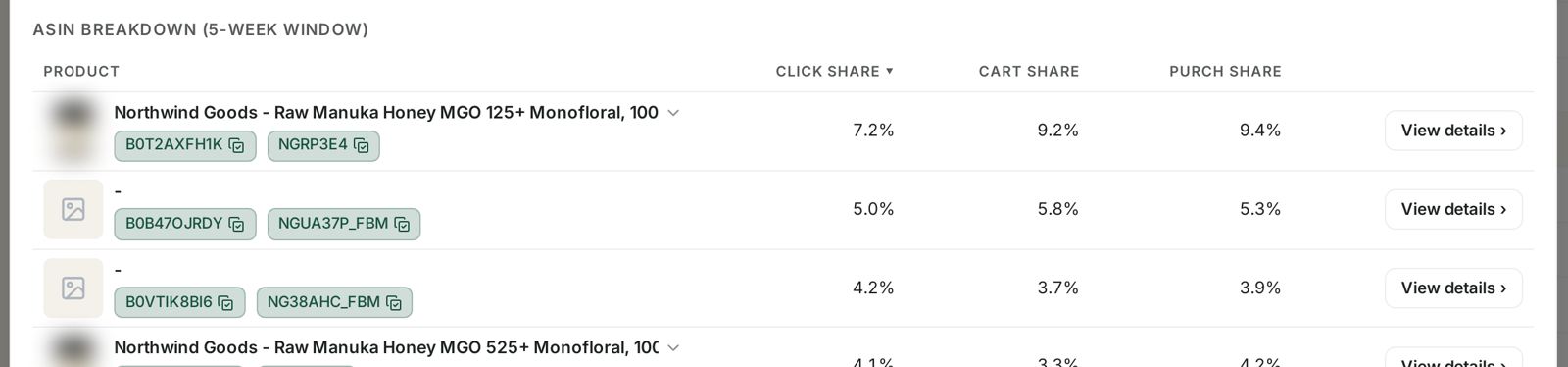
The same query, split by the products it landed on, with Click Share, Cart Share and Purchase Share per ASIN, and a View details link on each.
This answers a question the funnel cannot: is the query underperforming, or is it reaching the wrong product?
One ASIN dragging the average. If four products convert and one does not, the query is fine and the listing is not. Fix or exclude that ASIN rather than abandoning the term.
Click share high, purchase share low on the same ASIN. That product is attracting the query and failing it. A detail-page problem, narrowed to one page.
A product you did not expect. Sometimes a query is being served by a variant you never intended to advertise for it. That is a targeting fix, not a listing one.
What to do with each finding
Losing the click — the listing needs work before any bid change. Main image first; it does most of the work in a search result.
Losing the cart — the detail page. Compare your page against the sellers winning the query.
Losing the purchase — check price, delivery promise, stock and Buy Box status. See Catch a stockout before it costs you rank.
Winning everywhere but small share — this is the good problem. You convert better than the market and are not shown enough. Bid up, and check rank. See Organic vs Sponsored Rank.
What not to conclude
Share is not quality. A small brand will have small shares on every stage. Read the rates against market, not the shares.
SQP is weekly. The window is five weekly cohorts, not an arbitrary range. Compare week to week, not day to day. See SQP Is Weekly: Reading Week Cohorts Correctly.
Market includes everybody. The comparison is against all sellers on that query, including ones who are not your competitors in any meaningful sense.
A single week is thin on a low-volume query. The five-week window exists for a reason.
Related
- The SQP Dashboard: Market Share, Analysis and Recommended Actions — the screen this sits inside.
- Generic, Branded and Competitor Terms — the chips above the table.
- Recommended Actions: The Queries That Need a Decision — the same findings, pre-sorted by money.
- Work out which queries lose you the sale at the cart — the playbook version.