

Most teams read event numbers on the day, feel something, and move on. A week later the attribution has landed, the picture has changed, and nobody goes back to look.
The teardown is where an event stops being a spike on a chart and becomes something you can repeat deliberately.
Time: two hours, about a week after the event ends.
Prefer to watch? Eighty-four seconds on reading it a week late, and the four numbers to record.
Step 0 — Wait
Do not start this until attribution has settled. Sponsored Products credits sales up to 7 days after the click; the other formats up to 14. A teardown run on day two will systematically undervalue everything and overvalue nothing.
A week after the event is the earliest honest read. Ten days is better if you ran Sponsored Brands or DSP.
Step 1 — Did it actually grow the business?
Analytics → Category Insights.
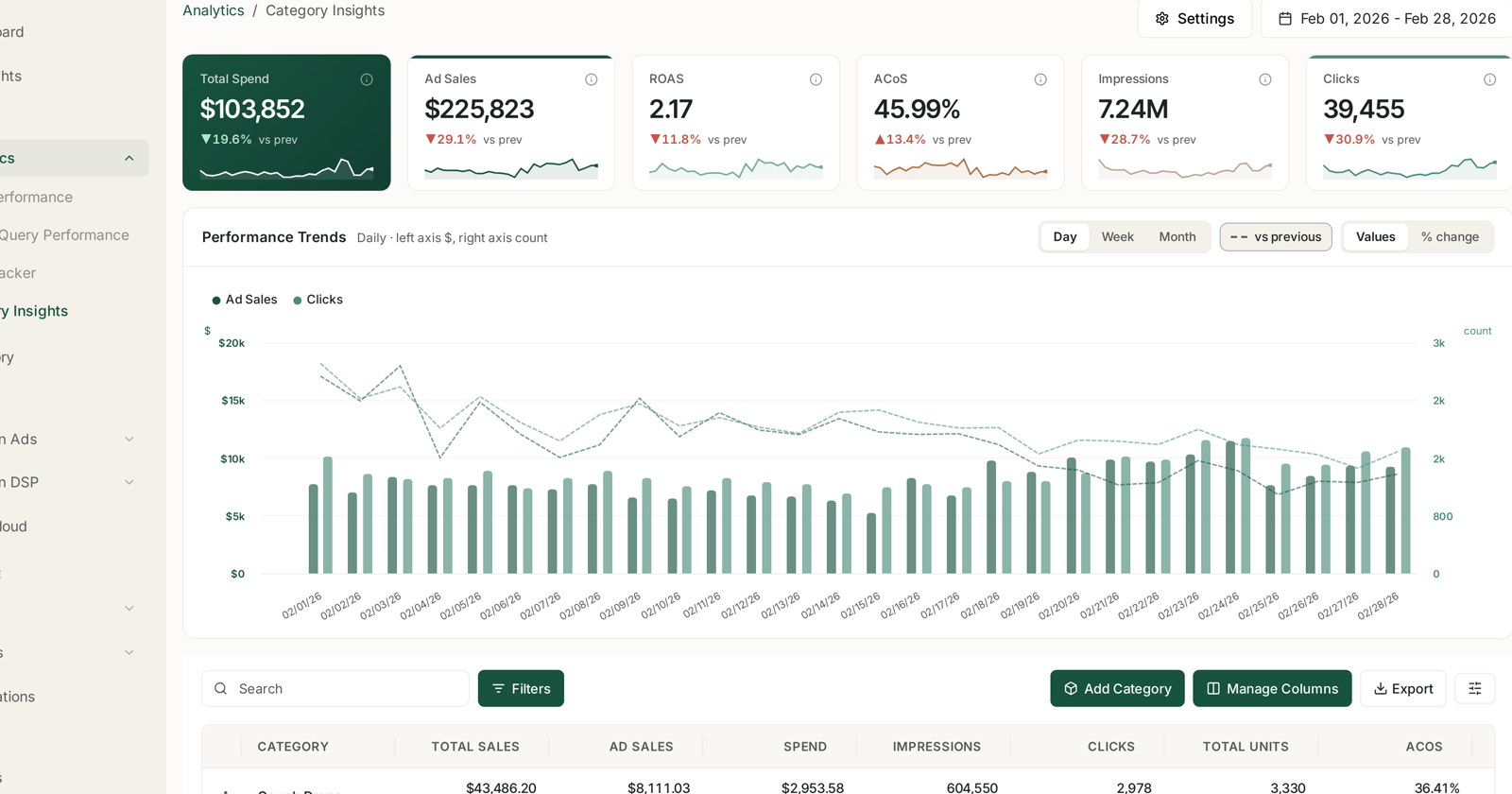
Start here rather than in the ad screens, because this is the only place with Total Sales beside Ad Sales. The question is not "did we sell more" — you did, that is what events do. It is how much of it was paid, and did the whole category grow?
| Pattern across the event window | Reading |
|---|---|
| Total sales up, ad sales up proportionally | ordinary event lift |
| Total sales up much more than ad sales | the event created organic demand — the best outcome |
| Ad sales up, total sales barely moved | you bought sales you would have had anyway |
| Total sales up, ad sales up far more | you paid a premium for the same demand |
The third row is the one worth catching, and it is invisible on any advertising screen.
Step 2 — Compare against the right baseline
Not against the week before — that is depressed by people waiting for the event. Not against the week after — that is depressed by demand already pulled forward.
Compare against the same event last year if you have it, and against a normal month otherwise. Write down the multiplier you actually achieved per category, because that is what you will plan the next event with.
Step 3 — Where did the money go, and did it work?
Amazon Ads → Campaigns, with vs previous and % change.
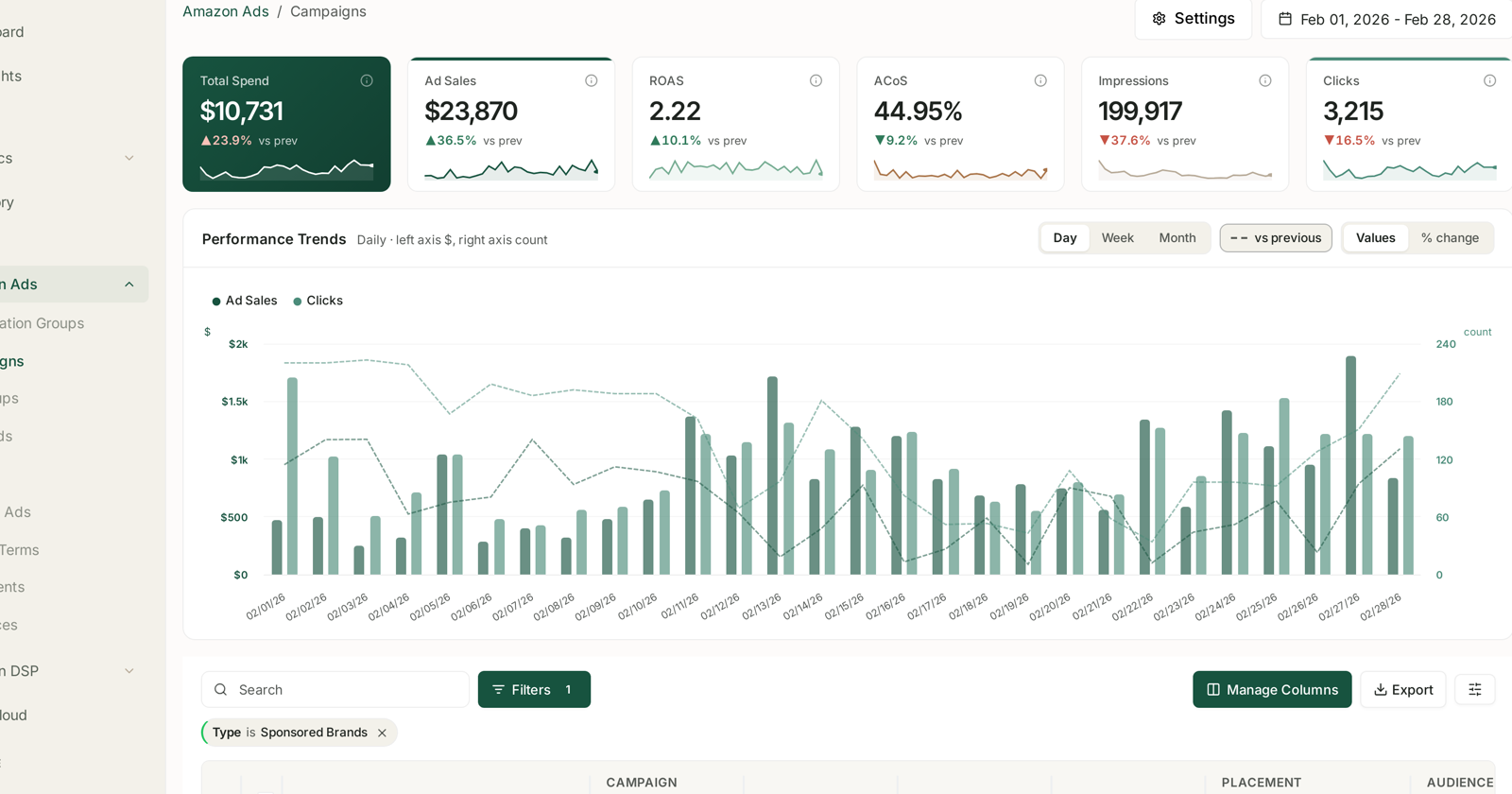
Sort by spend change and answer three questions per campaign:
Did it cap? A campaign that hit its budget is a campaign you underfunded, and you now know by how much. This is the single most actionable output of the teardown.
Did the extra spend convert? Compare its ACoS across the event against its normal ACoS. Events usually cost more per sale; the question is whether the premium was worth the volume.
Was it the right campaign? Concentration matters. If your spend increase was spread evenly across everything, you did not make a choice — you just scaled.
Step 4 — What did the traffic actually ask for?
Amazon Ads → Search Terms, aggregated, for the event window.
Events change the query mix, not just the volume. New terms appear, gift-shaped queries spike, and broad campaigns match things they never normally see.
New high-spend terms that converted — harvest them. They are proven, and they will come back next event. See Harvest Winning Search Terms into Exact-Match Campaigns.
New high-spend terms that did not — negative-match them before the next event, not after it.
This step is where a teardown pays for itself, because the query mix repeats far more reliably than the numbers do.
Step 5 — Did you acquire anybody?
AMC Cloud → NTB Customers, for the event month.
Events are one of the few moments when large numbers of people who have never bought from you are actively shopping. Whether you converted any of them is a different question from whether you sold a lot.
NTB users up sharply — the event did the job events are best at. Those customers are the return, and they arrive over the following months.
Sales up, NTB users flat — you discounted to your existing customers. Profitable perhaps, but it did not grow the base, and that changes how you value the discount next time.
Remember AMC reports monthly cohorts, so this is the event month as a whole rather than the event days. See Why AMC Data Is Monthly and Sometimes Empty.
Step 6 — The inventory post-mortem
Two failures, both expensive, and both only visible afterwards:
What sold out? Note how long it was unavailable and what its rank did afterwards. That is the real cost of under-ordering, and it is usually larger than the missed sales. Check BSR Tracker for the shape of the recovery.
What did not sell? Event stock that did not move is now carrying cost on a product with proven weak demand at a discount. Those ASINs belong in the next zero-sales review. See Find zero-sales ASINs and decide what to do with them.
Step 7 — Write down four numbers
The teardown is worthless unless next year's version of you can find it. Record, per category:
- The sales multiplier you achieved.
- The budget each key campaign needed to avoid capping.
- The ACoS premium the event cost.
- The NTB lift, if any.
Those four turn the next event from a guess into a plan.
Step 8 — Put the rules back
If you disabled or capped rules for the event, turn them back on — but only once the look-back window has cleared the event. A 14-day window still containing event days will produce large, wrong corrections.
Dry-run each one first and check the changed count looks normal. See Dry-Run Preview.
What not to do
Do not tear down on day two. Step 0 exists for a reason.
Do not compare against the adjacent weeks. Both are distorted, in opposite directions.
Do not treat the post-event slump as a problem. It is demand you already collected.
Do not skip step 7. An unwritten teardown is an afternoon spent learning something you will have forgotten by the next event.
Related
- Prepare for Prime Day: budget rules and inventory cover — the other half.
- Category Insights: Benchmarking Your Categories — step 1.
- NTB Customers: New vs Repeat, Counted as People — step 5.
- Why SP, SB and SD Numbers Don't Add Up — why step 0 matters.