

A rule group is a named set of campaigns. Rules point at groups, not at individual campaigns — which is what makes automation maintainable instead of a list of near-identical rules.
It is also your safety control, because a group's campaign count is the blast radius of every rule attached to it.
Prefer to watch? Sixty-eight seconds on blast radius, and grouping by intent.
The screen
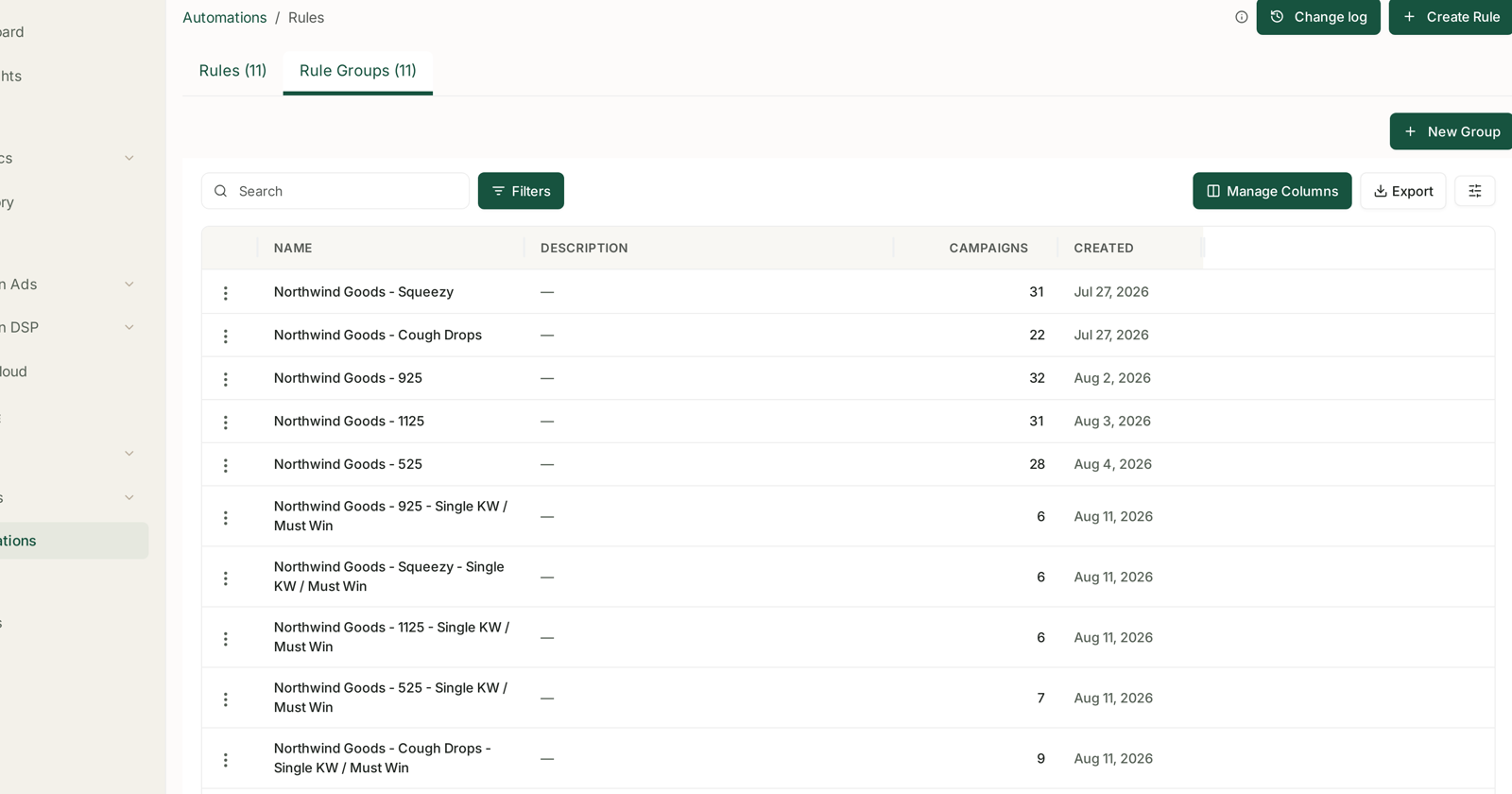
Automations → Rule Groups. One row per group:
| Column | |
|---|---|
| Name | what it covers |
| Description | why it exists — empty by default |
| Campaigns | how many are in it |
| Created | when |
+ New Group creates one. Each row has a menu.
Why groups instead of campaigns
One rule pointed at a group of 31 campaigns is one thing to maintain. Thirty-one rules is thirty-one things to keep in step, and they will drift.
Groups also mean a new campaign inherits your automation by being added to the right group, rather than by someone remembering to build it a rule.
Group by intent, not by convenience
This is the decision that determines whether your automation helps or quietly harms, and it is easy to get wrong because the wrong way looks tidier.
A rule enforces one definition of good across everything in its group. But campaigns do different jobs:
| Job | What good looks like |
|---|---|
| Defending a keyword you own | a higher ACoS is the price of holding ground |
| Launching | ACoS is expected to be poor — you are buying rank |
| Harvesting | the efficiency target genuinely applies |
Put all three in one group under a single target ACoS and the rule will strangle your launches and under-defend your best keywords — while the group average improves, which is what makes it hard to spot.
Group by what the campaigns are for. The naming in a well-run account shows this: separate groups for a product line, and separate ones again for its Single KW / Must Win campaigns, which are defended rather than optimised.
Sizing a group
Start small. A rule that behaves on 6 campaigns will behave on 31. A rule that misfires on 31 costs five times as much to notice and undo.
Check the count before attaching a rule. It is right there in the table, and it is the number that tells you how much of your account a mistake would reach.
Watch for a group that keeps growing. A group that started as “our hero product” and now holds 40 campaigns has probably stopped being one intent.
Use the description field
It is empty by default, and it is the only place to record why a group exists.
“Defended brand terms — higher ACoS is intentional. Do not attach efficiency rules.”
That sentence is worth more than it looks. Six months on, or when somebody inherits the account, the group name alone will not stop a well-meaning colleague attaching a target-ACoS rule to campaigns that are supposed to run hot.
One group, one rule — usually
Two rules that both adjust bids on the same group will fight, and the Change Log will show a bid moving up on Monday and down on Tuesday.
If you want both scaling and trimming, prefer a recipe that does both in one decision — Hit my Target ACOS for bids, or Defend margins for budgets — over two opposing rules. See Targeting Rules and Campaign Rules.
Running one targeting rule and one campaign rule on the same group is fine. They act on different things.
Checking it worked
After attaching a rule to a group, read the Change Log the next day and check the volume. A rule touching far more than the group's campaign count suggests is a sign the group is wider than you thought.
See The Change Log: Auditing What a Rule Changed and Guardrails to Set Before You Automate Anything.
Related
- The Automations Screen: Rules, Rule Groups and the Change Log — where groups are managed.
- Set a Target ACoS Across a Whole Portfolio — the playbook that uses them.