

Amazon access tokens expire. A connection that has worked for months will eventually stop, and when it does there is no error message — the screens simply stop gaining new data.
That is what makes this one worth knowing before it happens. The symptom looks like a bad week of trading.
Prefer to watch? Sixty-three seconds on spotting a stale connection before you blame trading.
The symptom
A stale connection presents as numbers that look wrong rather than missing:
- The last few days of every chart trend towards zero.
- A dashboard tile shows a dramatic drop against the previous period.
- One section is stale while the rest of the product is fine — because each source expires independently.
The instinct is to go looking for what went wrong with the business. Check the connection first. It takes ten seconds and rules out the boring explanation.
The check that answers it
Settings → Connections.
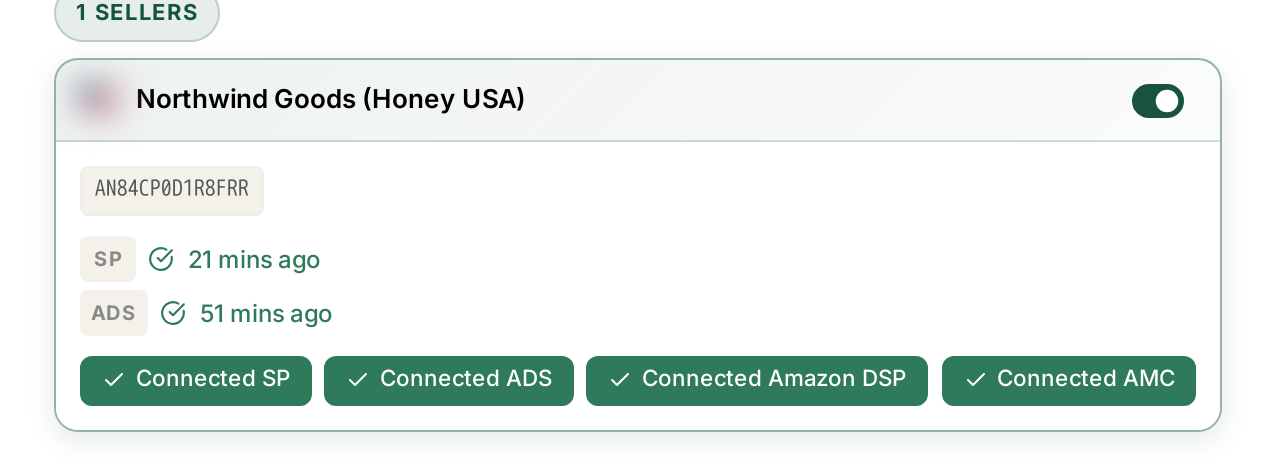
Every source carries a last-synced time. That timestamp is the whole diagnosis:
| What you see | What it means |
|---|---|
| Recent, and advancing day to day | working |
| Stopped several days ago | expired — reauthorise |
| Never | authorised but never completed a first sync |
| Recent, but the screen is still empty | not a connection problem — see My Dashboard Is Empty |
Note the date the timestamp stopped. It usually lines up exactly with the day your charts started falling — which confirms the diagnosis before you change anything.
Fixing it

Reauthorise the source that has gone stale. You sign in to Amazon, approve access, and land back in TrackIQ.
You need to be an admin on the Amazon account. If you are not, the failure happens at Amazon's end and the person holding that access has to complete the step.
Nothing is lost. Data resumes from where it stopped, and the gap backfills as Amazon delivers it. You do not have to reconnect anything else, and you do not lose history.
Fix only the stale source. Seller, Advertising, DSP and AMC are four separate connections. Reauthorising all four when one expired just costs you time.
Why it expires at all
Amazon issues time-limited access rather than a permanent key, and revokes it early in a few situations:
- Time. Tokens have a finite life by design.
- A password change on the Amazon account.
- A permissions change — the user who authorised TrackIQ losing admin, or being removed.
- Explicit revocation in Seller Central or the Advertising console.
Three of those four are things somebody on your team did deliberately. If a connection dies the same week someone left the company or rotated a password, that is your answer.
Catching it before it costs you
Two habits, neither of which takes long.
Glance at Connections when a number surprises you. Make it the first check rather than the last. A stale connection and a genuinely bad week look identical on a chart, and only one of them is worth a meeting.
Be careful about acting on the tail of a range. Even a healthy connection lags — the last day or two of any period is still filling in. A drop that only exists in the most recent few days is more often reporting than reality. See Why Do My Numbers Not Match Seller Central?
The one that is not a connection problem
If the last-synced time is current and the screen is still empty, stop looking at Connections. Check these instead:
- The brand selector in the top bar — every screen is scoped to one brand.
- The date range — a range before you connected has nothing in it.
- The publishing cadence — Search Query Performance arrives weekly and AMC monthly. A blank AMC dashboard is normal until the next delivery, no matter how healthy the connection is.
See My Dashboard Is Empty for the full checklist.
Related
- Managing Your Connected Accounts — the four grants, separately.
- Turning Brand Sync On and Off — the other reason data stops.