

You can upgrade or downgrade at any time.
There is no annual lock, no penalty for going down, and nothing you have built is lost by moving. The only thing a plan change alters is which features you can reach and how many people can log in.
Prefer to watch? Sixty-six seconds on what moves, what does not, and the cheap way to test a tier.
What carries over
Your data. Connections, rank projects, saved rules, Studios and reports belong to the account, not the plan.
Your history. Nothing is reset by a plan change. The reporting you had yesterday is the reporting you have today.
Your AI usage. There is no usage allowance to strand, because TrackIQ does not cap AI usage on any plan — see Are There Token Limits or Usage Caps? So there is no reason to time a plan change around it.
What changes
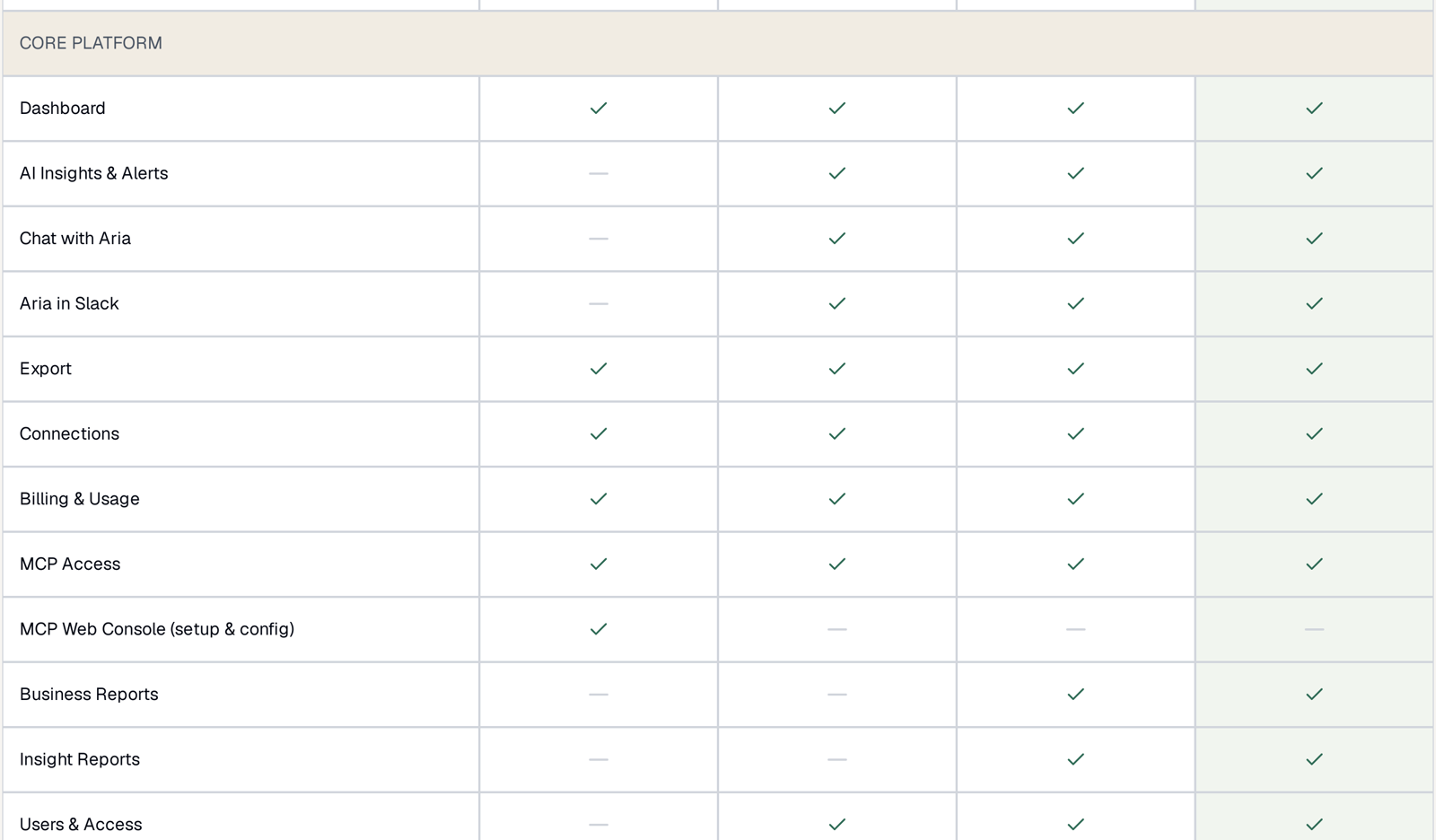
Only feature access and seat count. Compare the two plans row by row before you move — see What's Included in Each Plan.
| Moving | You gain | Watch out for |
|---|---|---|
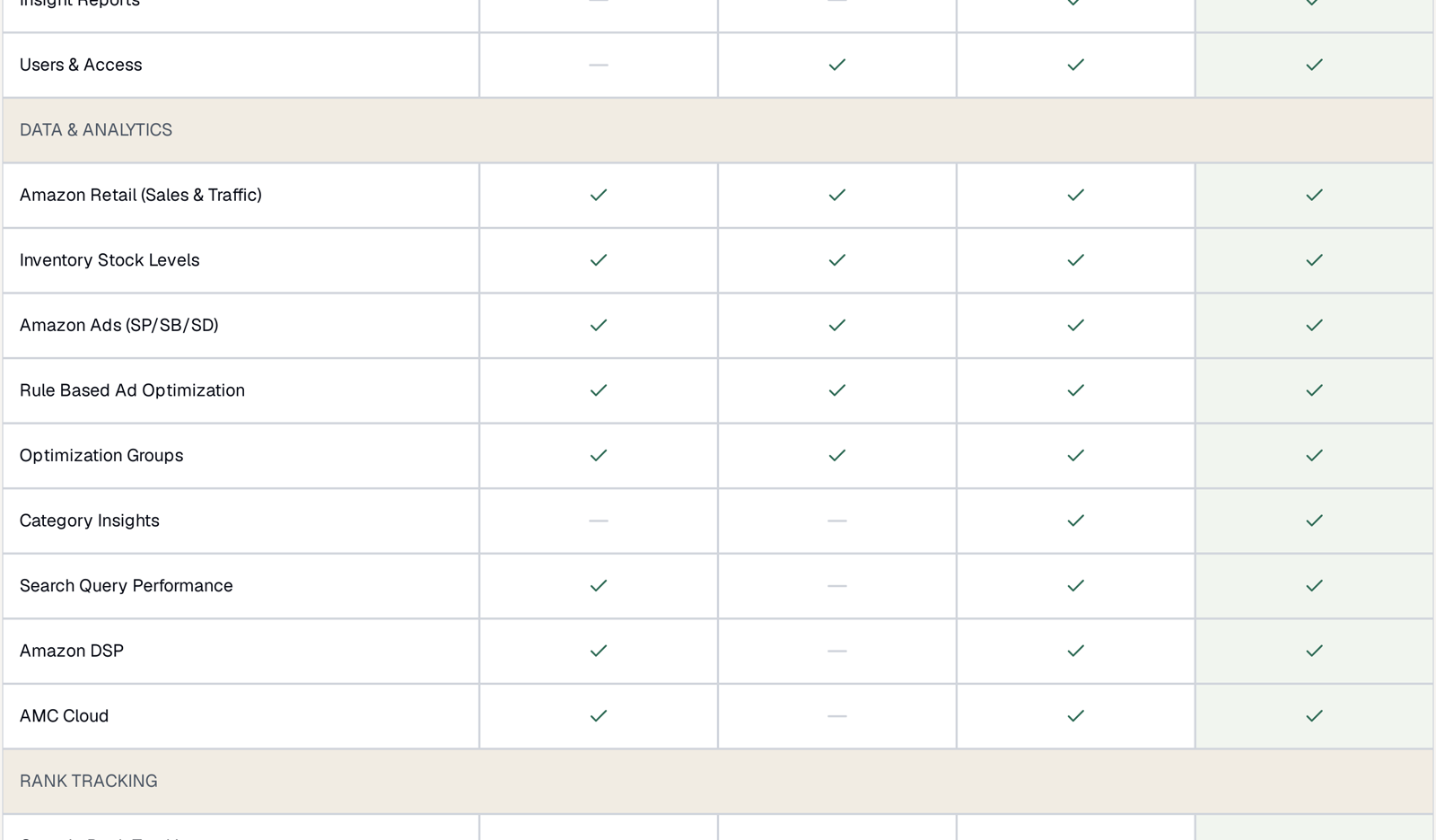
| Starter → PRO | SQP, DSP, AMC Cloud, Category Insights, Business & Insight Reports, 10 seats | nothing — this is the big step up |
| PRO → PRO+ | Role-based AI Agents, Priority Support, 20 seats | a step for team size more than capability |
| PRO → Starter | — | you lose SQP, DSP, AMC and Category Insights |
| Anything → MCP Only | full data through MCP | you lose Aria, alerts, reports and user management |
Before you downgrade, check two things
Seats. Starter is 5 users, PRO is 10, PRO+ is 20. If you have more people than the lower plan allows, sort that out first rather than discovering it mid-change.
What you would lose access to. The screens do not grey out — sections you no longer have are removed from the sidebar entirely. A colleague reporting that a menu item “disappeared” after a downgrade is describing exactly the expected behaviour. See I Cannot See a Menu Item Other People Can.
Anything you built inside a feature you drop is not deleted. It becomes unreachable until you go back up.
The move worth making deliberately
Starter → PRO is the one step that changes what you can know rather than how much of it you can do. Search Query Performance, Amazon DSP and AMC Cloud are all on the PRO side of that line.
Those three are also the hardest to evaluate from a feature list, because their value depends entirely on what your own data looks like in them. If you are weighing it up, the fastest way to decide is to go up, look at your own numbers for a week, and come back down if it did not tell you anything. That test costs you a few days, not a year — which is the whole point of being able to change freely.
Multiple brands
Starter, PRO and PRO+ are priced per brand. MCP Only is not.
So a plan change on an account with several brands multiplies. Work out the per-brand cost across your whole portfolio before committing, and remember the revenue component sits on top — see How Revenue-Based Pricing Works.
It is also worth asking whether every brand needs the same plan. A small brand that only needs reporting and a flagship that needs AMC are not obviously the same purchase.
After a change
Reload the page. The sidebar is built when the app loads, so features you have just gained will not appear until you refresh.
Re-check your rules. Automation is on every plan, so rules keep running — but a rule that referenced something only available on the higher plan is worth a look after a downgrade.
Look at Billing & Usage once the new cycle starts, so you can see the change reflected rather than assuming it.
Related
- TrackIQ Plans Explained — which plan does what, and how to choose.
- What's Included in Each Plan — the row-by-row grid.
- Are There Token Limits or Usage Caps? — no, and why that is a pricing decision rather than an oversight.
- Cancelling: What Happens to Your Data — if you are leaving rather than moving.