

The quick-start recipes cover the common cases. When none of them fits — because your margin maths is unusual, or you want several behaviours in one rule — you build the logic yourself.
The builder is a branch list, not a single condition. Understanding that one fact is most of understanding the screen.
Prefer to watch? Eighty-six seconds on branches, order, and where thresholds go wrong.
Start blank
+ Create Rule opens the chooser. Pick Targeting or Campaign, then scroll past the recipes to Start blank.
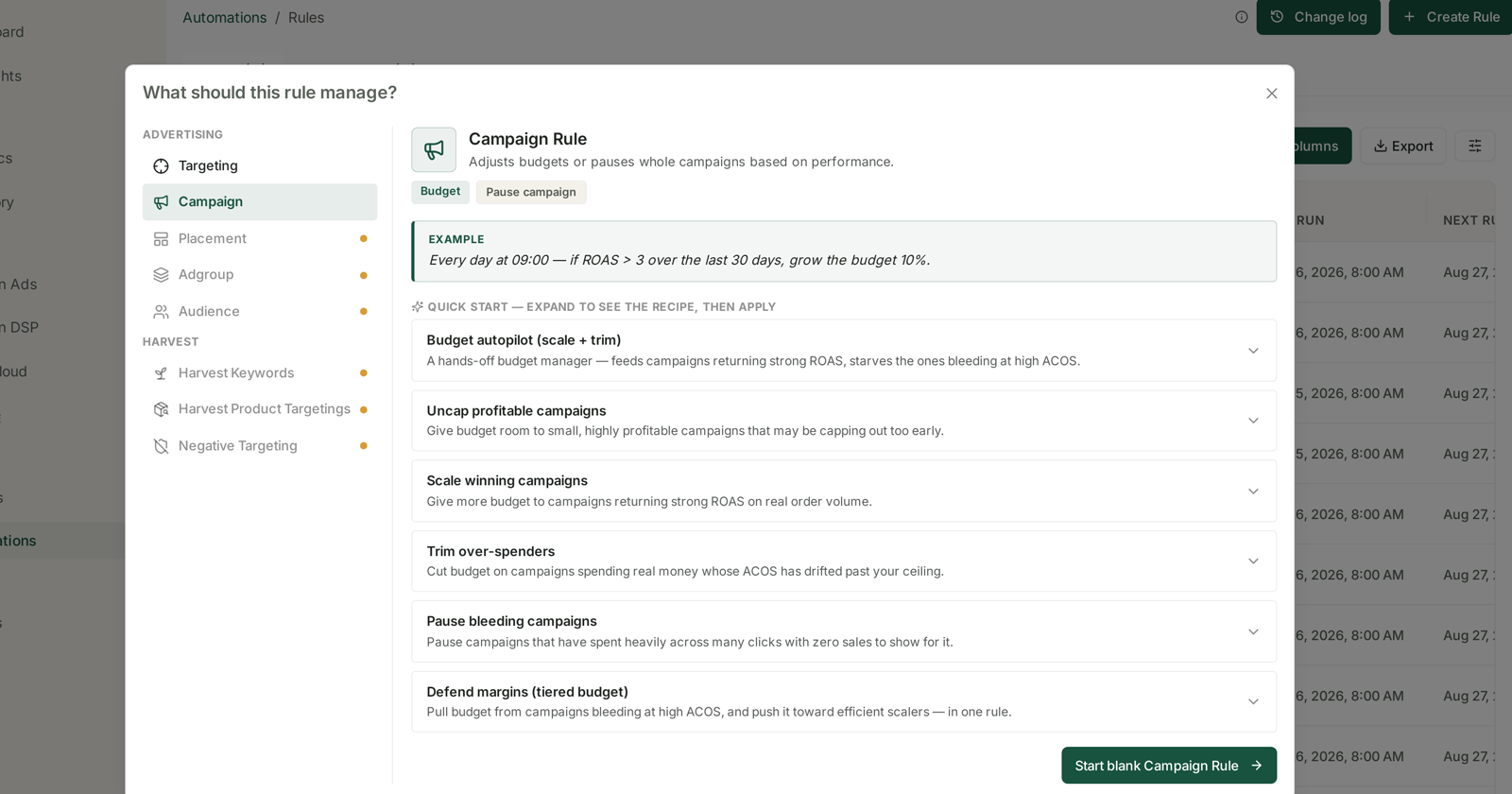
The two live rule types differ in what they act on:
| Targeting Rule | Campaign Rule | |
|---|---|---|
| Acts on | keywords & product targets | whole campaigns |
| Can do | Bid · Pause targeting | Budget · Pause campaign |
| Example given | if ACOS > 40% and clicks ≥ 10, lower the bid 15% | if ROAS > 3 over the last 30 days, grow the budget 10% |
Everything below applies to both.
A rule is a list of branches, walked in order
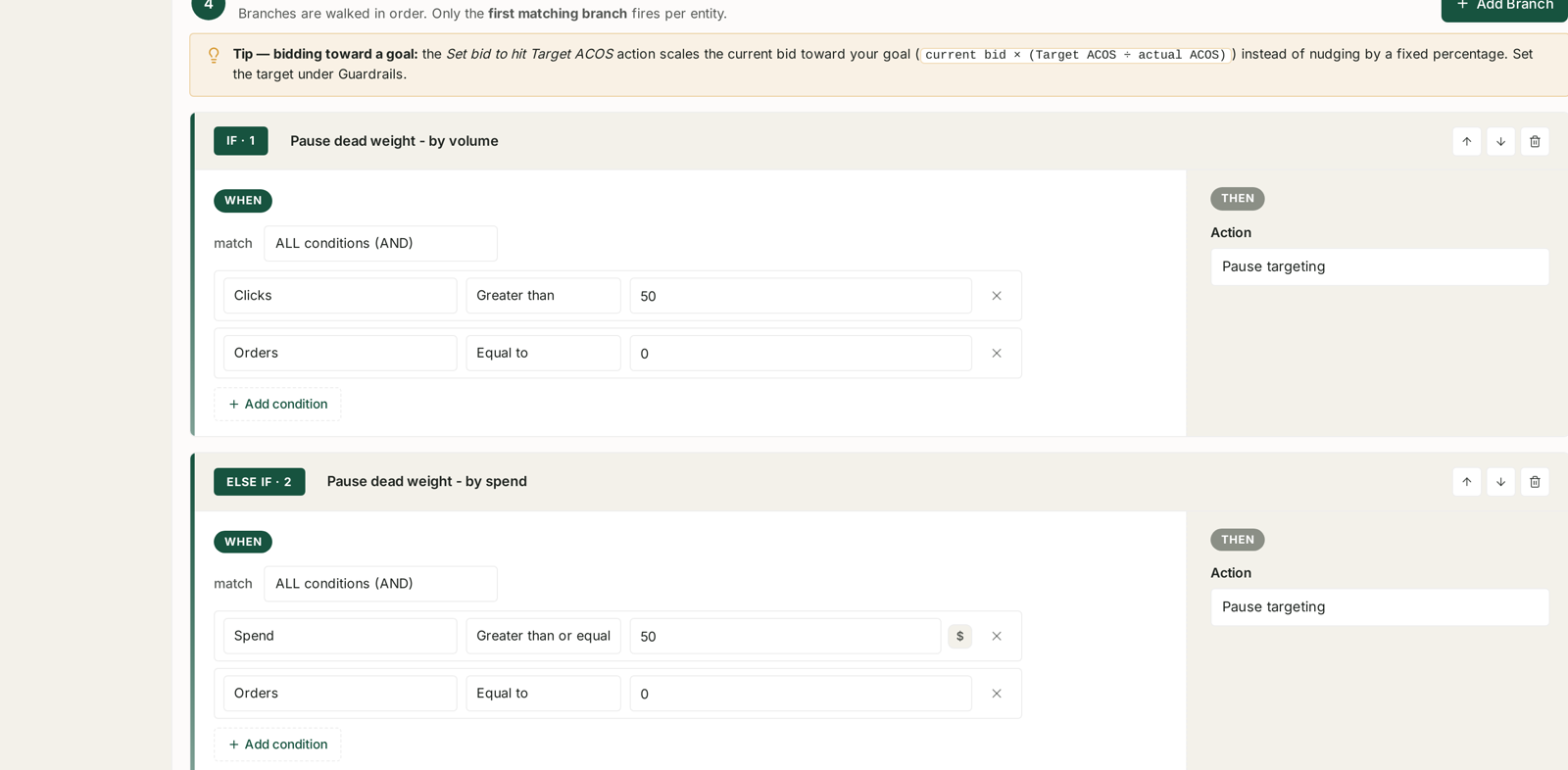
Section 4 of the form says it plainly:
Branches are walked in order. Only the first matching branch fires per entity.
This is the single most important behaviour in the builder. Each keyword, target or campaign is tested against IF · 1 first. If it matches, that branch's action fires and the entity is done — no later branch is evaluated for it.
So branch order is not cosmetic. It is the logic.
Put the most specific branch first. A branch that pauses dead targets must sit above a branch that raises bids on low-click targets, or the bid-raise will catch them first and you will spend more on things that never convert.
Put the catch-all last. The general "nudge everything toward target" branch belongs at the bottom, where it picks up whatever the specific branches did not claim.
The ↑ ↓ controls on each branch header reorder them, and the effect on outcomes is immediate.
Building a condition
Each branch has a WHEN side and a THEN side.
On the WHEN side, choose how conditions combine:
- ALL conditions (AND) — every condition must be true. Use this for the specific branches.
- ANY condition (OR) — one is enough. Use this when several different symptoms deserve the same treatment.
Then add conditions, each a metric · operator · value triple:
Clicks · Greater than · 50 Orders · Equal to · 0
Together, with AND, that is the classic definition of dead weight: enough traffic to have proved itself, and nothing to show for it.
Operators include Greater than, Greater than or equal, Less than, Less than or equal and Equal to. Money metrics show a $ marker so you know the unit you are typing in.
Choosing thresholds
This is where rules go wrong, and the failure is almost always the same one: a threshold low enough to fire on noise.
Require enough evidence before acting. A target with 4 clicks and no orders has not failed — it has barely been tested. Conversion rates in the low single digits mean 25–50 clicks is the honest floor for concluding "this does not convert". That is why the built-in recipe uses clicks ≥ 25 rather than 5.
Prefer spend to clicks when click values differ wildly. Spend ≥ $50 and Orders = 0 is more consistent across a mixed catalog than a click count, because a $0.20 click and a $5.00 click are not the same evidence.
Set the threshold where you would act by hand. If you would not personally pause a target at 25 clicks and no orders, do not let the rule do it either. The rule is not braver than you are; it is only faster.
Write down the reason. Use the Description field. "25 clicks is roughly 3× our typical order rate" is what stops a future you from halving it on a hunch.
Choosing the action
The THEN side offers a percentage nudge, a pause, or a goal-seeking bid.
Increase / decrease bid by % moves the bid a fixed step. Predictable, and slow by design.
Set bid to hit Target ACOS is different, and better for anything mature:
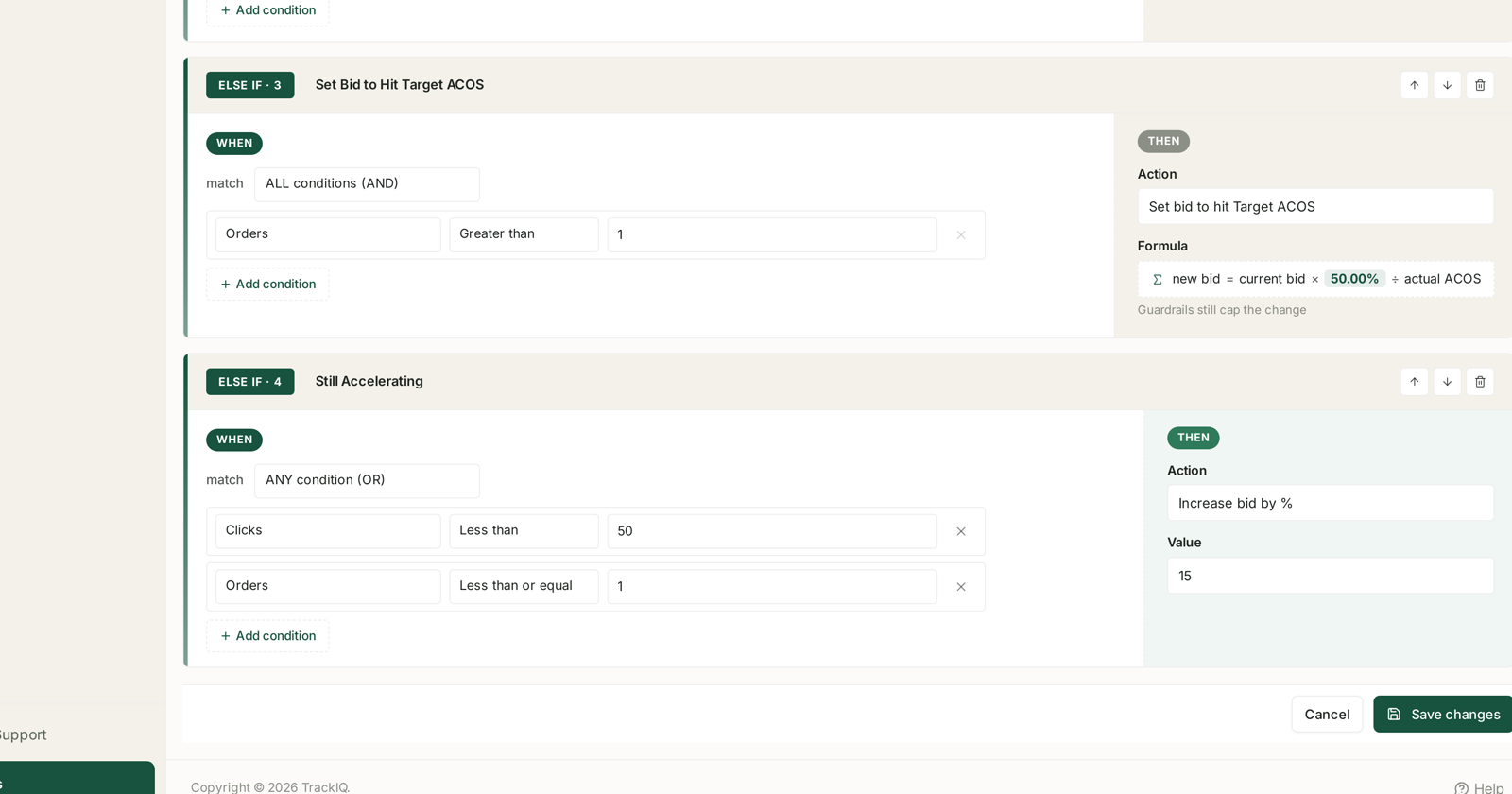
new bid = current bid × (Target ACOS ÷ actual ACOS)
It scales the bid toward the goal in one move rather than nudging by a fixed percentage — so a target at 100% ACoS against a 50% goal halves, while one at 55% barely moves. The size of the correction matches the size of the problem.
The Target ACOS itself is set once, under Guardrails, and every branch that uses this action reads it. Guardrails still cap the change, so the formula can never move a bid further than your max-change-per-run allows.
A worked shape
A four-branch rule that covers most of a mature account:
| # | When | Then |
|---|---|---|
| IF 1 | Clicks > 50 and Orders = 0 | Pause targeting |
| ELSE IF 2 | Spend ≥ $50 and Orders = 0 | Pause targeting |
| ELSE IF 3 | Orders > 1 | Set bid to hit Target ACOS |
| ELSE IF 4 | Clicks < 50 or Orders ≤ 1 | Increase bid by 15% |
Read it as a decision list. Kill what has proved it does not work, on two different measures of "proved". Steer what has proved it does. Give everything else a little more room, because it has not been tested yet.
Branch 4 sits last deliberately — it is the widest condition in the rule, and anywhere higher it would swallow the entities the branches above it are meant to catch.
Before you save
Read the plain-English summary at the top of the form. It renders your whole rule as a sentence, and reading it aloud catches inverted operators faster than re-reading the fields.
Run a dry run. The rule's ⋮ menu offers Dry-run preview, which computes every change and applies none of them. See Dry-Run Preview: Seeing What a Rule Would Change.
Related
- Look-back Windows and Adjustment Frequency — the two settings that decide how much evidence each run sees.
- Guardrails to Set Before You Automate Anything — the caps that bound every branch.
- Dry-Run Preview — check the logic before it touches anything.
- Targeting Rules: Adjusting Bids and Pausing Targets — the recipes this replaces.