

There is no alert setup screen in TrackIQ, and that is deliberate.
Monitoring runs against every product and every campaign from the moment your data lands. You do not choose which products to watch, and you do not fill in thresholds — because the alerts that catch you out are always the ones on the product you never thought to put on a watchlist.
Prefer to watch? Fifty-three seconds on why there is nothing to configure — and what to configure instead.
What this means in practice
| You do not have to | Because |
|---|---|
| pick which ASINs to monitor | all of them are |
| define thresholds | the rules ship with sensible ones |
| remember to check | alerts come to you, on the dashboard and in the Alerts screen |
The trade-off is that you cannot tune a threshold to your own tolerance. If a rule fires more often than you want to act on it, the answer is to work by severity rather than to try to silence it.
Where they appear
Alerts in the sidebar is the full list. Your dashboard also surfaces the urgent ones, so an alert reaches you without a special trip.

Those counters at the top are your triage order, and they mean specific things:
- Critical — money is moving right now. Stock about to run out, spend running away, a campaign that stopped delivering.
- Warning — something is drifting. Worth a look this week.
- Informational — context. Read it when you have time.
Work critical first, then warning, and treat informational as reading. A list of fifty-eight alerts is unmanageable; twenty-seven criticals sorted by category is a morning's work.
The category split tells you where to look
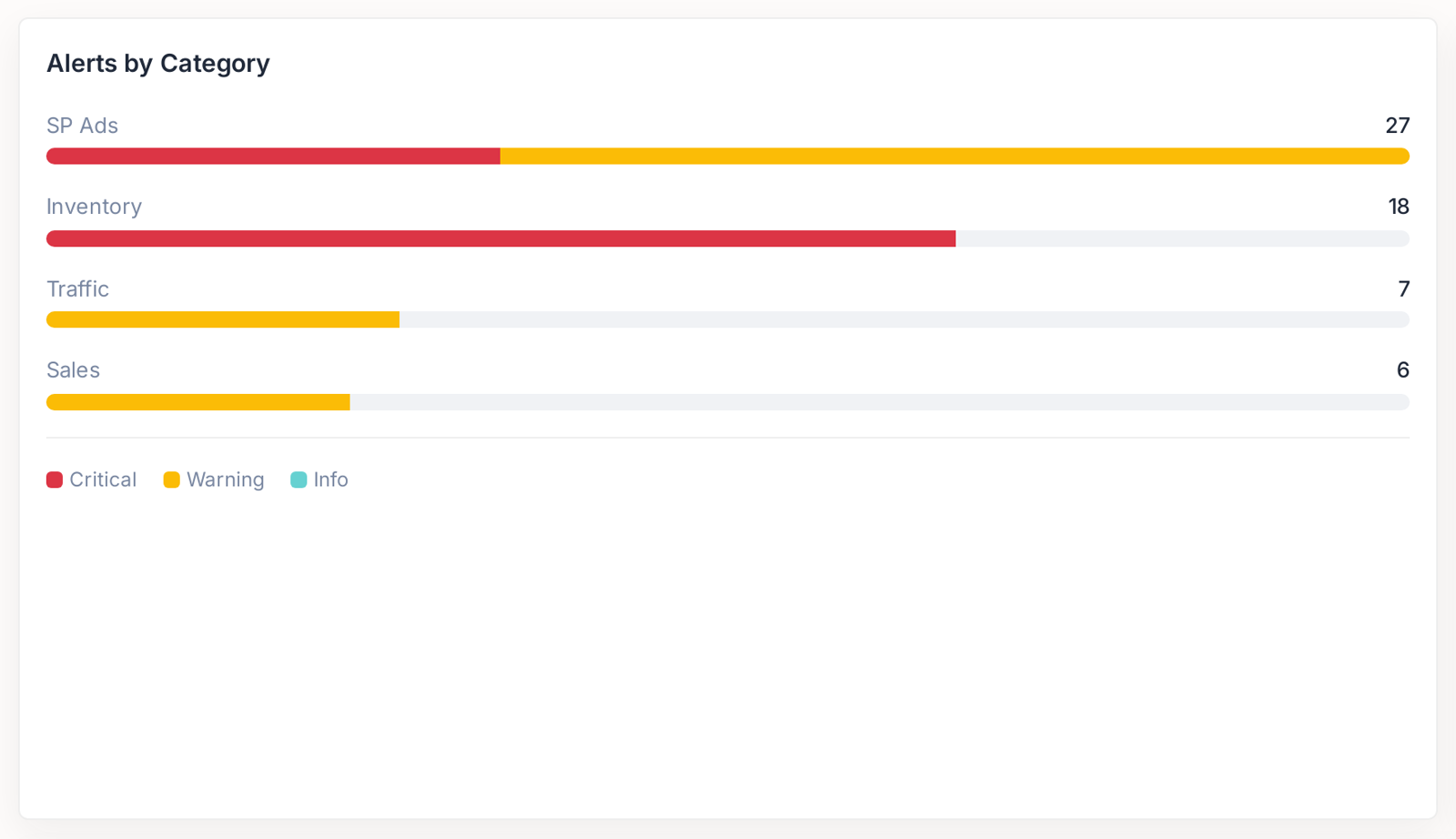
Alerts group into SP Ads, Inventory, Traffic and Sales, and the split is itself a diagnosis. Thirty alerts concentrated in Inventory is a supply problem, not an advertising problem — and it tells you which conversation to have today.
Every alert names the rule that fired it
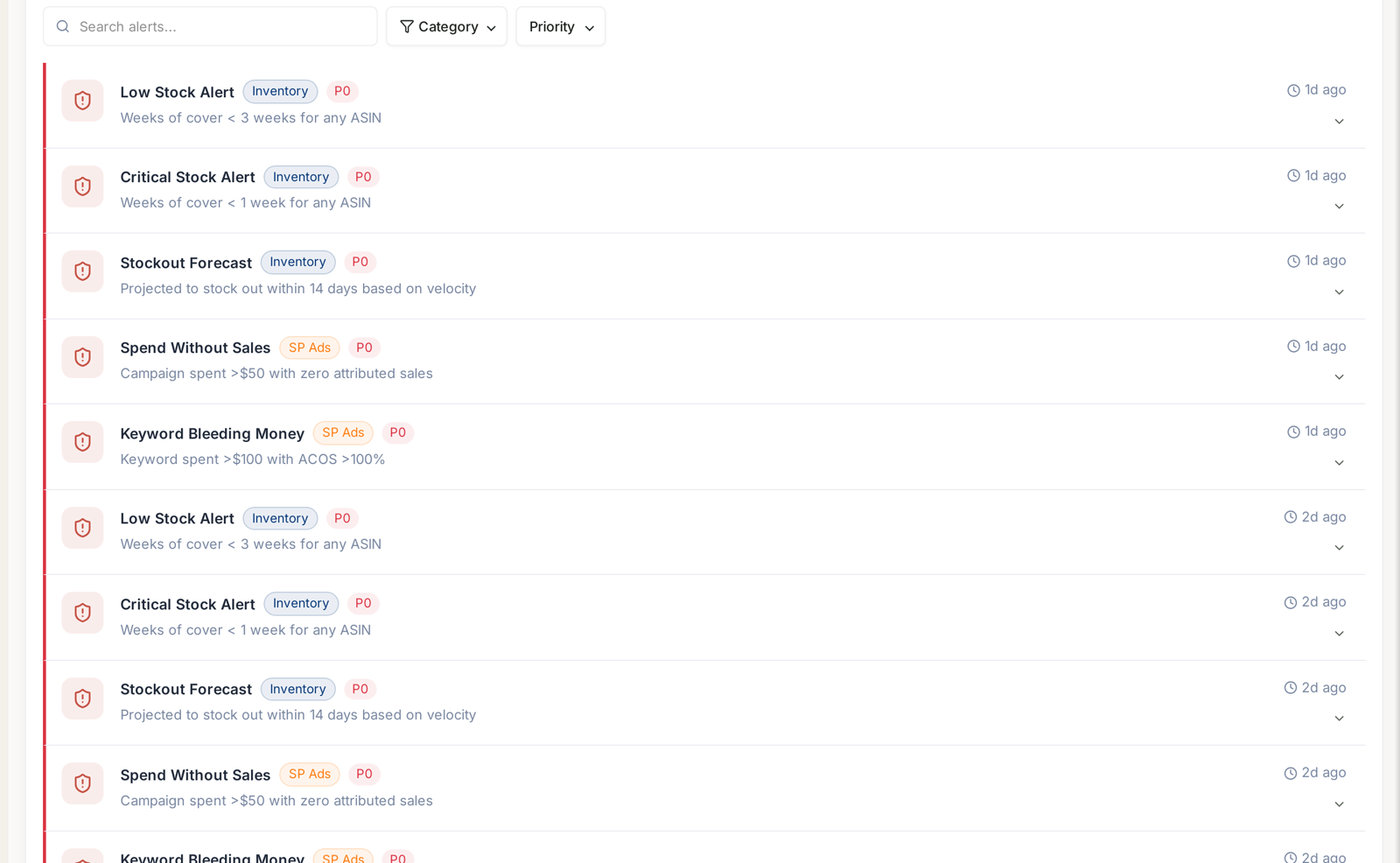
This is the part that makes alerts usable rather than merely noisy. Each one carries the named trigger rule and the threshold it crossed, so you are never guessing why it appeared or whether it matters.
That means an alert can be acted on by someone who did not set it up and does not know the account — which is exactly what you want when you are handing work to a team.
For the full list of rules and what each one watches, see Alert Categories, Priorities and What Actually Triggers Them.
The setup worth doing is on the other side
Alerts tell you what happened. They do not do anything about it. That is a separate part of the product, and it is where configuration actually lives.
Automations → Rule-Based Optimization is where you decide what happens automatically:
| Alert says | A rule can |
|---|---|
| this product will stock out in nine days | pause its advertising before you pay for unsellable clicks |
| this campaign's ACoS is above target | scale its bids down toward the target |
| this keyword spends with no conversions | pause it |
That is the difference between being informed and being covered. The stockout rule in particular usually pays for itself the first time it fires, because it saves money on a day you are already losing sales.
See Rule-Based Optimization: Automating Bids and Budgets.
Getting alerts where your team already is
Connect Aria in Slack and you can ask about the current state from a channel — is anything about to stock out? — without anyone opening the app.
See Chatting With Aria in Slack.
A practical routine
- Open Alerts once a day. Sort by severity.
- Clear criticals. These are the ones with money attached.
- Scan the category counts for a concentration — that is usually the real story.
- When the same alert keeps returning, stop handling it manually and write a rule.
That last step is the one people skip, and it is the one that gives you the time back.
Related
- Alert History and Priority — reading what already fired.
- Get Your Daily Number in Slack Without Opening TrackIQ — getting them where you work.
- Monitoring Inventory Against Sales — the checks worth alerting on.