

A stock level on its own tells you very little. Four hundred units is comfortable for one product and a crisis for another. The Inventory screen converts stock into time, and time is something you can act on.
Prefer to watch? A minute on days of cover and why stockouts cost rank.
The two rows of figures
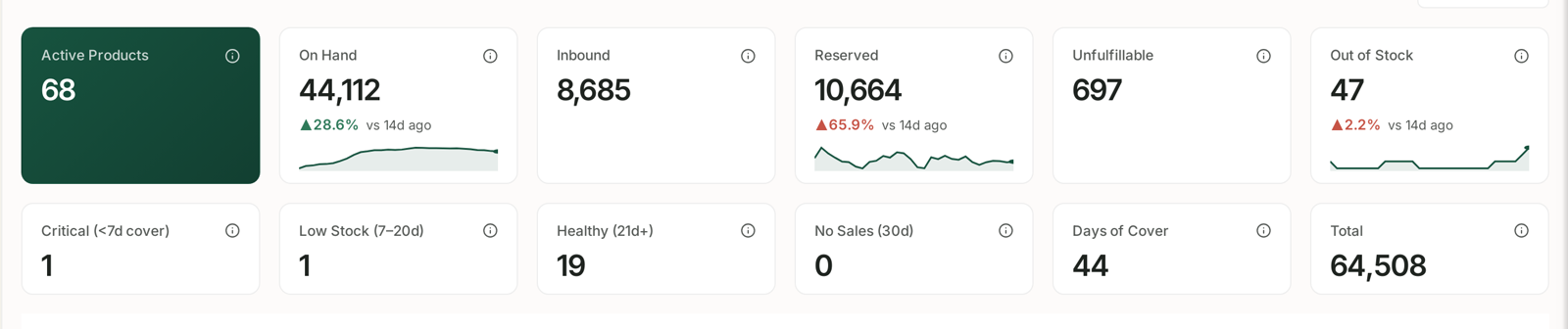
The top row counts units:
| Tile | What it counts |
|---|---|
| Active Products | listings currently sellable |
| On Hand | units in fulfilment centres now |
| Inbound | units on their way to Amazon |
| Reserved | units allocated to orders or transfers |
| Unfulfillable | units Amazon cannot sell |
| Out of Stock | listings with nothing available |
The second row bands your catalogue by urgency, and this is the row to read first:
| Band | Meaning |
|---|---|
| Critical | under 7 days of cover |
| Low Stock | 7–20 days of cover |
| Healthy | 21 days or more |
| No Sales (30d) | not moving at all |
Plus overall Days of Cover and Total units.
Those thresholds are worth memorising. Critical means you have about a week — usually less than the lead time to get more stock in, which is exactly why it is flagged.
Unfulfillable is the quietest problem here. Those units are sitting in Amazon's warehouses, counted in your total, and cannot be sold. A number that keeps climbing is worth investigating.
No Sales (30d) is the opposite problem: stock you are paying to store that nobody wants.
The product table
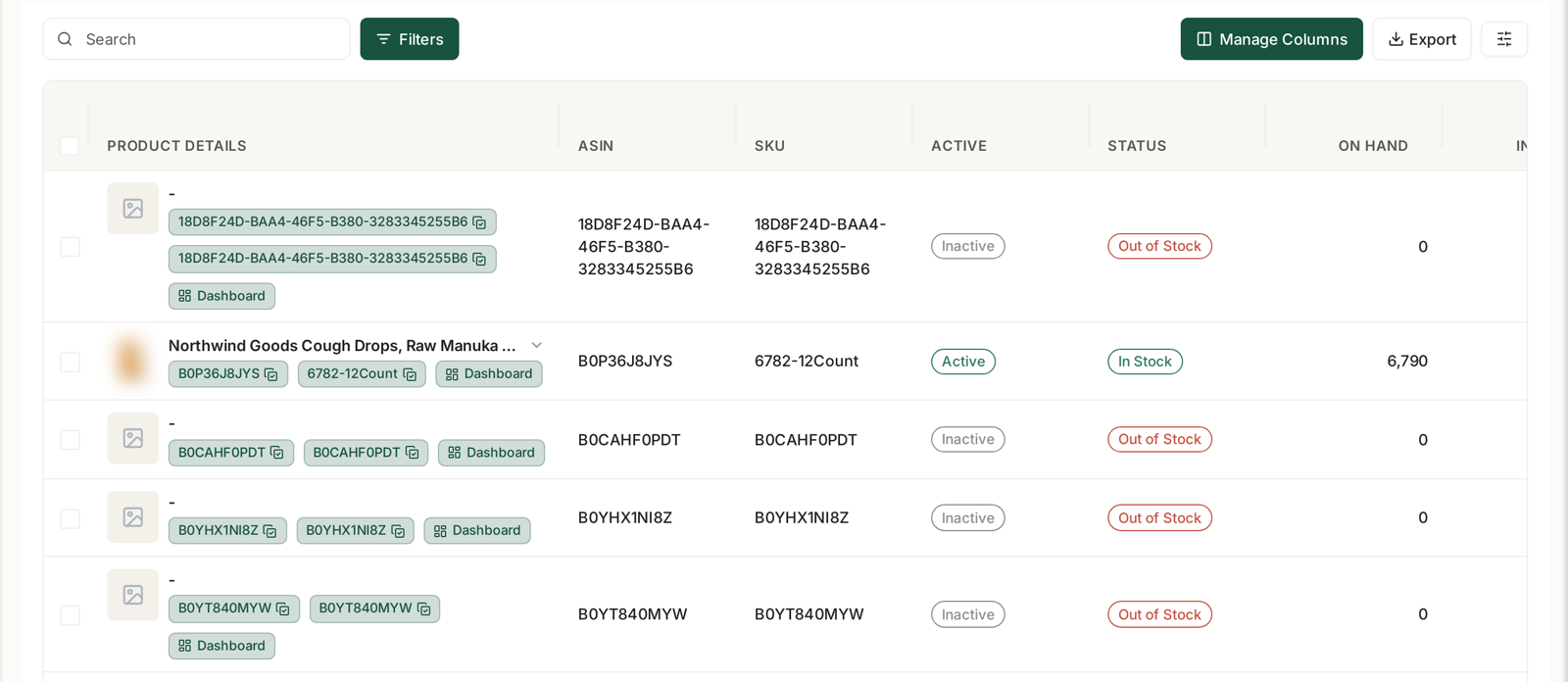
Every product with its ASIN, SKU, whether the listing is Active, its Status — In Stock or Out of Stock — and units On Hand.
Sort by days of cover and you have your restocking order, most urgent first. That single sort is the main job of this screen.
Use Filters to narrow to a status, and Manage Columns to bring in velocity and cover if they are not showing.
Why this screen deserves a daily glance
Every other problem in TrackIQ costs money. This one costs rank.
When a product goes out of stock, Amazon stops showing it. When it comes back, it does not return to where it was — the sales history that earned that position has a hole in it, and competitors have taken the traffic. You lose the orders you would have taken and you pay to climb back.
That asymmetry is why inventory alerts outrank advertising alerts even when there are fewer of them. Money you can win back. Rank you have to earn again.
A routine that prevents most of it
- Check the Critical count each morning. Anything in it needs a decision today.
- Check Low Stock weekly. That is your reorder list, with time to act.
- Check Unfulfillable and No Sales monthly. Both are money sitting still.
To have this reach you rather than you going to look, Smart Alerts fire on low stock, critical stock and stockout forecast — see Alert Categories, Priorities and What Actually Triggers Them. You can also have a rule pause advertising on a product about to run out, so you stop paying for clicks you cannot fulfil.
Related
- Inventory Forecasting: Reordering Before You Have To — reordering before you have to.
- Catch a Stockout Before It Costs You Rank — the playbook.
- Monitoring Inventory Against Sales — what to look for, and what to do about it.
- Inventory Forecasting and Purchase Orders — planning so the screen stays green.