

A rule that reads well can still be wrong. An operator inverted, a branch in the wrong order, a threshold an order of magnitude out — none of these look like mistakes on the form, and all of them look obvious the moment you see what the rule would actually do.
Dry-run preview runs the rule for real against live data, computes every change, and writes none of them.
Prefer to watch? Eighty-three seconds on running a rule for real and applying none of it.
Running one
Open the ⋮ menu on any rule and choose Dry-run preview. It takes a few seconds and opens the result directly.
There is nothing to undo and nothing to clean up. A dry run touches Amazon not at all — it is safe on a live rule managing a live account, at any time of day.
Reading the result
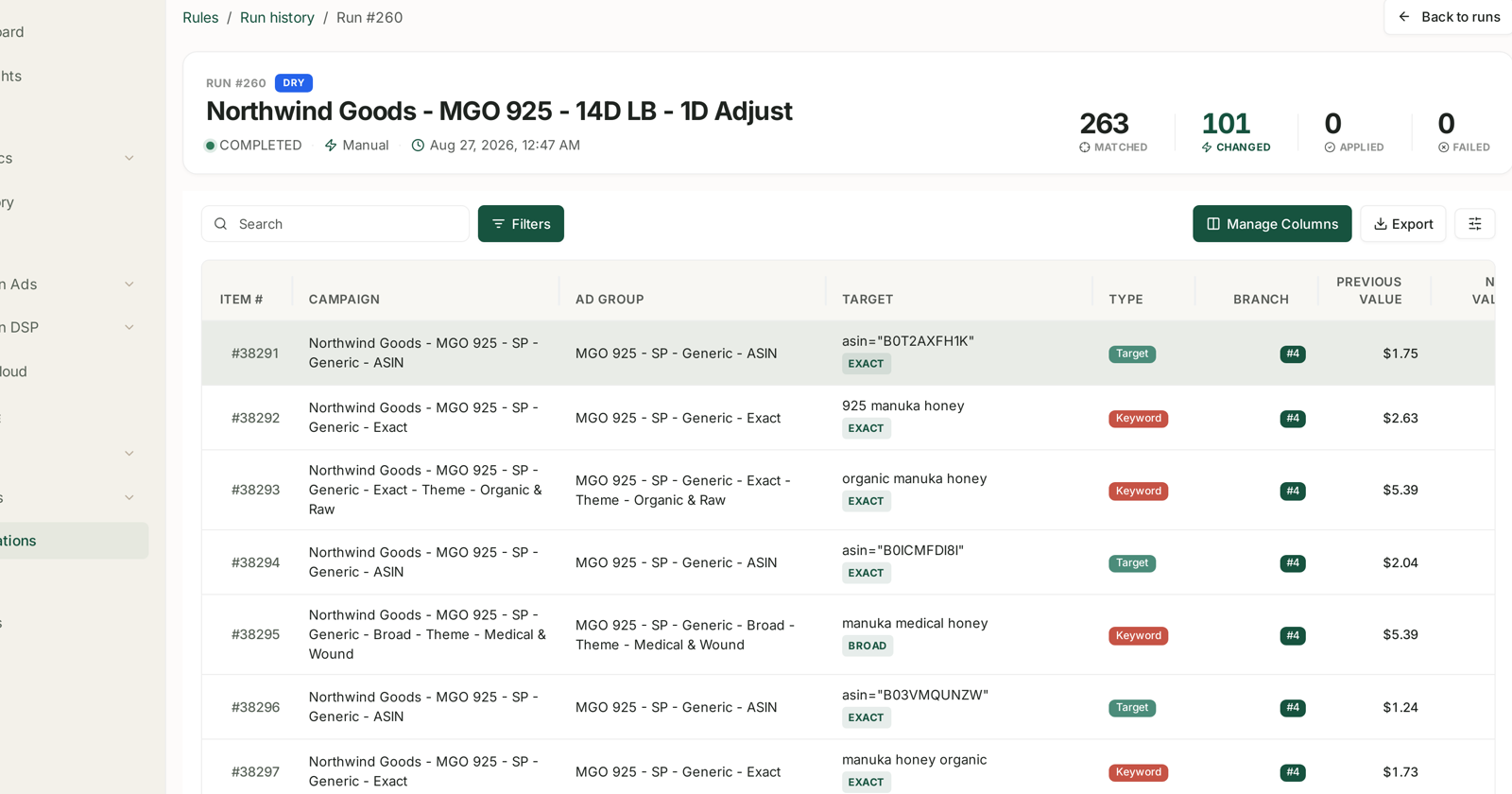
The header carries the DRY badge and four counters:
| Counter | Meaning |
|---|---|
| Matched | entities in scope the rule evaluated |
| Changed | entities a branch decided to act on |
| Applied | zero, always — this is what makes it a dry run |
| Failed | entities the rule could not process |
263 matched, 101 changed, 0 applied reads as: the rule looked at 263 keywords and targets, decided to act on 101 of them, and did nothing. Those 101 rows are the preview.
The row detail is the point
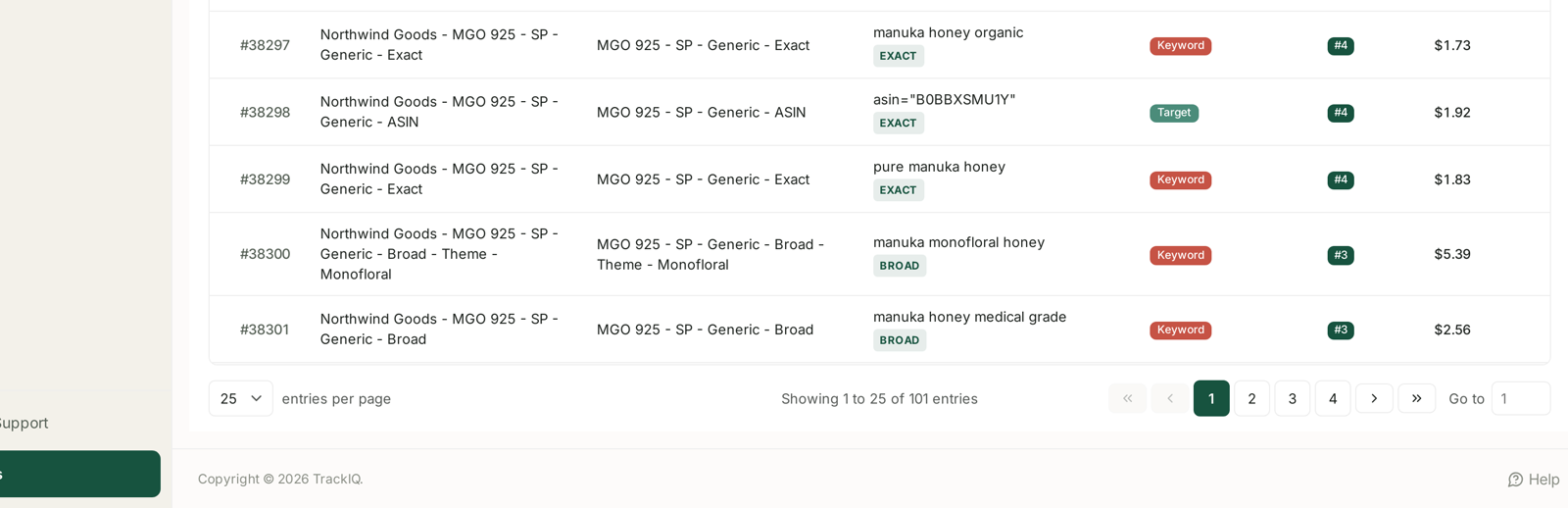
Every changed entity is listed with its campaign, ad group, target (with its match type), whether it is a Keyword or a Target, the branch that fired, and the previous value beside the new one.
The Branch column is what makes this a debugging tool rather than a summary. It tells you which of your own rules claimed each entity — and because branches are walked in order and only the first match fires, that number is the answer to almost every "why did this happen?"
What to look for
Is the Changed count plausible? Against 263 matched, a hundred changes is aggressive for a daily rule. Against 263 matched, zero changes means your thresholds never fire and the rule is decoration. Both are worth knowing before the rule runs on its own.
Is the branch distribution what you expected? If every row says branch 4, branches 1 to 3 are unreachable — almost always because a broader branch sits above narrower ones and is claiming everything. Reorder with the ↑ ↓ controls and preview again.
Are the previous values sensible? A pause branch listing targets whose bids are $5.39 — your top performers — is the moment to stop and re-read the condition, not after it has run.
Is anything in scope that should not be? The campaign and ad group columns show exactly what the rule group resolved to. Branded campaigns turning up in a rule you wrote for generic terms is a scope problem, not a logic one.
Sort and filter. The preview is a normal TrackIQ table — Search, Filters, Manage Columns and Export all work. Exporting a dry run gives you the whole change set as a spreadsheet, which is the easiest way to have somebody else check your reasoning.
When to run one
Before the first scheduled run of any new rule. Always. This is the cheapest safety step in the product.
After changing a threshold. Preview, compare the Changed count to the last one, and confirm the change moved things the way you intended.
After reordering branches. Order changes outcomes, and the preview is the only place you see that before it happens.
Before turning a rule loose on a larger scope. Attaching a second rule group can multiply the entity count. Preview first.
When someone asks what a rule does. A dry run answers with 101 concrete rows rather than a description.
It is a preview, not a promise
A dry run reads the same data the scheduled run will, but it reads it now. By tomorrow morning the look-back window has moved by a day and the numbers will differ slightly.
The counts are therefore indicative; the logic is what you are checking. If branch order and scope are right today, they will be right tomorrow.
Note too that a dry run appears in the rule's run history, tagged Manual · Dry Run with a dash in the Applied column. That is deliberate — it keeps the audit trail complete, and it lets you compare a preview against the scheduled run that followed it. See Scheduling: Last Run, Next Run and Run History.
Related
- Building a Rule from Scratch — the branches this preview exercises.
- Guardrails to Set Before You Automate Anything — the caps that bound what a run can do.
- Scheduling: Last Run, Next Run and Run History — where dry runs are recorded.
- The Change Log — what actually got applied, account-wide.