

An Aria answer that looks wrong is usually right about something else. The question, the scope or the period drifted, and the number is a correct answer to a question you did not ask.
This is how to find out which, in about two minutes, without asking Aria to try again.
Prefer to watch? Ninety-nine seconds on separating a wrong question from wrong data, wrong scope, and an interpretation that overreached.
Do not start by re-asking
The instinct is to rephrase and hope. It is the slowest route, because you learn nothing about why the first answer was what it was.
Start with the evidence that is already on screen.
1. Read the plan
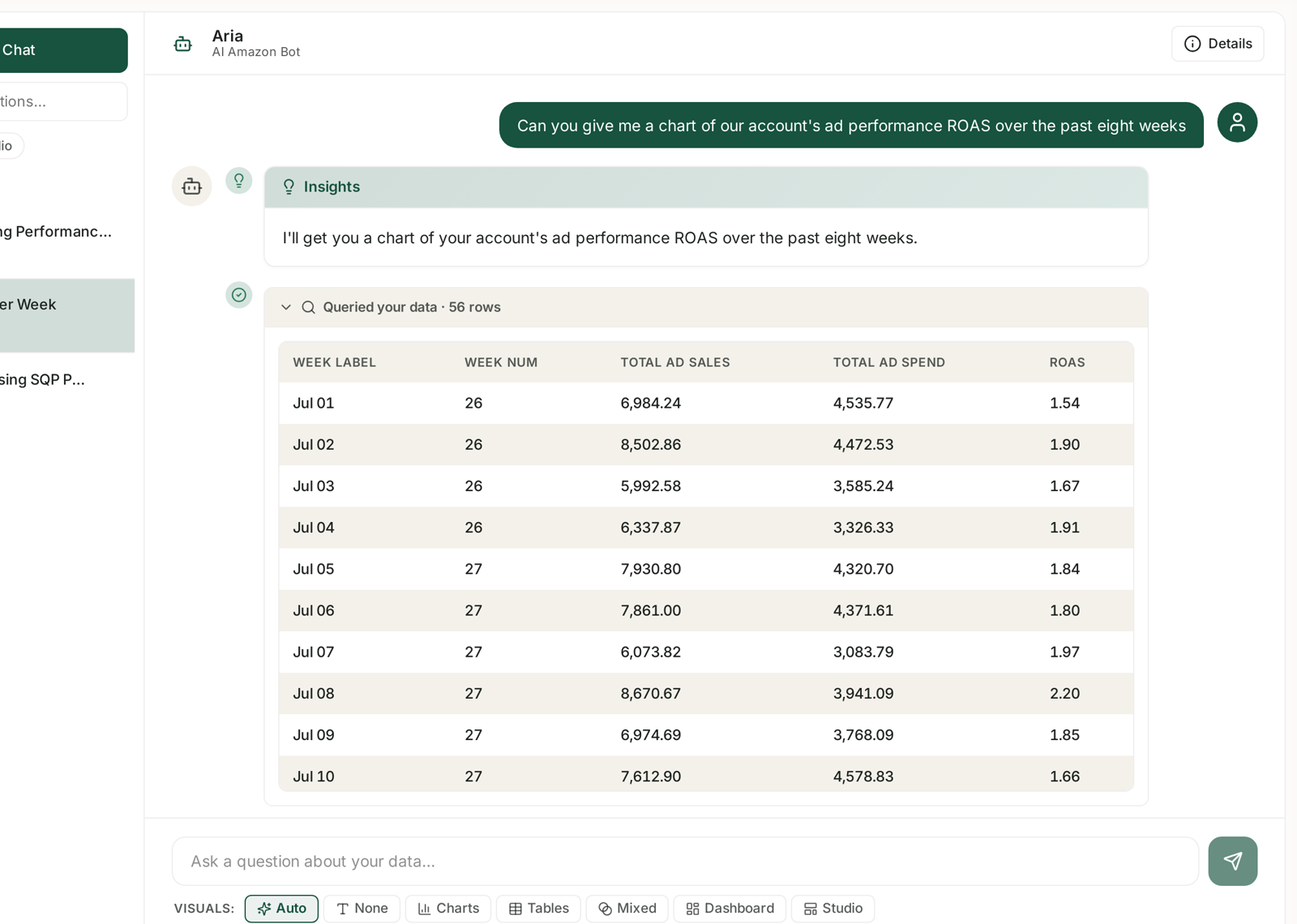
Every answer opens with an Insights block restating what Aria set out to do — "I'll get you a chart of your account's ad performance ROAS over the past eight weeks."
Compare it, word by word, against what you meant:
Metric — ROAS or ACoS? Sales or ad sales? Orders or units?
Period — the range it chose, against the range you intended.
Scope — account-wide, one product, one campaign?
Most wrong answers are wrong here, and the plan says so in plain English. See Reading Aria's Plan and Data Queries.
2. Expand "Queried your data"
The collapsible row under the plan shows the row count and, when opened, the actual rows Aria retrieved.
Check the row count first. A handful of rows behind a sweeping claim is the classic tell.
Then spot-check one figure against the screen it should have come from — Sponsored Ads, Sales Performance, SQP. Same brand, same marketplace, same dates.
Three outcomes:
| Result | What it means |
|---|---|
| The row matches your screen | the data is right — go to step 4 |
| The row does not match | scope or period differ — go to step 3 |
| There is no query at all | Aria answered from conversation context, not data |
3. Check the scope you were both working in
Two scopes have to agree, and neither is Aria's fault when they do not:
The brand and marketplace in the top bar. Aria answers for the current scope. If you switched brands mid-conversation, earlier answers were about a different brand. See Switching Brands and Choosing a Marketplace.
The date range you had in mind versus the one Aria chose. If you did not state a period, it chose one, and the plan told you which.
And check the data itself is complete. An answer built on a brand whose sync is switched off will be confidently wrong. See Turning Brand Sync On and Off.
4. If the data is right, the interpretation is the problem
This is the case people miss. The rows check out; the paragraph beneath them overreaches.
Correlation stated as cause. "Spend rose and sales fell, so spend caused it" is a sentence, not a finding.
A trend from too few points. Three weeks is not a trend.
Attribution ignored. Recent days are incomplete — seven days for Sponsored Products, fourteen for the rest — so a "decline" at the right-hand edge of a chart is often just attribution that has not landed. See Time to Conversion: Checking Your Attribution Window.
Amazon's publishing lag treated as a drop. SQP is weekly and late; AMC is monthly. A missing recent period is a schedule, not a fall. See SQP Data Is Sparse or Missing.
The interpretation is Aria's reading, not a fact. You are entitled to disagree with it while accepting the numbers.
5. Only now, re-ask
If it was the question, fix the question rather than repeating it:
Name the metric exactly. "ROAS", not "performance".
Name the period. "the last 8 complete weeks", not "recently".
Name the scope. "for ASIN X", not "for that product".
Ask one thing. Compound questions get compound answers, and the weak half is hard to spot.
See Asking Aria a Good Question.
The two-minute routine
| Step | Look at | Rules out |
|---|---|---|
| 1 | the plan | wrong question |
| 2 | the row count and one row | wrong or missing data |
| 3 | the top bar and the date range | wrong scope |
| 4 | the written paragraph | overreach |
| 5 | re-ask precisely | everything else |
When it is genuinely wrong
It happens. If the plan is right, the rows match your screens, the scope is right, and the interpretation still does not follow — that is worth reporting.
Include the chat, the question as you asked it, the plan text, and the row count. See Getting Help from the TrackIQ Team.
Do not delete the chat. It is the evidence. Rename and pin it instead — see Managing Chats.
Related
- Reading Aria's Plan and Data Queries — the evidence, in detail.
- Asking Aria a Good Question — preventing the problem.
- What Aria Can and Cannot Answer — questions it will never do well.
- Why Don't My Numbers Match Seller Central? — when TrackIQ and Amazon disagree, not Aria.