

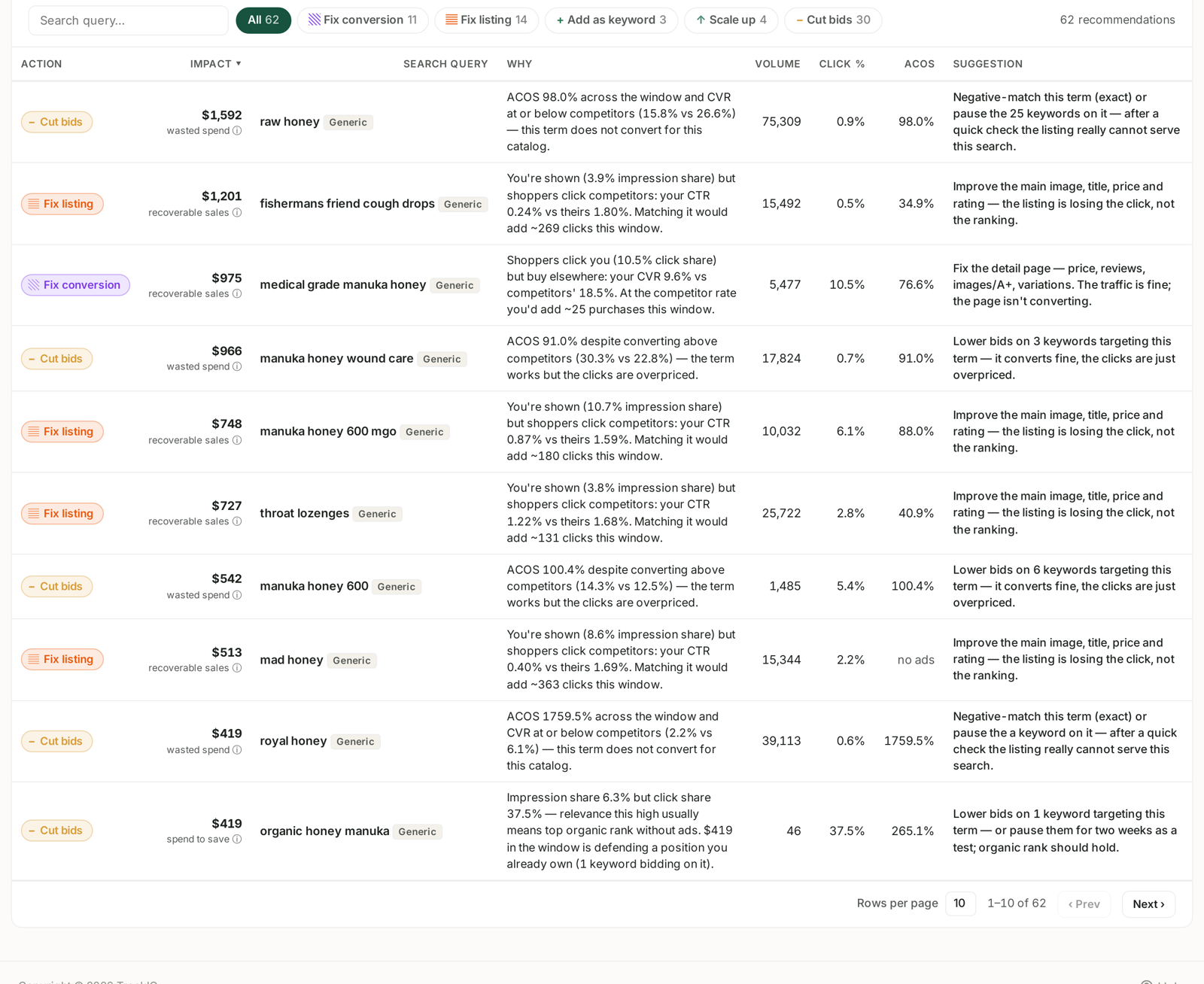
Most reports tell you what happened. The Recommended actions section at the bottom of the Search Query Performance dashboard tells you what to do, why, and what it is worth.
It is the fastest route to value in the product, and it sits below three sections of dense analysis that people rarely scroll past.
Prefer to watch? A minute on working the list by impact.
The five action types
Every recommendation is filed under one of five types, and the filter chips along the top carry live counts.
| Action | The situation | What it usually means |
|---|---|---|
| Cut bids | High ACoS on a query | Either it does not convert for your catalogue, or it converts fine and the clicks are simply overpriced. The Why column tells you which. |
| Fix listing | Shown, but not clicked | Your impression share is healthy and your CTR trails competitors. The listing is losing the click, not the ranking. |
| Fix conversion | Clicked, but not bought | Traffic is fine; the detail page is not converting. |
| Scale up | You beat the market and are under-invested | The rare pleasant one. |
| Add as keyword | Real demand you are not bidding on | You are winning these organically and not buying any of them. |
Impact is money, not a score
The Impact column is a currency figure, and its label changes with the action type:
- wasted spend — what this query is currently costing you for nothing.
- recoverable sales — what fixing it could reasonably return.
- spend to save — spend you could stop without losing the position.
Sort by Impact and work down. A £1,592 wasted spend row is worth more of your morning than a £46 one, whatever the percentage next to it says.
Why and Suggestion
These two columns are what make the table worth trusting.
Why states the evidence in full. Not “low CTR” but “You're shown (3.9% impression share) but shoppers click competitors: your CTR 0.24% vs theirs 1.80%. Matching it would add ~269 clicks this window.” You can check every part of that.
Suggestion states the action concretely, including how many keywords it affects: “Negative-match this term (exact) or pause the 25 keywords on it — after a quick check the listing really cannot serve this search.”
Note the hedge in that example. The recommendation tells you what it thinks and what to verify first. Read both halves.
The supporting columns
Volume is market-wide search volume for the query — the size of the prize. Click % is your click share. ACoS is your advertising cost of sale on that query, or no ads if you are not bidding on it at all.
no ads combined with a high-volume query and a Fix listing recommendation is a particularly clear signal: real demand, you are visible, and the listing is the thing standing in the way.
How to work it
- Filter to one action type. Mixing Fix listing and Cut bids mixes two different jobs — one is a listing task, the other is a bidding task.
- Sort by Impact.
- Read the Why before acting. Every row is an inference from a specific window of data.
- Do the bidding actions first. Cutting wasted spend takes minutes and the saving starts immediately. Listing fixes take longer to make and longer to show.
A caution on windows
Every recommendation is calculated across the week range selected at the top of the screen, and Search Query Performance is weekly. A query with one unusual week can produce a confident-looking recommendation built on very little.
Before acting on a large-impact row, click through to the query in SQP Analysis and look at its week-by-week rows. A pattern across five weeks is a decision. One spike is a coincidence.
Related
- The Search Query Performance Dashboard, Section by Section — the dashboard this panel sits on.
- SQ Score and Funnel Score — the scores that order the queue.
- Generic, Branded and Competitor Terms — why competitor queries are skipped.
- Keyword Research from Search Query Performance — the comparisons behind the recommendation.