

Connecting your Seller account does not connect advertising. They are two separate authorisations, and this catches almost everyone once — usually on day one, when the advertising screens are empty and the sales screens are not.
Prefer to watch? Sixty-three seconds on connecting advertising, and confirming it with the timestamp.
Connect Seller first
If you have not connected your Seller account yet, do that before advertising. Almost every advertising screen leans on sales data:
- TACoS needs total sales, not just ad sales.
- Ad sales versus total sales is meaningless without the second number.
- Inventory-aware rules need stock.
Connect advertising alone and much of the product still looks half-empty. See How to Connect Your Amazon Accounts.
Connecting it
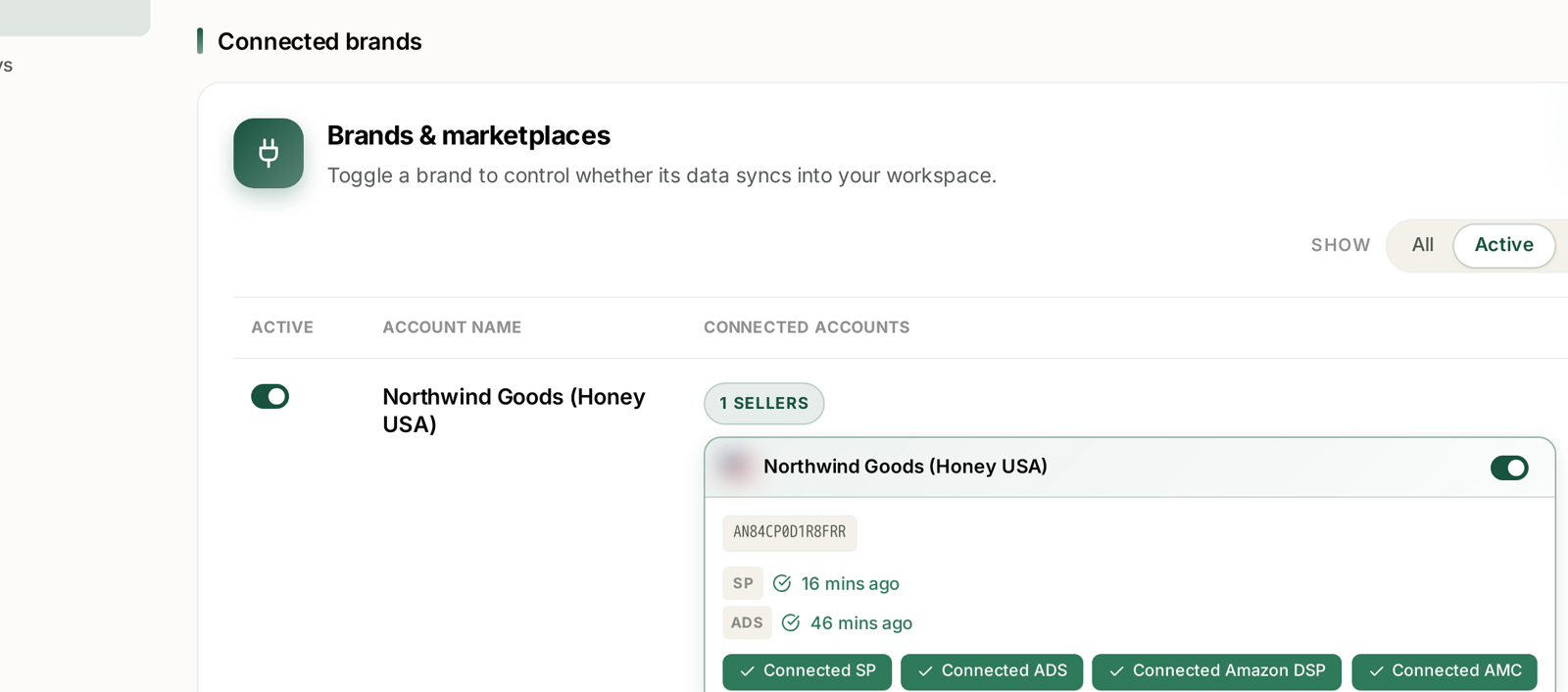
Settings → Connections. Find the brand, and use the Connected ADS control on its card.
It is a standard Amazon authorisation: you sign in to Amazon, approve access, and are returned to TrackIQ. TrackIQ never receives your Amazon password — that exchange happens on Amazon's side.
You need to be an admin on the Amazon Advertising account. If you are not, the authorisation fails at Amazon's end rather than TrackIQ's, and whoever holds that access has to complete the step.
One authorisation, three ad types
This is the part worth knowing, because people go looking for three connections.
Sponsored Products, Sponsored Brands and Sponsored Display all arrive through the single Advertising connection. There is nothing separate to switch on for each.
Amazon DSP is separate. So is AMC. Each card shows them as their own connected source, and having Advertising does not give you either.
| Connection | Gives you |
|---|---|
| ADS | Sponsored Products, Brands and Display |
| Amazon DSP | the DSP screens |
| AMC | the AMC Cloud dashboards |
Confirm it actually worked
Authorising and syncing are different states, and the second one is what matters.
The brand's card shows an ADS badge with a last-synced time once data has arrived. That timestamp is your confirmation, not the fact that the authorisation returned you to TrackIQ.
Expect ADS to lag SP. Sales sync ahead of advertising because Amazon publishes advertising reporting later — a card reading SP 16 mins ago and ADS 46 mins ago is a healthy card, not a broken one. See Where Your Data Comes From and How Fresh It Is.
Empty advertising screens on day one
Normal. Amazon delivers history over a period rather than in one go.
Before reporting a screen as broken:
- Check the ADS badge — is there a timestamp at all?
- Check the brand in the top bar. Every screen is scoped to one.
- Check the date range. A range before you connected has nothing in it.
- Check the state filter. Tables show enabled campaigns by default, so a paused-heavy account can look emptier than it is.
That last one is the most common false alarm after the first week. See My Ad Data Is Missing or Looks Wrong.
What connecting advertising unlocks
Worth knowing so you connect it early rather than eventually:
- Sponsored Ads reporting across all three ad types.
- Rule-Based Optimization — bid and budget automation, which is on every plan.
- Optimization Groups.
- TACoS, which needs both sides.
- Advertising questions in Aria and through MCP.
If it stops later
Amazon's access tokens expire, so a connection that has worked for months can stop. The symptom is a timestamp that stops advancing rather than an error message.
Reauthorise the ADS source only — the others are independent, and reconnecting all four when one expired just costs you time. Nothing is lost; data resumes from where it stopped.
See Fixing a Broken or Expired Amazon Connection.
Related
- Turning Brand Sync On and Off — controlling whether it flows in.