

SQP tells you what the whole market searched for. Your Search Terms report tells you what your ads actually ran on. They are two views of the same shopper behaviour, and the gap between them is where most missed opportunity lives.
The SQP & Search Terms tab puts them side by side so you do not have to reconcile two reports by hand.
Prefer to watch? A hundred and one seconds on the demand you never reached, and why it cannot appear in your ad reports.
Where it lives
Search Query Performance → SQP Analysis.
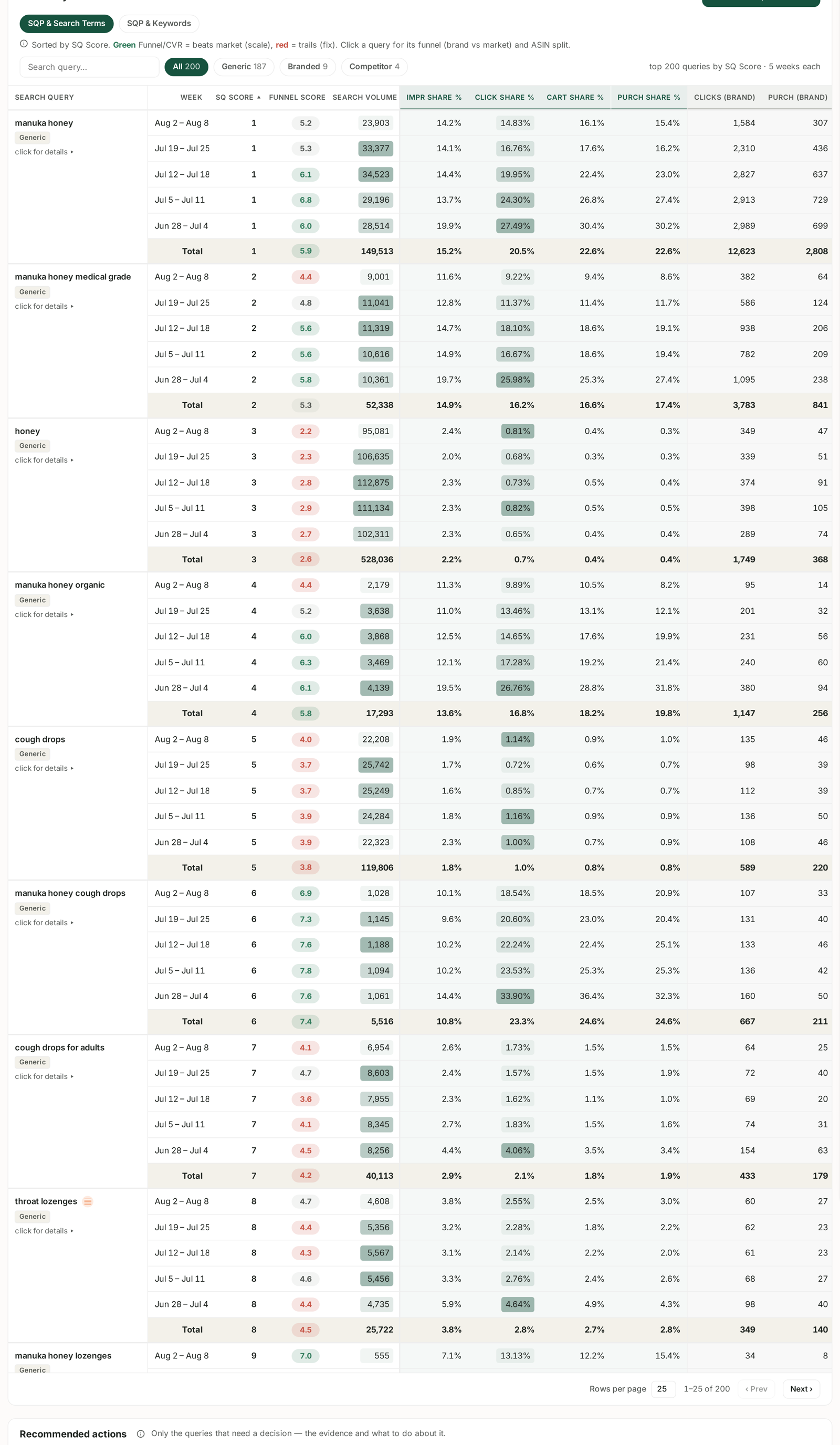
Two tabs sit above the table:
SQP & Search Terms — market demand matched against the customer searches your ads were actually served on.
SQP & Keywords — market demand matched against the keywords you bid on. See SQP & Keywords: Finding Queries You Convert On But Don't Bid On.
The difference matters more than it sounds. A keyword is what you chose to bid on. A search term is what a customer actually typed. Broad and auto matching means the two are frequently not the same phrase at all.
The four situations
Matching demand against what you ran produces four cases, and each has a different action:
| Market demand | You ran on it | Meaning | Do |
|---|---|---|---|
| high | yes, converting | working | scale — bid and rank |
| high | yes, not converting | you are present and losing | fix — listing or page |
| high | no | demand you never reached | add it |
| low | yes, spending | you are paying for a thin query | cut it |
The third row is why this tab exists. A high-volume query where you have no presence at all will never appear in your Search Terms report — because your ads never ran on it, there is nothing to report. It is invisible in advertising reporting by construction, and visible here.
The gap worth hunting
Work in this order:
1. Sort by search volume. Start where the demand is.
2. Find rows with volume and no click share. The market searches this; you are not being clicked. Either you are not shown, or you are shown and ignored.
3. Check whether you are shown at all. Impression share separates the two:
- No impression share — you are absent. This is a targeting gap: add the term.
- Impression share, no clicks — you are shown and passed over. This is a listing problem, and adding keywords will not fix it. See Search Query Cart Analysis: Why a Query Doesn't Convert.
That distinction determines whether you spend money or spend effort, and getting it backwards is the common mistake.
The other direction — what you ran that nobody wanted
The same tab exposes the reverse case: terms your ads served on that carry very little market demand.
Broad and auto matching drifts. Some of that drift is discovery and worth keeping; some of it is spend on phrases almost nobody searches. Sort by your spend against market volume, and the thin-demand, real-spend rows are negative-match candidates.
This overlaps with the aggregated Search Terms view in Amazon Ads, which is the better screen for the spend side. See Search Terms and Aggregated Search Terms.
Read the classification chips
The Generic / Branded / Competitor chips above the table filter the population, and they change what a gap means:
A generic query you are absent from is a genuine growth opportunity.
A branded query you are absent from is unusual and worth checking — it is your own name.
A competitor query you are absent from is often a deliberate choice, and expensive to change. Note that competitor-brand queries are deliberately excluded from Fix listing and Add-keyword recommendations, because a better page cannot win a shopper who wants somebody else's brand. See Generic, Branded and Competitor Terms.
Turning findings into keywords
A gap you decide to close becomes an exact-match keyword, in a campaign where you can see it, at a bid informed by what the query already costs the market.
Then negative-match it in whichever broad or auto campaign might otherwise pick it up, so you are not bidding against yourself. The full routine is in Harvest Winning Search Terms into Exact-Match Campaigns.
What not to conclude
Absence is not always a mistake. Some high-volume queries are wrong for your product, and the right answer is to stay out.
Market volume is not your opportunity. You will win a share of it, not all of it. Estimate with your existing share on similar terms.
Weekly cohorts. SQP reports whole weeks; your Search Terms report is daily. Compare like with like. See SQP Is Weekly: Reading Week Cohorts Correctly.
SQP is not real-time. It lags, so a term you added this week will not appear here immediately.
Related
- SQP & Keywords: Finding Queries You Convert On But Don't Bid On — the sibling tab.
- Search Terms and Aggregated Search Terms — the advertising-side report.
- Generic, Branded and Competitor Terms — the chips that filter the table.
- Harvest Winning Search Terms into Exact-Match Campaigns — acting on the gap.