

Sponsored Brands is the banner at the top of search — your logo, a headline, and several products. It sells the brand rather than one item, and it is the only ad type that can send a shopper to your storefront instead of a product page.
It also needs Brand Registry, so if the option is missing that is why.
Prefer to watch? One hundred and thirty-two seconds on the three goals and what each actually buys, the ad formats, and the measure that is fairer to a brand banner than ACoS.
Creating the campaign
Amazon Ads console → Campaign manager → Create campaign → Sponsored Brands.
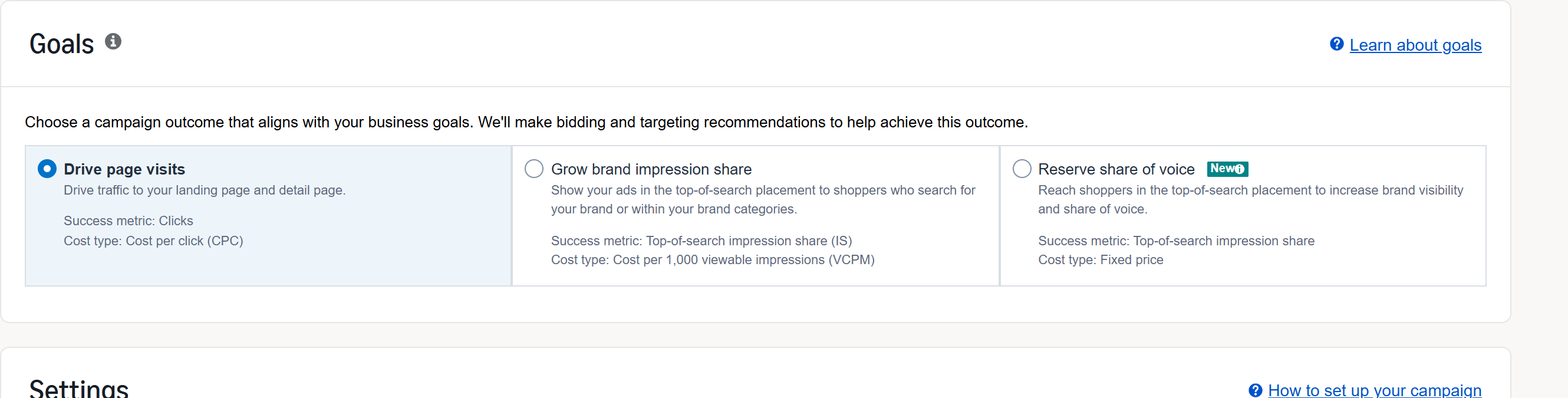
1. Choose the goal. Three are offered, and they are priced completely differently:
| Goal | Success metric | You pay for |
|---|---|---|
| Drive page visits | Clicks | cost per click (CPC) |
| Grow brand impression share | Top-of-search impression share | 1,000 viewable impressions (vCPM) |
| Reserve share of voice | Top-of-search impression share | a fixed price |
Choose drive page visits almost every time. It bills per click, which is measurable, and every optimisation covered here assumes it.
The other two buy placement, not response. Impression share is a visibility target, so you are committing budget to appear at the top of search whether or not anyone acts. That is a brand-awareness purchase with far weaker attribution, and it is not where to learn what works.
2. Name, dates, budget. No end date unless the promotion genuinely ends. Daily budget conservative.
3. Amazon or Amazon Business. Leave it on Amazon unless you are genuinely B2B-heavy, in which case a separate Business-targeted campaign is worth running.
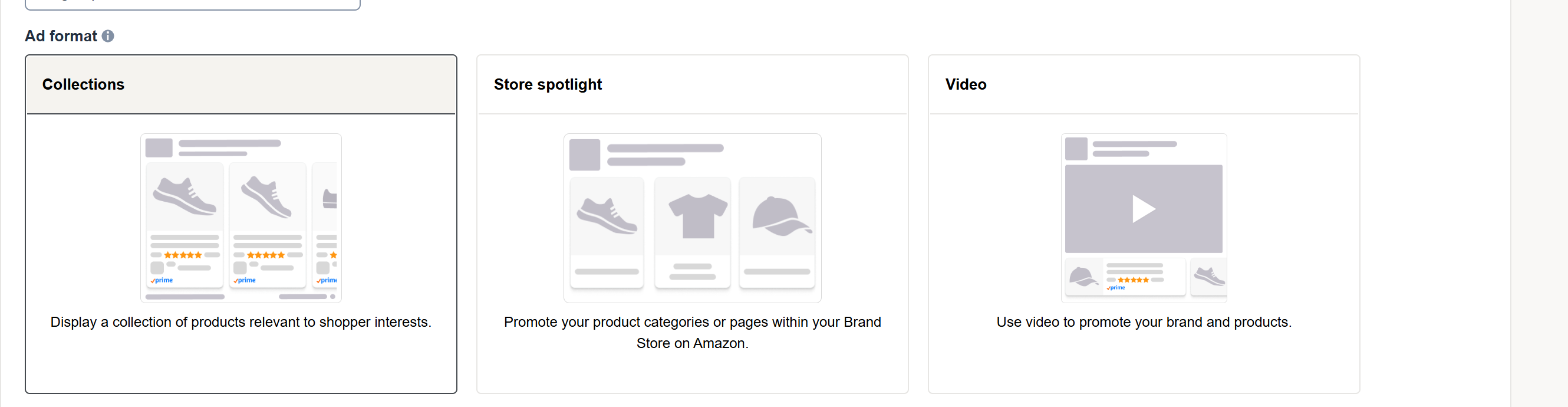
4. Pick the format.
Collections — several products, landing on a page you compose. The usual choice. You then pick a collection type: automatic, where Amazon assembles the products from your catalogue against your keywords, or manual, where you choose them. Start manual. Automatic is convenient, but it decides what shoppers see and you lose the ability to say why a banner worked.
Store spotlight — sends shoppers into your storefront. Good for a broad brand, weaker for a single hero product.
Video — the same campaign type with a video creative. Covered separately in Create a Sponsored Brands Video Campaign.
5. Bidding. Turn off Amazon's bid optimisation and control your own bids. You can add placement and audience adjustments later, once there is data to justify them.
6. Targeting. Keyword (exact, phrase, broad) or product (ASIN, category). Start with exact. Broad on a brand banner spends quickly and teaches you little.
7. The creative. This is where SB differs from everything else:
Logo — to Amazon's stated pixel specification, showing your brand name.
Headline — up to 50 characters. It is the only copy you control at the top of search, so it deserves more than a product name.
Products — you will select three for display, drawn from the products on the campaign.
Images — use them. A banner of bare product shots performs worse than one with considered imagery.
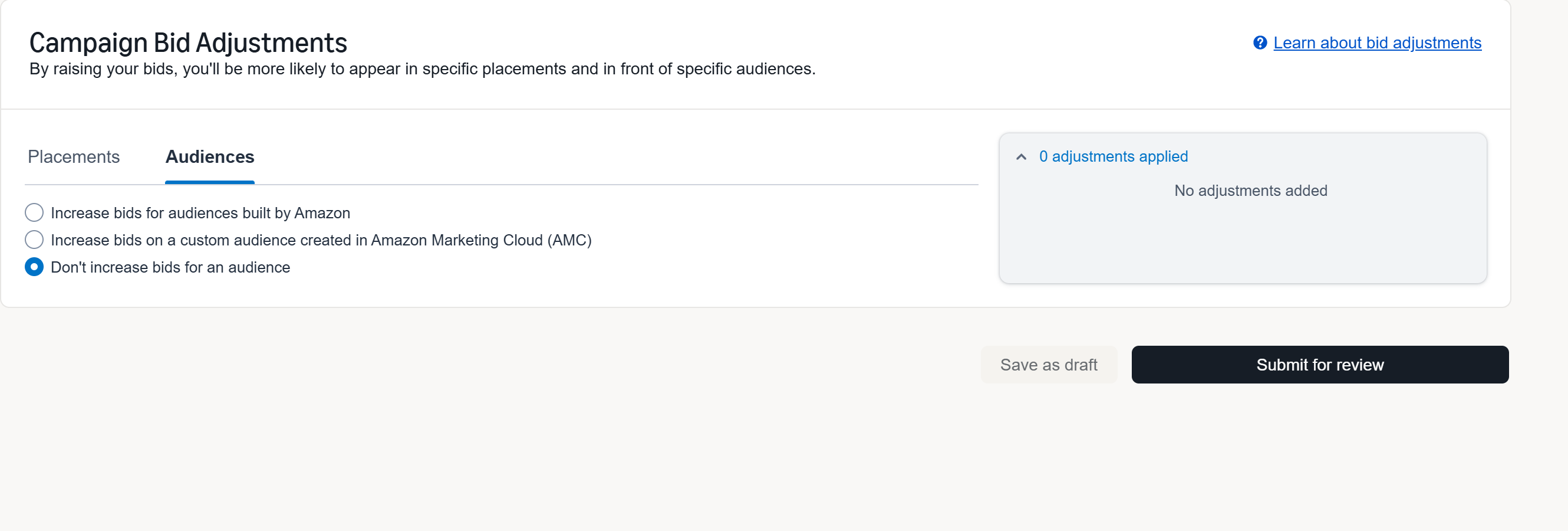
8. Bid adjustments. You can raise bids by placement, and by audience. The audience option is worth knowing about: alongside Amazon's own prebuilt audiences, you can raise bids on a custom audience you built in Amazon Marketing Cloud. That is the point where your own data starts steering your bids rather than Amazon's segments. See Understanding AMC Cloud: New-to-Brand and Path-to-Purchase Insights.
Then submit. Sponsored Brands goes through creative moderation, so it is not live immediately — the button reads Submit for review, not Launch.
Judging it in TrackIQ
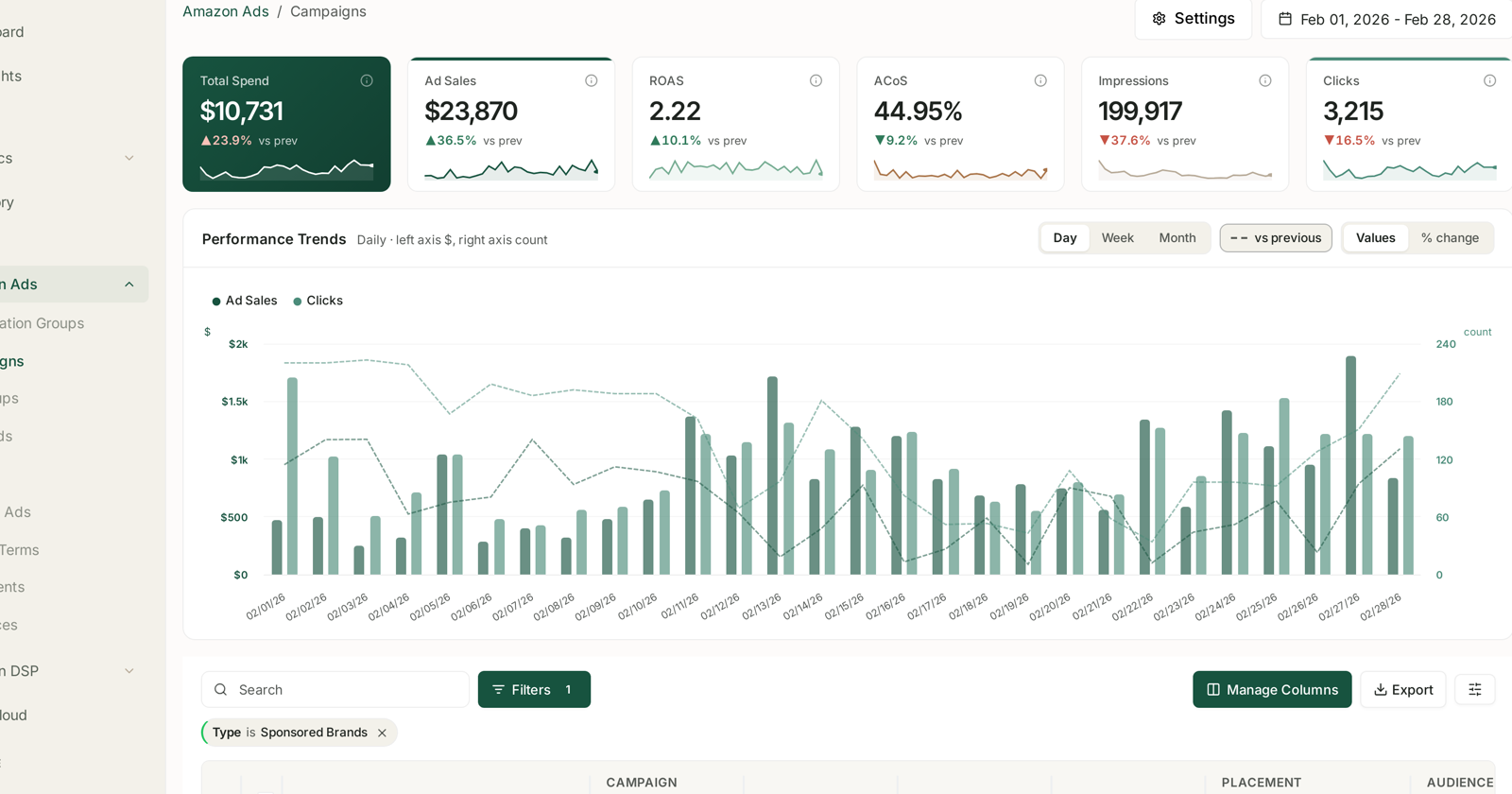
Sponsored Brands appears alongside your other campaigns in Amazon Ads → Campaigns, with the same columns and the same date range.
Three things to hold in mind that do not apply to Sponsored Products:
Attribution is 14 days, not 7. Recent days understate more than you are used to.
Do not compare its ACoS with Sponsored Products. They are doing different jobs. SB reaches people earlier, and its last-click ACoS will usually look worse. Judged only on that number, you will switch off the thing building the brand.
It overlaps with Sponsored Products. One shopper can see both, and both can claim the sale. This is why the ad types cannot be added together — see Why Sponsored Products, Brands and Display Numbers Do Not Simply Add Up, and, if you suspect real cannibalisation, Spot Cannibalisation Between Sponsored Brands and Sponsored Products.
The better measure: new customers
Since SB works higher in the funnel, the honest question is not "what was the ACoS" but "did it bring people who did not know us".
That is a new-to-brand question, and it is answered in AMC Cloud:
Are these new customers? See NTB Customers: New vs Repeat, Counted as People.
Did it cause branded search to rise? If people saw the banner and later searched your name, that is the banner working. See Brand Keywords: Proving Upper-Funnel Spend Works.
Does it appear early in the path? See Path to Purchase: Which Ad Sequences Actually Convert.
Common mistakes
Choosing an impression-share goal because the numbers look impressive. Impressions are not sales, and neither is share of voice.
A headline that repeats the product title. Fifty characters of prime placement, spent saying nothing.
Judging on ACoS alone. It reliably under-credits upper-funnel work.
Broad match from day one. Expensive discovery on your most visible placement.
Related
- Amazon PPC: Core Terms and Metrics — the vocabulary.
- Create a Sponsored Brands Video Campaign — the same campaign type, video creative.
- Prove Your Display Campaigns Created Demand — the method, applied to upper funnel.