

There is a specific gap worth hunting in every Amazon account: search queries where your products already convert well, but which you are not bidding on at all.
You are winning those sales organically. Adding a keyword lets you win more of them — and if a competitor finds the query first, you start losing the ones you had.
TrackIQ has a view built for exactly this.
Prefer to watch? A minute on finding and claiming unbid demand.
Where it is
Analytics → Search Query Performance, then scroll to SQP Analysis and choose the SQP & Keywords tab.
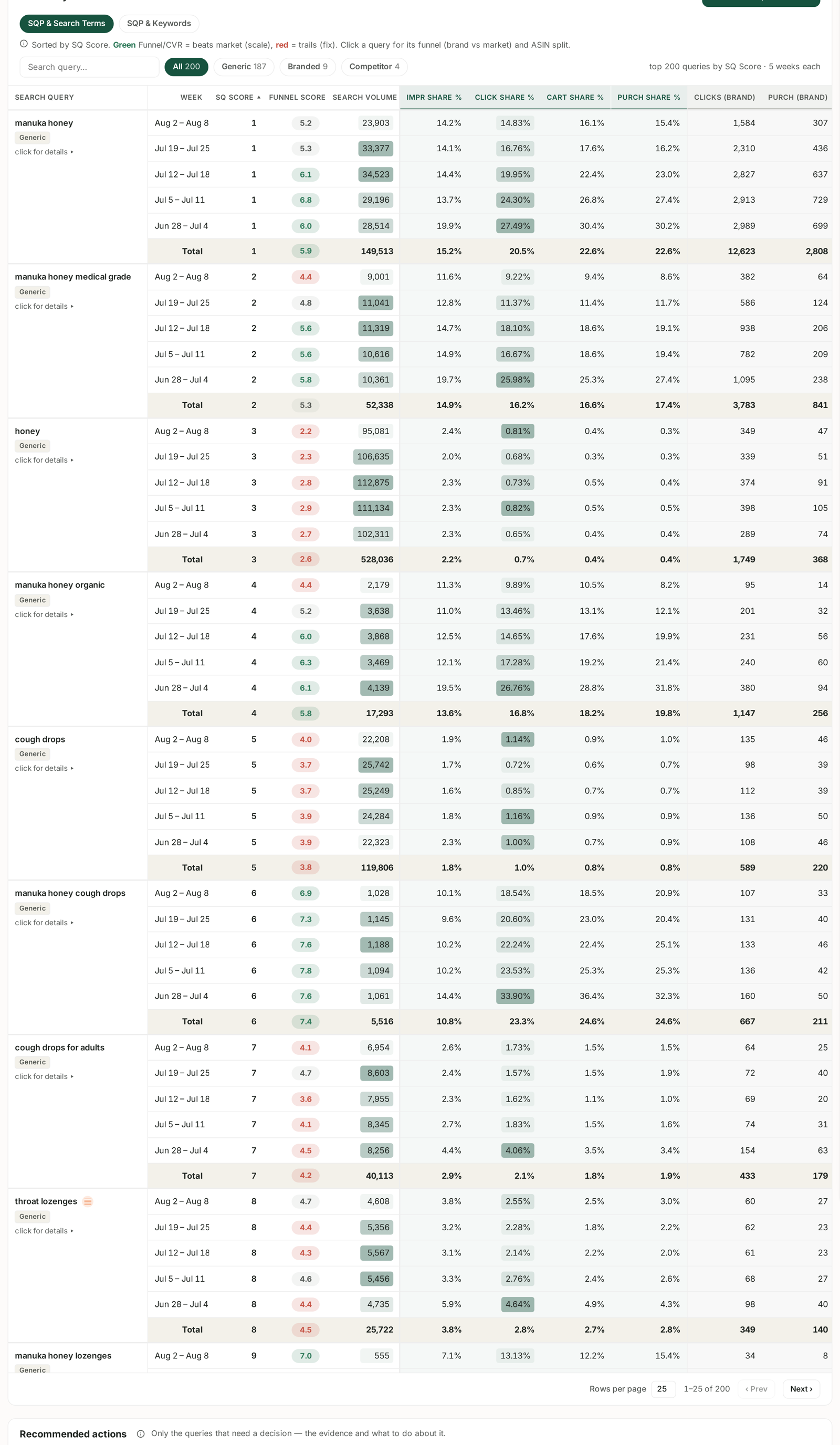
The other tab, SQP & Search Terms, matches queries against the search terms your ads actually served on. SQP & Keywords matches them against the keywords you are bidding on. That difference is the whole point: a query can produce sales through a broad match or organically without ever appearing as a keyword you chose.
What you are looking for
A query with all four of these:
- Meaningful search volume — enough demand to be worth the effort.
- A green Funnel Score — you beat the market on conversion for this query.
- Purchase share at or above click share — people who click you, buy.
- No keyword bidding on it.
The first three say the query converts for your catalogue. The fourth says you are not paying to be there.
Set the term filter to Generic while you do this. Branded queries you already win, and competitor queries are a different decision entirely.
The shortcut
The Recommended actions section at the bottom of the same screen does this analysis for you and files the results under Add as keyword.
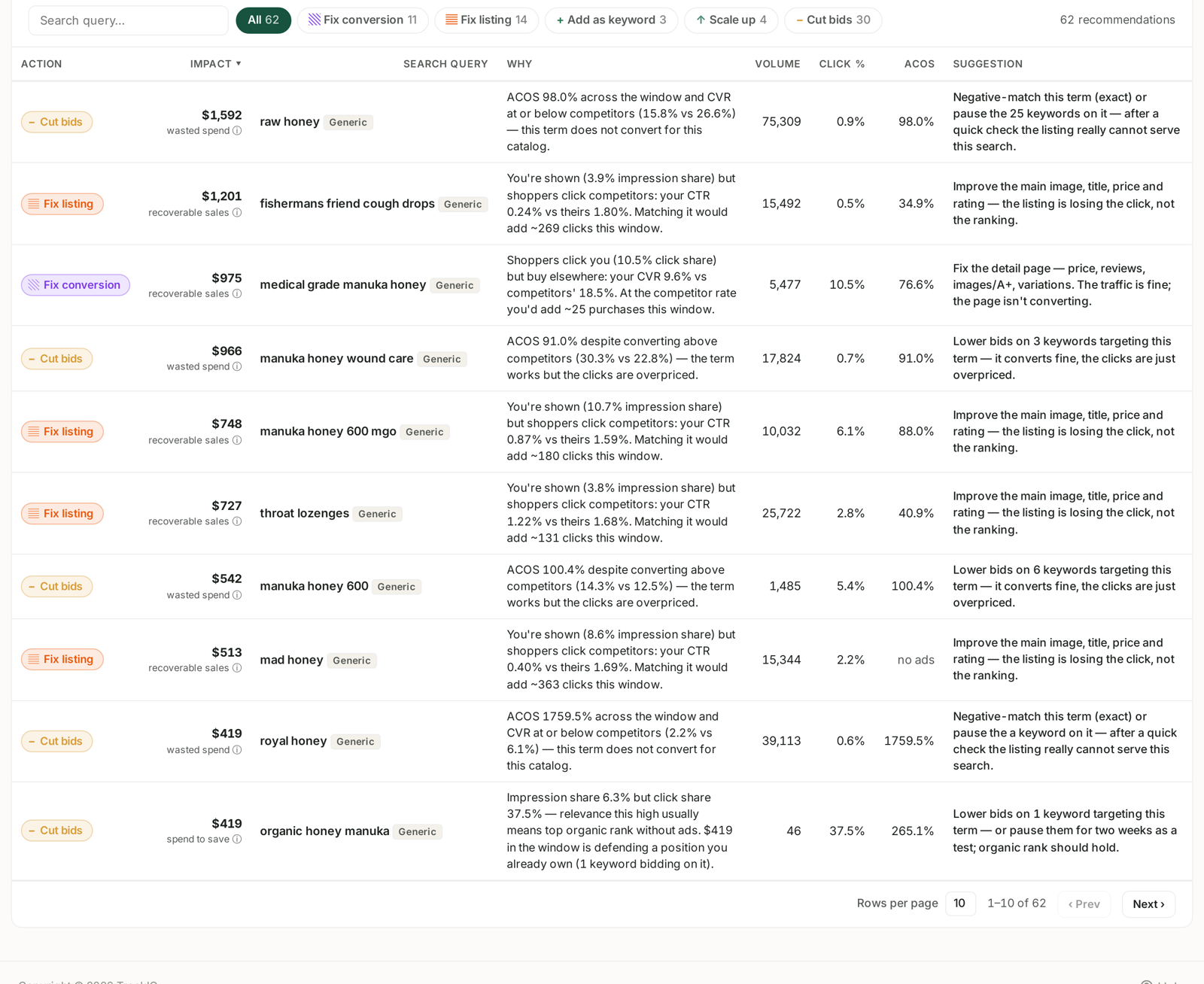
Each row states the evidence in the Why column and the action in Suggestion. Start there, then use the Analysis table to check anything you want to see the week-by-week trend for.
Ask Aria instead
If you would rather not read a table, ask:
Which search queries have high purchase share but no keyword bidding on them, over the last six weeks?
Aria queries the same Search Query Performance data. Give it a date range, because SQP is weekly and the answer changes by week.
What to do with what you find
Add the query as an exact-match keyword in a campaign that already contains the product that converts for it. Exact rather than broad, because you know the specific query works — you do not yet know its neighbours do.
Start the bid modestly. You already rank organically for this query. The aim is to capture more of it, not to pay top of search for a position you partly hold.
Check back in two weeks. SQP publishes weekly, so two weeks is the first honest read. Look for click share rising without purchase share falling.
The reverse case, worth the same attention
While you are in this view, look for the opposite: queries where you are spending but the Funnel Score is red. You are buying clicks on searches your catalogue does not convert. Those appear under Cut bids in Recommended actions.
Finding demand you are missing and stopping spend you are wasting are the same exercise, done in the same table.
Related
- SQP & Search Terms: Matching Demand to What You Actually Ran — the sibling tab, matched against what you ran.
- Harvest Winning Search Terms into Exact-Match Campaigns — turning a finding into a keyword.
- Generic, Branded and Competitor Terms — the chips that filter the table.
- Keyword Research from Search Query Performance — the same data, read for a relaunch.