

Rank tracking is the one part of TrackIQ that does not come from an Amazon report. It is measured — TrackIQ runs the searches and records where things appear — which means blank rank data has a different set of causes from blank ad data.
Work through these in order.
Prefer to watch? A hundred seconds on why rank is measured rather than reported, and what blank actually means.
1. Is there a project at all?
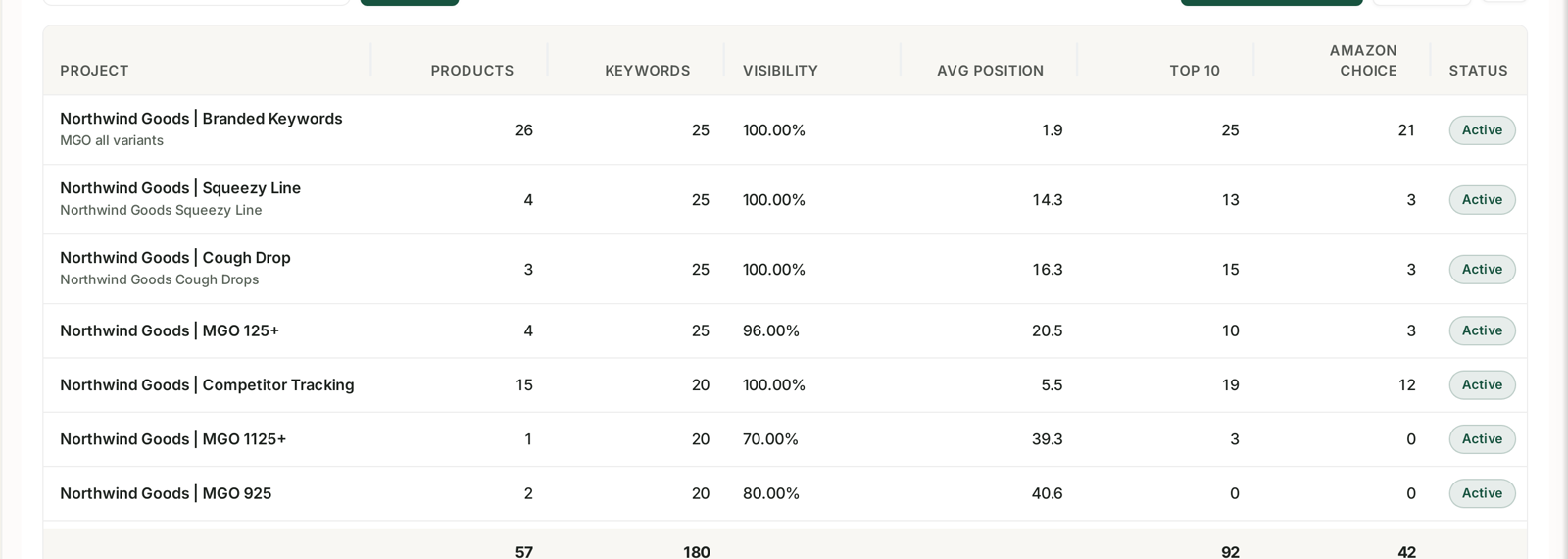
Rank Tracker is opt-in. Nothing is tracked until you create a project and add keywords to it.
An empty Rank Tracker on a brand-new account is not a fault — it is the starting state. See Rank Tracker: Creating Your First Project.
The banner on the screen also states the limits: up to 50 projects per account, 25 keywords per project. A keyword you thought you added may have been over a project's cap.
2. It has not run yet
A newly created project has nothing to show until its first collection completes. Rank is sampled on a schedule, not on demand, so:
A project created an hour ago will be blank. Give it a full cycle.
A keyword added to an existing project starts from the moment you added it. There is no history for it and no backfill to request. The chart begins on the day you started tracking.
This is the single most common cause after "no project yet".
3. The date range predates the project
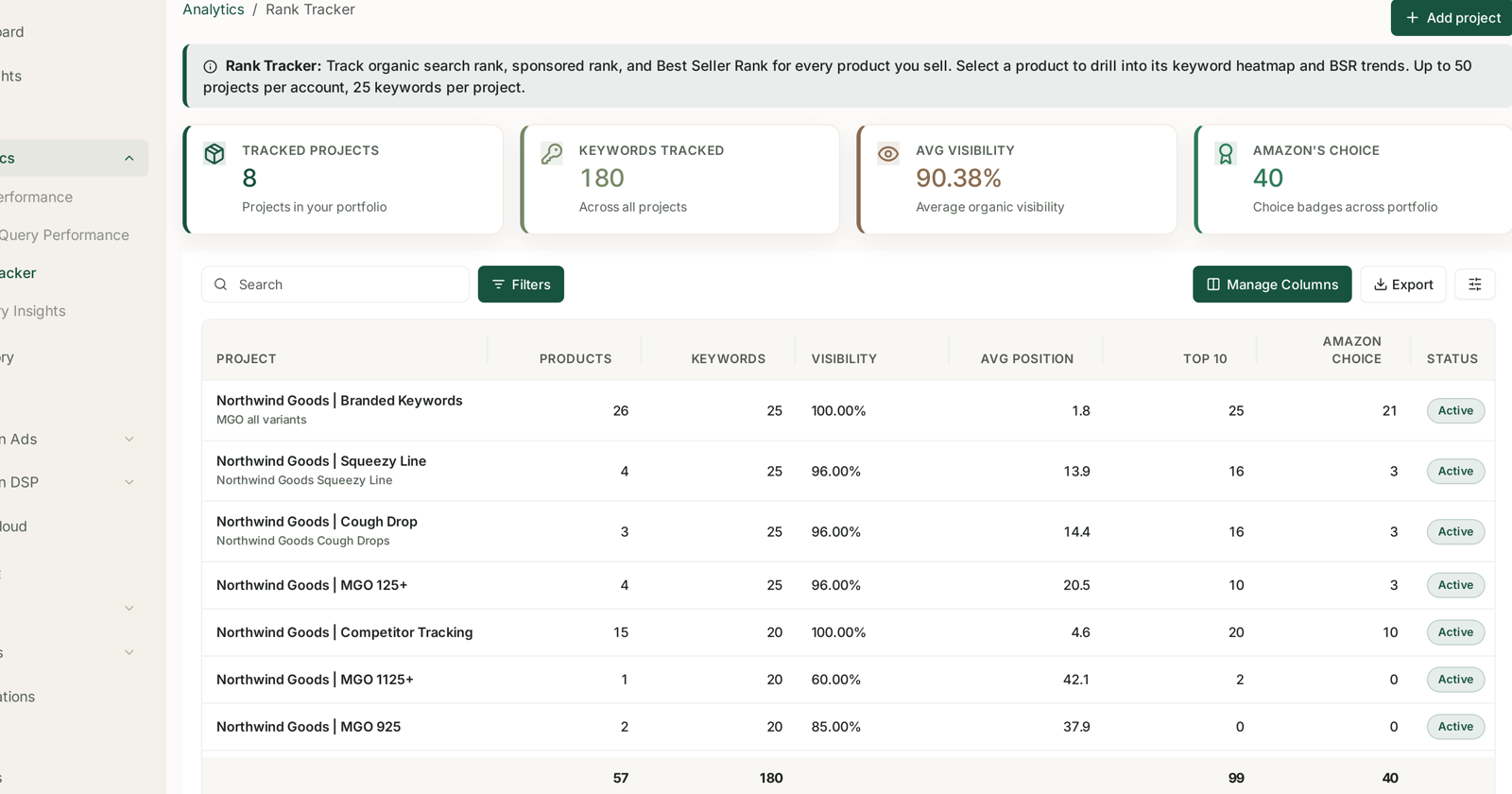
The KPI tiles and the chart follow the date range like every other screen.
If your range starts before the project did, the early part will be empty — correctly, because nothing was measured then. Narrow the range to the period since tracking began and the data appears.
A partially blank chart with data only at the right-hand end is almost always this.
4. The product genuinely does not rank
Blank and zero are not the same, and the screens distinguish them:
No row / no data point — nothing was measured.
A recorded position outside the tracked depth — measured, and you were not found.
TrackIQ records rank down to a fixed depth of results. A product sitting far below that depth is not "missing data"; it is a product that does not rank for that phrase. Nothing you change in TrackIQ will make it appear.
Check a keyword you know you rank for. If that one populates and the others do not, the data collection is fine and the answer is competitive, not technical.
5. Organic vs Sponsored
The tracker separates the two, and a product can be blank in one and present in the other.
Sponsored blank — you were not running ads on that phrase at collection time, or your ad was not served in that sample.
Organic blank — you were not in the organic results at the tracked depth.
Do not read a blank Sponsored column as a tracking failure if the campaign was paused, out of budget, or simply not eligible that day. See Organic vs Sponsored Rank.
6. The keyword or ASIN is wrong
Two mechanical causes worth checking before anything else:
A misspelled or oddly-spaced keyword will be tracked faithfully and return nothing, because nobody searches it.
A tracked ASIN that is inactive, suppressed or out of stock will not appear in search results, so it will not rank. Rank returning while inventory is out is not something to wait for — the listing has to be buyable first. See Catch a Stockout Before It Costs You Rank.
7. Marketplace mismatch
A project tracks a marketplace. A US ASIN in a UK project will show nothing at all.
Confirm the marketplace on the project matches the ASIN you added.
8. Badges are not always present
Amazon's Choice and Best Seller Rank columns are frequently blank, and legitimately so.
Amazon's Choice is awarded to one product per query and most products never hold it. A blank badge column means the badge was not present, not that the check failed. See Tracking the Amazon's Choice Badge.
How to tell which one you have
| Symptom | Most likely cause |
|---|---|
| Rank Tracker entirely empty | 1 — no project |
| Project exists, nothing anywhere | 2 — not collected yet |
| Chart empty on the left, fine on the right | 3 — range predates the project |
| Some keywords populate, others do not | 4 — you do not rank for those |
| Organic present, Sponsored blank | 5 — ads not serving |
| One ASIN blank across every keyword | 6 — listing inactive, or 7 — wrong marketplace |
| Badge column blank | 8 — normal |
What not to do
Do not widen the date range to find missing history. There is none before the project started.
Do not add the same keyword twice hoping to force a re-collection. It runs on its own schedule.
Do not treat a blank as zero in a report. Not measured and measured-as-absent are different claims.
Related
- Rank Tracker: Creating Your First Project — if there is no project.
- Reading Visibility, Average Position and Top 10 — what the tiles mean.
- Organic vs Sponsored Rank — why one can be blank.
- My Dashboard Is Empty — when it is not just rank.