

Automation does not fail loudly. A badly-scoped rule does not error — it works exactly as written, on far more of your account than you meant, every day, until somebody looks.
None of what follows is difficult. All of it is easier before the first run than after.
Prefer to watch? Sixty-seven seconds on scope, proof, and the mistake that catches everyone.
1. Know what is already running
If rules exist on the account, read the Change log before adding anything. You are not designing in an empty room, and the most common cause of a bid bouncing up and down every day is two rules that were each individually sensible.
See The Change Log: Auditing What a Rule Changed.
2. Scope before you act
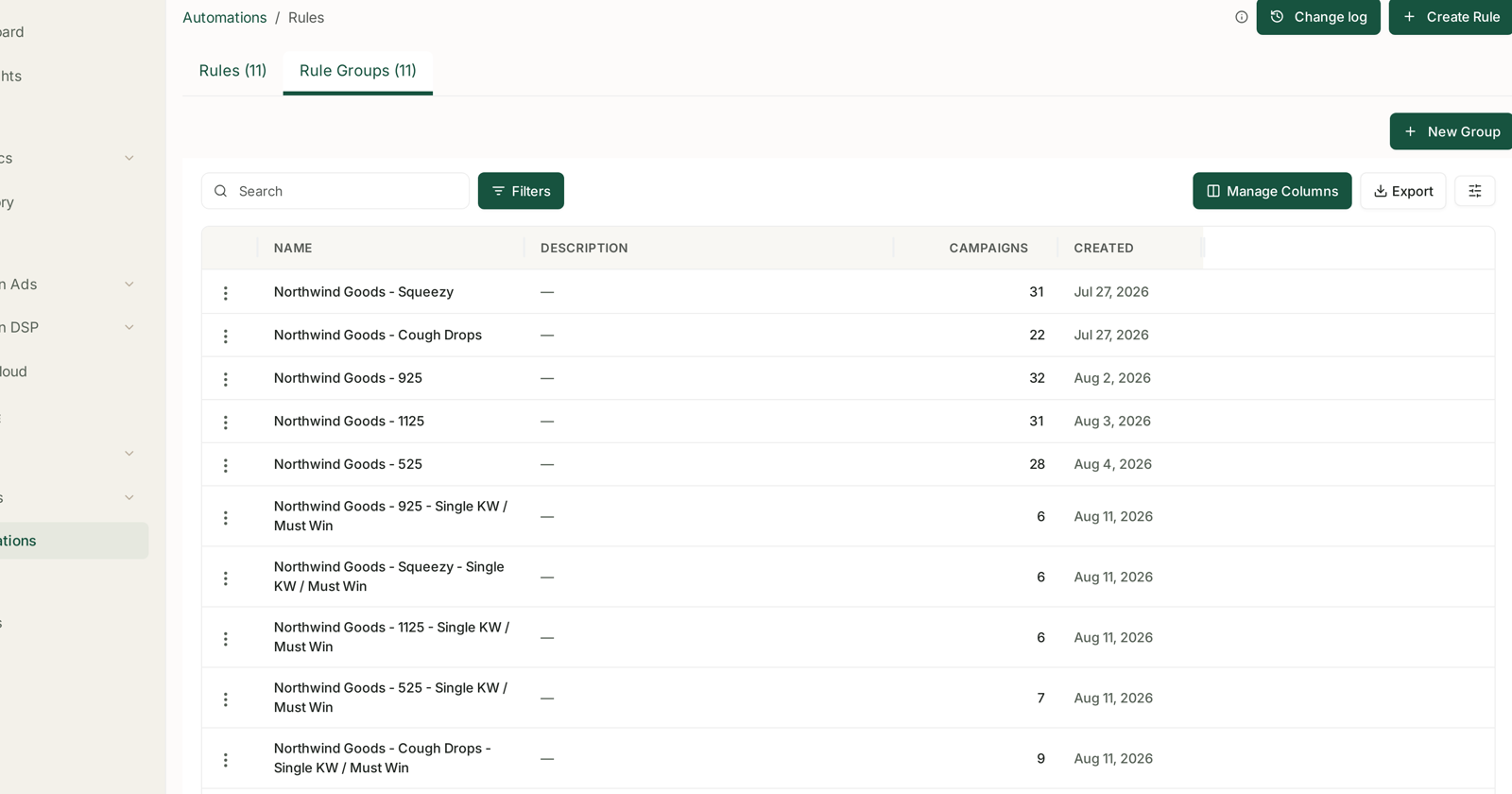
Create a rule group and check its campaign count before pointing a rule at it. That number is your blast radius, and it is right there in the table.
Start narrow. One product line, or one group of campaigns you understand well. A rule that works on 6 campaigns will work on 31; a rule that misfires on 31 costs five times as much to notice and undo.
3. Require proof before acting
The single most valuable habit: every condition needs a volume threshold attached.
if ACOS > 40% and clicks ≥ 10, lower the bid 15%
Without the second clause, that rule acts on targets with two clicks — where ACoS is not a measurement, it is a coin toss. The recipes ship with these thresholds for exactly this reason. If you build from blank, put them in yourself.
The same applies to scaling. “High ROAS” on three orders is a fluke, and funding it is how a rule turns randomness into spend.
4. Set the look-back window long enough
A look-back shorter than the attribution window makes a rule judge sales that have not been credited yet.
| Ad type | Attribution | Minimum sensible look-back |
|---|---|---|
| Sponsored Products | 7 days | 14 days |
| Sponsored Brands / Display | 14 days | 21 days or more |
A 7-day look-back on Sponsored Brands sees roughly half the sales that target will eventually be credited with, concludes it is failing, and cuts the bid. The rule is not wrong; the window is.
See Why SP, SB and SD Numbers Don't Add Up.
5. Do not act more often than the data can answer
1D Adjust — once a day — is right for almost everything. A bid changed this morning has not yet produced the clicks that would justify changing it again tonight.
Frequent adjustment feels responsive and behaves like noise.
6. Change one thing at a time
Do not switch on five rules on Monday. When spend moves on Friday you will not know which one did it, and you will end up turning all five off.
One rule, one week, one look at the Change log. Then the next.
7. Be careful with pause
Pause is the action that keeps acting after you stop paying attention.
A paused campaign or keyword vanishes from the default view of every table, because tables show enabled entities by default. So the thing your rule paused is now the thing you cannot see. See My Ad Data Is Missing or Looks Wrong.
Set pause thresholds high enough to be unambiguous — the classic 25-click cutoff exists because that is roughly where “no orders” stops being bad luck.
8. Decide what each campaign is for, first
A rule enforces one definition of good across everything in its group. But campaigns do different jobs:
- Defending a keyword you own — a higher ACoS is the price of holding ground.
- Launching — ACoS is expected to be poor; you are buying rank and history.
- Harvesting — here the target genuinely applies.
Put those in different rule groups. A single target ACoS across all three will strangle your launches and under-defend your best keywords — and it will look like it is working, because the average will improve.
9. Name rules so the settings are visible
Northwind Goods — MGO 925 — 14D LB — 1D Adjust
Look-back and frequency are not columns in the rules table, and they are exactly what makes two similar rules behave differently. Put them in the name from the start.
10. Check on the days that matter
Day one after the first run — open the Change log. Volume, direction, repetition.
End of week one — is spend where you expected?
After anything unusual — a stockout, a price change, a promotion, Prime Day. Rules keep running through events they know nothing about, and a rule that scales winners will happily pour budget into a product that is about to run out. See Inventory Forecasting.
The one that catches everyone
A rule does not know your stock. A product about to go out of stock is often a product performing well, which is precisely what a scaling rule funds.
Pairing a stock alert with a pause rule on low-cover products is usually the highest-value automation in the whole account, because it saves money on a day you are already losing sales.
Related
- Dry-Run Preview: Seeing What a Rule Would Change — the other thing to do before enabling.
- A Rule Didn't Run — when nothing happens.
- The Bleeder Reports — the thresholds to trust before you let a rule act on them.