

A Targeting Rule adjusts bids or pauses keywords and product targets based on performance. It is the workhorse of the rule engine, because bids are where most Amazon advertising money is won or lost.
Nine ready-made recipes come with it. Each is a real rule you expand, review and apply — not a template you have to finish.
Prefer to watch? Seventy-five seconds on the nine recipes and how they group.
Two actions
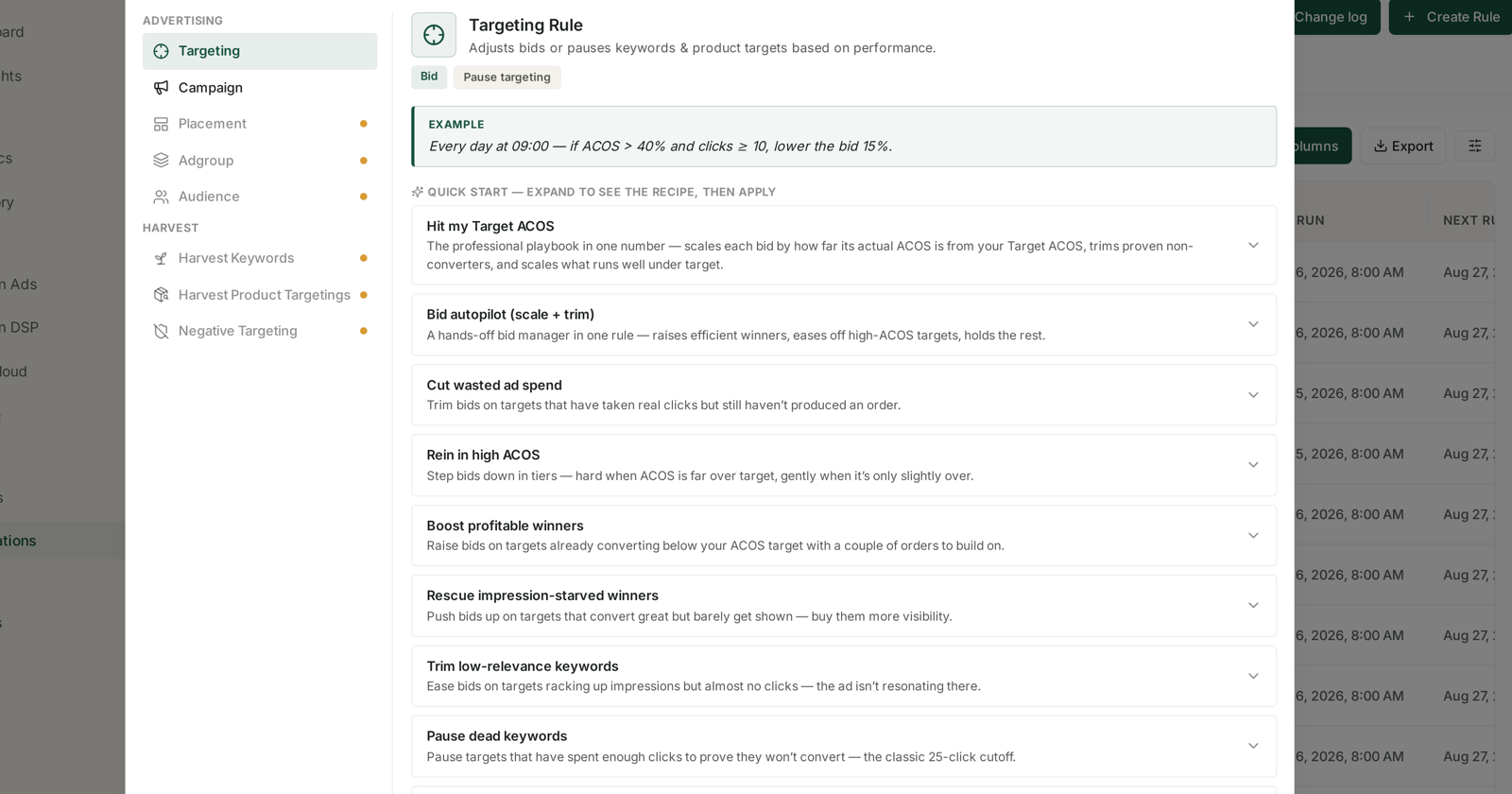
Every targeting rule does one of two things:
Bid — raise or lower the bid by a percentage.
Pause targeting — stop the keyword or product target entirely.
The screen shows the shape a rule takes:
Every day at 09:00 — if ACOS > 40% and clicks ≥ 10, lower the bid 15%.
Read that carefully, because every recipe below is a variation on it: a schedule, a condition, a threshold that proves the condition, and an action.
The clicks part is the one people skip. “ACoS above 40%” on a target with three clicks is noise — three clicks cannot tell you anything about ACoS. The clicks ≥ 10 is what stops the rule acting on randomness.
The nine recipes
Start here
Hit my Target ACOS — the professional playbook in one number. Scales each bid by how far its actual ACoS sits from your target, trims proven non-converters, and scales what runs under target.
If you only ever use one rule, use this one. You supply a single number — your target ACoS — and it does the proportional work in both directions.
Bid autopilot (scale + trim) — a hands-off bid manager in one rule. Raises efficient winners, eases off high-ACoS targets, holds the rest.
Similar territory, less dependent on you having a defensible target number.
Cutting waste
Cut wasted ad spend — trims bids on targets that have taken real clicks but still have not produced an order.
Rein in high ACOS — steps bids down in tiers: hard when ACoS is far over target, gently when it is only slightly over.
The tiering matters. A flat “cut 20% if over target” treats 31% and 90% the same, and they are not the same problem.
Trim low-relevance keywords — eases bids on targets racking up impressions but almost no clicks. The ad is not resonating there.
Pause dead keywords — pauses targets that have spent enough clicks to prove they will not convert. The classic 25-click cutoff.
Scaling what works
Boost profitable winners — raises bids on targets already converting below your ACoS target, with a couple of orders to build on.
Rescue impression-starved winners — pushes bids up on targets that convert well but barely get shown. Buys them visibility.
This is the most under-used of the nine. A target converting brilliantly on forty impressions is not a small win, it is a capped one — and nothing in a normal report makes it stand out, because its totals are tiny.
Reward high converters — nudges bids up on targets with a strong conversion rate so they win more of the auctions they are good at.
Choosing between them
| If you want to | Use |
|---|---|
| Manage everything from one target number | Hit my Target ACOS |
| Stop obvious bleeding, nothing else | Cut wasted ad spend or Pause dead keywords |
| Respond proportionally to overspend | Rein in high ACOS |
| Grow what is already working | Boost profitable winners |
| Find capped winners | Rescue impression-starved winners |
| Set it and leave it | Bid autopilot |
Do not run overlapping recipes on the same group. Two rules that both adjust bids on the same targets will fight, and the Change log will show you a bid moving up and down on alternate days. Pick one, or scope them to different groups.
Building one from scratch
Start blank Targeting Rule gives you the conditions without a preset. Worth it when your logic is genuinely yours — a margin threshold nobody else shares, or a seasonal rule.
Two settings do most of the work, and neither is obvious:
Look-back window — how much history the rule judges on. Short windows react fast and chase noise; long windows are stable and slow. 14D is a sensible default for bids, because it clears the Sponsored Products attribution window with room to spare.
Adjustment frequency — how often it acts. 1D is once a day. More often is rarely better, because each change needs time to produce data before the next judgement.
That is what 14D LB — 1D Adjust in a rule name means, and why it belongs in the name.
Before you switch one on
Read Guardrails to Set Before You Automate Anything, then check The Change Log the day after your first run. A rule that has done something visible and sensible on day one is a rule you can leave alone.
Related
- Campaign Rules: Adjusting Budgets and Pausing Campaigns — the other rule type.
- Building a Rule from Scratch: Conditions and Thresholds — when no recipe fits.
- Look-back Windows and Adjustment Frequency — how much evidence each run sees.