

Aria shows its working. Every answer carries the plan it formed and the data it actually retrieved, and both are on screen without asking — which turns "do I believe this?" from a judgement call into something you can check.
Prefer to watch? A hundred and one seconds on the two parts of an answer nobody opens, and what the row count tells you on its own.
The shape of an answer
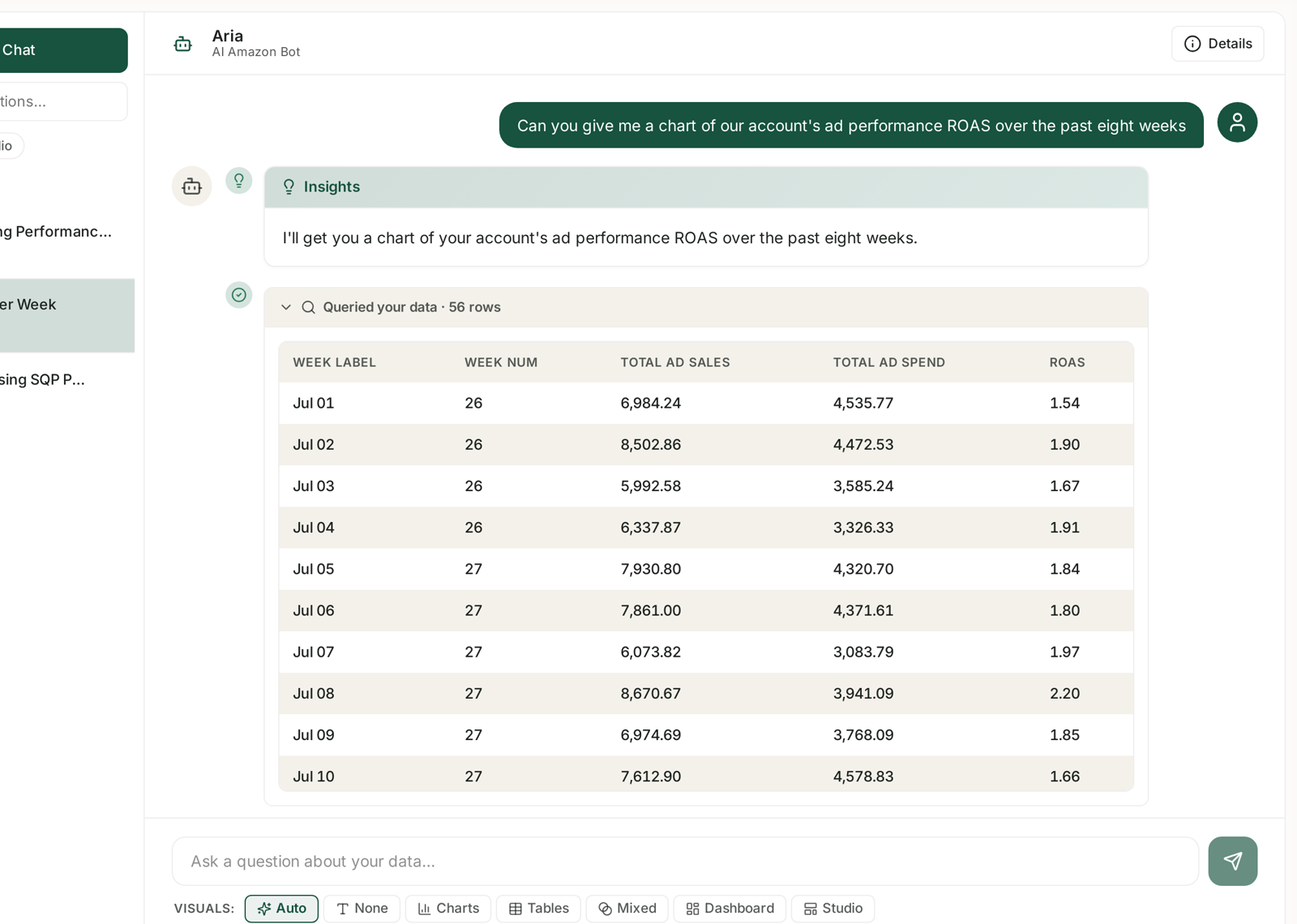
Four parts, in order:
1. Your question, as you typed it.
2. The plan — an Insights block restating what Aria is about to do. In the example above: "I'll get you a chart of your account's ad performance ROAS over the past eight weeks."
3. The data query — a collapsible row headed Queried your data · 56 rows, with a green tick beside it. Expand it and you get the rows themselves.
4. The answer — the visual, then the written interpretation.
Parts 2 and 3 are the ones nobody opens, and they are where the value is.
Read the plan first
The plan is a restatement, and restatements are where misunderstandings surface.
Check the metric. You asked about ROAS; the plan should say ROAS, not ACoS.
Check the period. "Past eight weeks" should match what you meant. If you said "recently" and the plan says eight weeks, that is Aria choosing for you — fine, but now you know.
Check the scope. "Your account's ad performance" is account-wide. If you meant one product, the plan has just told you it did not understand that.
If the plan is wrong, the answer will be wrong. Stop there and re-ask rather than reading on. It costs ten seconds instead of ten minutes. See Asking Aria a Good Question.
Then open the query
The disclosure expands to a real table of what came back. In the example: WEEK LABEL, WEEK NUM, TOTAL AD SALES, TOTAL AD SPEND, ROAS — the ingredients of the chart above it.
This is the part that makes Aria checkable. You are not being asked to trust a summary; you can look at the numbers it was computed from.
Spot-check one row against a dashboard. If week of Jul 05 reads 7,930.80 in ad sales, that figure should appear on the Sponsored Ads screen for the same range and scope.
Check the shape. Does the table cover the whole period you asked for, or does it stop short?
Check the granularity. A question about weeks answered from daily rows is fine; a question about weeks answered from four monthly rows is not.
The row count is a signal on its own
The header says how many rows came back, and it is worth reading before you expand anything.
| What you see | What it usually means |
|---|---|
| A plausible number for the period | normal |
| Suspiciously small (a handful) | the query was narrower than your question |
| Zero, or no query at all | Aria answered from context, not data — treat with care |
| Very large | fine, but the summary is doing a lot of compression |
A small row count with a confident answer is the combination to watch. Ten rows can support a sweeping statement that the data does not.
More than one query
A question that needs several sources produces several query rows, each with its own count and tick. Aria joins them for you.
That is where to look when two figures in one answer disagree — they may have come from different queries with different scopes or periods, and the join is where the mismatch lives.
What the plan and query cannot tell you
They do not prove the interpretation is right. Correct data can carry a wrong conclusion. The written paragraph is Aria's reading, not a fact.
They do not show the transformation. You see what came back and what was produced, not every step between.
They are not the MCP call log. That is a separate audit trail for AI tools querying your data from outside. See MCP Call Logs: Seeing What Your AI Tools Asked.
A habit worth forming
Before you act on an Aria answer, or put it in front of anyone else:
Read the plan. Metric, period, scope.
Read the row count. Does it look like the right amount of data?
Expand the query and check one number against a screen you trust.
Three checks, under a minute, and they catch nearly everything.
Related
- Asking Aria a Good Question — getting the plan right first time.
- Checking Aria's Work When an Answer Looks Wrong — the full diagnostic routine.
- What Aria Can and Cannot Answer — the boundaries.
- MCP Call Logs: Seeing What Your AI Tools Asked — the other audit trail.