

If your morning starts by opening campaigns to nudge bids and budgets, that is the job Automations exists to take off you. You describe the condition once, TrackIQ applies it on a schedule you set, and it records every change it makes.
Prefer to watch? Seventy seconds on the screen and how to start safely.
What you get out of it
Three things, in order of how much they matter:
- Speed of response. A rule that runs daily reacts to a keyword going bad in a day. You react when you next look, which might be Thursday.
- Consistency. The rule applies the same logic to the four-hundredth target as the first. Attention does not.
- A record. Every change is logged, so a bid change is something you can look up rather than something you have to remember.
What it does not do is think. A rule applies your judgement at scale — so the judgement has to be right before you scale it.
The Automations Screen

Open Automations in the sidebar.

Two tabs:
- Rules — individual conditions.
- Rule Groups — one rule applied across many campaigns at once. Build the logic once, point it at a portfolio.
And two buttons top right: Change log, and + Create Rule.
Reading the rules table
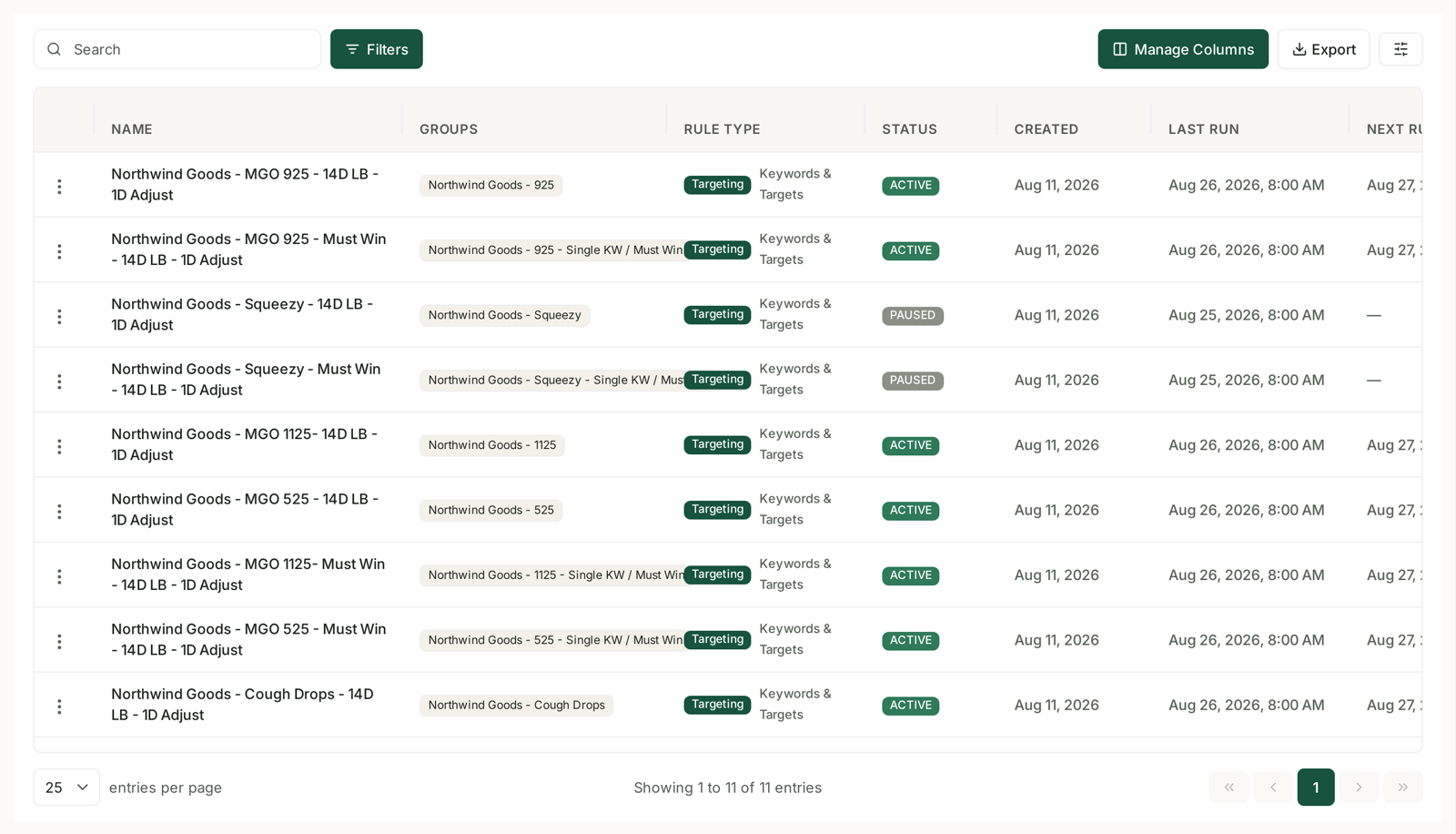
| Column | Why it matters |
|---|---|
| Name | see the naming convention below — it is doing real work |
| Groups | which campaigns this rule touches |
| Rule Type | Targeting, Campaign, and what it acts on |
| Status | Active or Paused |
| Created | |
| Last Run / Next Run | the two columns people forget, and the first place to look when a rule “did nothing” |
| Run History / Changed | what it has actually been doing |
The naming convention is worth copying
Live rules are named like “MGO 925 — 14D LB — 1D Adjust”. That encodes the two settings you will otherwise have to open the rule to check:
- 14D LB — a 14-day look-back. Judge performance on two weeks of data.
- 1D Adjust — adjust daily.
Getting that pair right matters more than the thresholds. Too short a look-back and you react to noise; too long and you react to something that stopped being true a week ago. Two weeks of data with a daily adjustment is a sensible default for most catalogues.
Creating a rule
+ Create Rule asks what should this rule manage?
Available now:
- Targeting — adjusts bids or pauses keywords and product targets based on performance.
- Campaign — adjusts budgets or pauses whole campaigns.
Listed but not yet available (marked with a dot): Placement, Adgroup and Audience under Advertising; Harvest Keywords, Harvest Product Targetings and Negative Targeting under Harvest.
Every rule type shows a plain-English Example of what it will do, such as:
Every day at 09:00 — if ACOS > 40% and clicks ≥ 10, lower the bid 15%.
Read that line before anything else. If it does not describe what you want, change the settings until it does.
The nine Targeting recipes
This is the part worth knowing about. Rather than building from scratch, Quick Start offers nine ready-made strategies. Expand one to see its recipe, then apply it.
| Recipe | What it does | Reach for it when |
|---|---|---|
| Hit my Target ACoS | Scales each bid by how far its actual ACoS sits from your target, trims proven non-converters, scales what runs under target. | You have one number you manage to. The closest thing to a default. |
| Bid autopilot (scale + trim) | Raises efficient winners, eases off high-ACoS targets, holds the rest. | You want one hands-off rule doing the whole job. |
| Cut wasted ad spend | Trims bids on targets that have taken real clicks but produced no order. | Spend is up and orders are not. |
| Rein in high ACoS | Steps bids down in tiers — hard when far over target, gently when only slightly over. | Blunt cuts have hurt you before. |
| Boost profitable winners | Raises bids on targets already converting below your ACoS target. | You have headroom and want volume. |
| Rescue impression-starved winners | Pushes bids up on targets that convert well but barely get shown. | Something converts brilliantly on tiny volume. |
| Trim low-relevance keywords | Eases bids where impressions are high and clicks are not. | The ad is not resonating on those searches. |
| Pause dead keywords | Pauses targets that have spent enough clicks to prove they will not convert — the classic 25-click cutoff. | Housekeeping. |
| Reward high converters | Nudges bids up where conversion rate is strong. | You want to win more of the auctions you are good at. |
Or Start blank Targeting Rule and build your own.
Which to pick first: if you manage to a target ACoS, start with Hit my Target ACoS. If you are cleaning up an account you have inherited, start with Cut wasted ad spend — it is the one with an immediate, measurable saving.
Scheduling
Rules run on a schedule, and the table shows Last Run and Next Run for each.
Timing matters more than people expect. A rule running at 09:00 judges yesterday as a complete day. One running at 15:00 is partly reacting to a day still in progress, and Amazon's data for the last day or two is still settling.
If a rule appears to have done nothing, check Last Run first. Nine times in ten it has not run yet, or it ran and no target met the condition.
The Change Log
Change log, top right, is the record of every change every rule has made.
This is the feature that makes automation safe to use. When a bid is not what you expect, the change log tells you which rule changed it, when, and from what. Without it you are trusting a black box; with it you are supervising a process.
Start paused
The single most useful habit:
- Create the rule and leave it paused.
- Read the Example line. Does it describe your intent in plain English?
- Activate it, then check the change log after the first run. Look at what it actually touched.
- Widen it. Once one rule behaves, apply it across a portfolio with a Rule Group.
A rule you have verified once is worth far more than one you trusted immediately — and step 3 takes two minutes.
Related
- Guardrails to Set Before You Automate Anything — read this before enabling anything.
- Dry-Run Preview: Seeing What a Rule Would Change — see what a rule would change, before it does.
- Rule Types Coming Soon: Placement, Ad Group, Audience and Harvest — the rule types visible but not yet available.
- The Bleeder Reports — the checks most worth automating first.
- Bid Optimisation: Six Rules — the manual version, and which parts are safe to automate.