

Amazon Ads → Campaigns is the entry point to advertising, and it establishes a layout that every screen under Amazon Ads repeats. Learn it once here and Ad Groups, Keywords, Targets, Product Ads, Search Terms, Placements and Audiences all read the same way.
Prefer to watch? Sixty-eight seconds on the layout every Amazon Ads screen repeats.
The layout, top to bottom
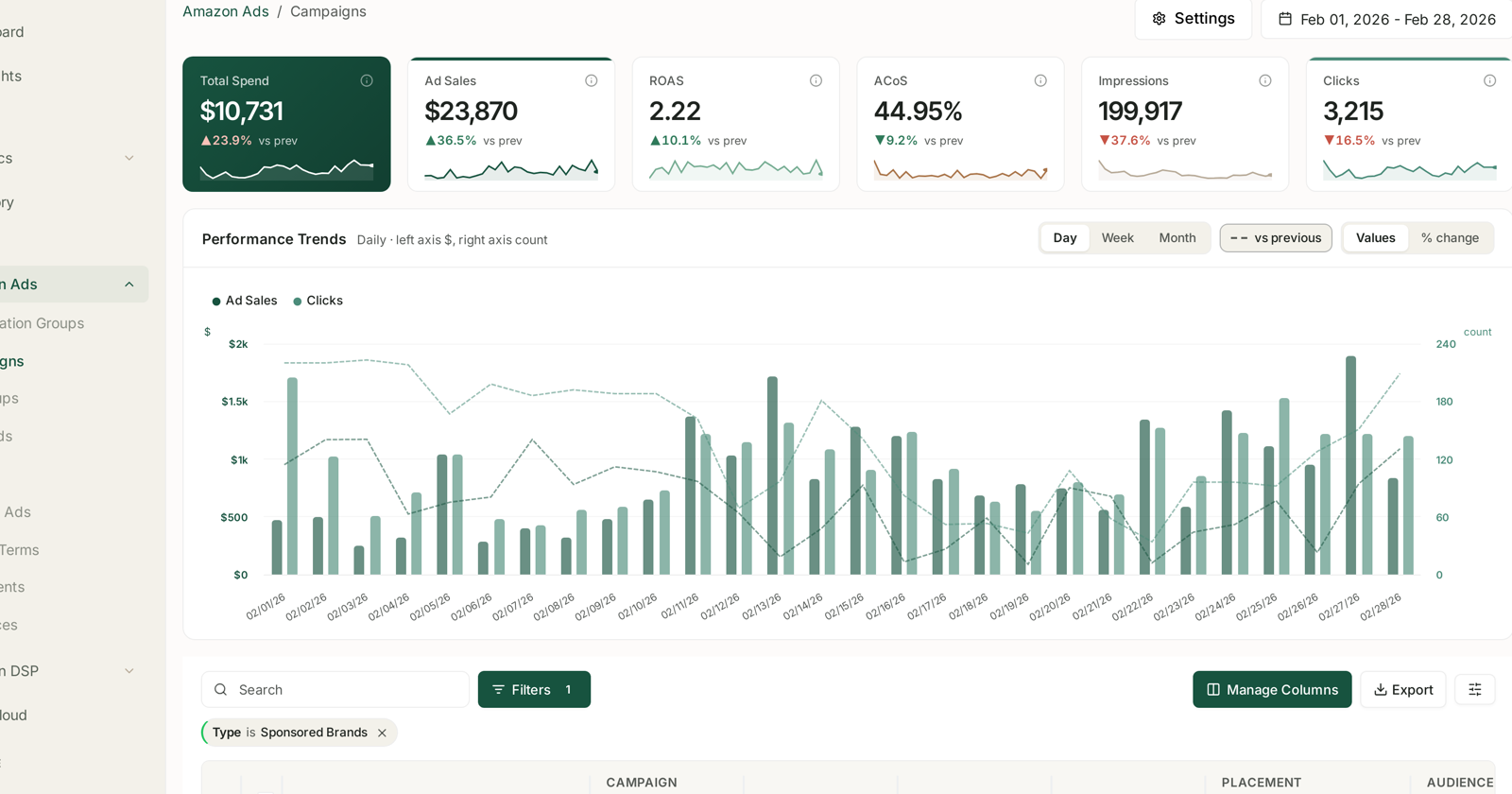
Six headline tiles. Total Spend, Ad Sales, ROAS, ACoS, Impressions and Clicks — each with its own sparkline and a vs prev change figure. Each carries an info icon giving its definition, which is worth reading once per metric.
Performance Trends, labelled Daily · left axis $, right axis count. Two axes, because money and counts do not share a scale.
The table, with Search, Filters, Manage Columns and Export.
Plus a date range and a Settings control in the header.
The four controls above the chart
These are the ones people miss, and they change what the chart means.
| Control | What it does |
|---|---|
| Day / Week / Month | granularity of the series |
| vs previous | overlays the preceding period as a dashed line |
| Values | plots the actual numbers |
| % change | plots movement instead |
Day is noisy on advertising. Weekly smooths out the weekday pattern that makes every daily chart look volatile, and it is usually the better read for anything longer than a fortnight.
vs previous is how you answer “is this better than it was?” without opening two tabs. See Values vs % Change: The Comparison Toggle for when to use each.
Filters persist, and they show as chips
The Filters button carries a count when filters are active, and each one appears as a removable chip below the toolbar — for example Type is Sponsored Brands.
Two things follow:
Filters survive between sessions. A filter set last week is still applied today, on this screen and on the tiles above it. The headline figures respect your filters, so a filtered view shows filtered totals — which is right, and surprising if you have forgotten the chip is there.
Tables show enabled campaigns by default. Paused and archived keep their history but are not in the default view. That is the single most common cause of “half my campaigns vanished”.
The columns worth knowing
Beyond the obvious spend and sales columns, the Campaigns table carries Placement and Audience — the two adjustment levers that live at campaign level in Amazon.
For what those adjustments do, see Placements: Top of Search vs Rest of Search and Audiences: Segment Performance.
Reading the tiles honestly
ROAS and ACoS are the same relationship. ACoS 44.95% is ROAS 2.22. Watching both is watching one number twice — use whichever your team thinks in.
Spend up and ACoS down is the good combination. Spending more while getting more efficient means you found headroom. Spending more with ACoS also rising means you are buying worse traffic.
Impressions falling with ACoS improving is often deliberate — a bid cut trading volume for efficiency. Check whether that was you or a rule. See The Change Log.
The right-hand edge is unreliable. The last day or two is still accruing, because Sponsored Products is credited over 7 days and Brands and Display over 14. See My Ad Data Is Missing or Looks Wrong.
Comparing ad types
If your filter includes more than one ad type, the totals blend two attribution windows. That is fine for size and misleading for efficiency — Sponsored Brands has twice as long to be credited with a sale, so it flatters against Sponsored Products.
Filter to one type when comparing efficiency. See Why SP, SB and SD Numbers Don't Add Up.
Where to go from here
| You want | Screen |
|---|---|
| What customers actually typed | Search Terms |
| Which keywords you bid on | Keywords |
| Which ASINs are advertised | Product Ads |
| Campaigns grouped for automation | Optimization Groups |
| To act on all this automatically | Rule-Based Optimization |
Related
- Monitoring Your Sponsored Ads Performance — the overview these screens sit under.
- Create a Sponsored Products Campaign — building the campaigns this screen reports on.
- Amazon PPC: Core Terms and Metrics — the vocabulary behind every column here.
- Ad Type and Placement Mix — the two ratios worth checking on this screen.
- Restructure Your Campaigns Before You Optimise — the structure this screen is easier to read with.