

Your plan price is not the whole bill once you pass $1.5M. A revenue component is added on top — and unusually, the rate falls as you grow rather than rising.
The headline promise on the pricing page is the one to hold on to: it never goes above 0.5%.
Prefer to watch? Sixty-eight seconds on the bands, and why your rate falls as you grow.
The first $1.5M is included
Every plan covers your first $1.5M in trailing twelve-month average revenue. Below that line you pay the plan price and nothing else.
“Trailing twelve month average” matters. It is not last calendar year, and not an annualised guess from your best month. It is a rolling average, so a single exceptional month moves it slightly rather than repricing you overnight — and it comes down again as that month rolls out of the window.
The tiers
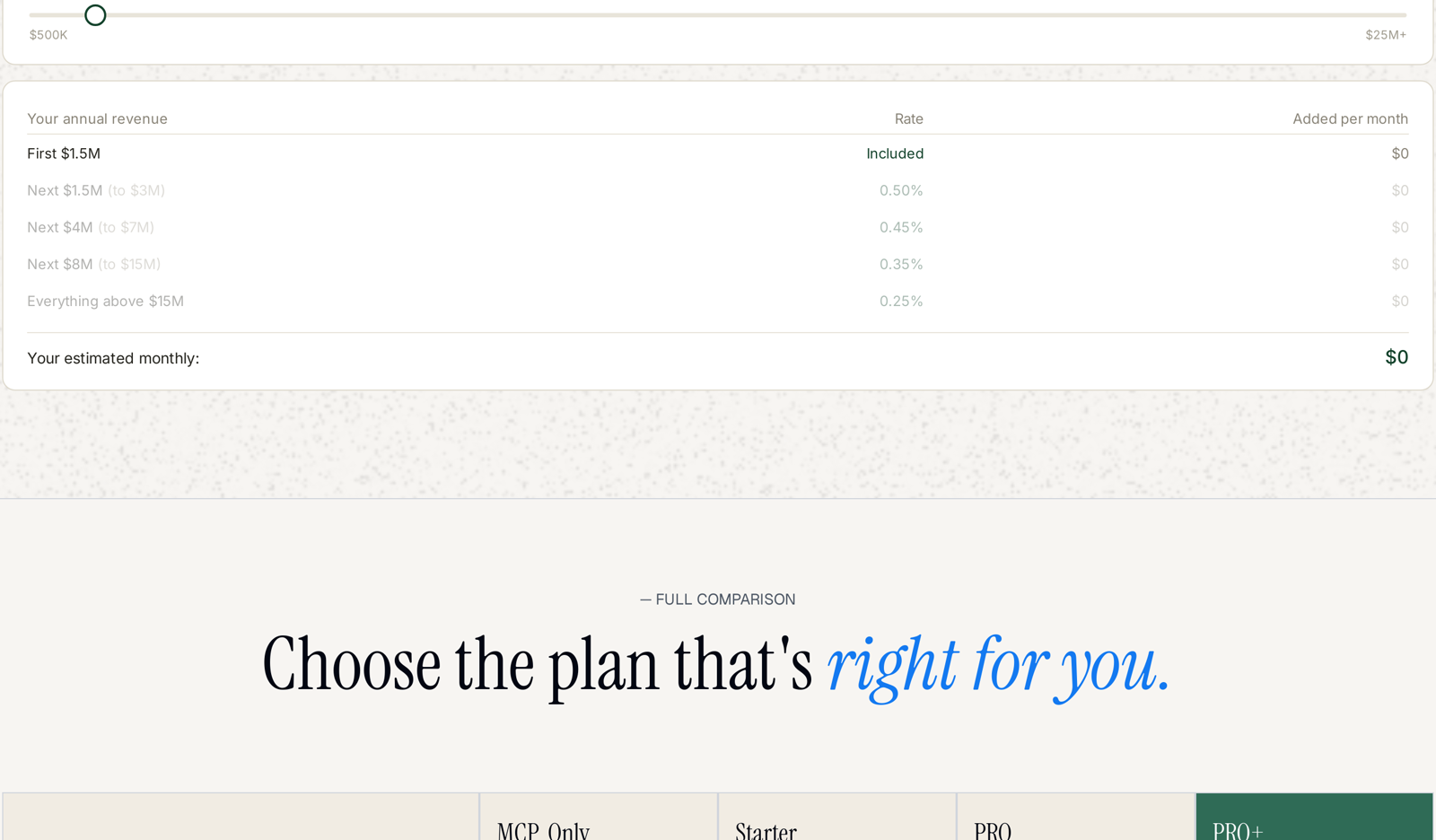
Rates apply to each band separately — the way income tax brackets work, not a single rate on the whole figure.
| Your annual revenue | Rate |
|---|---|
| First $1.5M | Included |
| Next $1.5M (to $3M) | 0.50% |
| Next $4M (to $7M) | 0.45% |
| Next $8M (to $15M) | 0.35% |
| Everything above $15M | 0.25% |
Crossing a threshold never reprices what came before. Going from $2.9M to $3.1M does not move your whole revenue to a new rate; only the $100,000 above the line moves to the next band. That is why the marginal cost of growth keeps falling.
The highest rate you can ever pay on any dollar of revenue is the 0.50% in the first band above the included tier.
Working an example
A brand at $5M in trailing twelve-month average revenue:
| Band | Amount in band | Rate | Added |
|---|---|---|---|
| First $1.5M | $1.5M | included | $0 |
| $1.5M – $3M | $1.5M | 0.50% | $7,500 |
| $3M – $7M | $2M | 0.45% | $9,000 |
| per year | $16,500 |
That is roughly $1,375 a month on top of the plan price. The arithmetic is the same shape at any size — fill each band in turn, stop at your revenue.
Use the slider on the pricing page rather than doing this by hand. Drag it to your own trailing twelve-month average and it shows the monthly figure directly.
Why it is built this way
Two properties are worth naming, because they change how the cost behaves as you grow.
Cost rises more slowly than revenue. Doubling from $3M to $6M does not double this component — the new revenue lands in a cheaper band. Your effective rate falls the larger you get.
Small sellers pay nothing extra. A brand under $1.5M pays the plan price and stops. The revenue component only begins where the value of the product scales with the size of the business.
How it combines with everything else
Three separate things make up a bill, and they are easy to conflate:
| Component | Charged |
|---|---|
| Plan price | monthly — per brand on Starter, PRO and PRO+ |
| Revenue component | on trailing twelve-month average revenue above $1.5M |
| AI usage | nothing — usage is not metered or capped on any plan |
Note that plan price is per brand while the $1.5M allowance is stated per plan. If you run several brands, price the plan side by brand count first, then add the revenue component.
That third row is the point of the second: because the revenue component already scales with the size of your business, AI usage does not need metering on top. See Are There Token Limits or Usage Caps?
If your revenue changes
Because the figure is a rolling twelve-month average, it moves gradually. A strong quarter raises it over the following year rather than immediately; a weak one lowers it the same way.
The practical consequence: a seasonal peak does not spike your bill, and you do not need to do anything when one happens. If your business changes shape permanently, the average follows it within a year.
Related
- TrackIQ Plans Explained: MCP Only, Starter, PRO and PRO+ — the four plans.
- What's Included in Each Plan — what each one gets you.
- Changing Plans: Upgrades and Downgrades — moving between them.