

Two settings decide how much evidence a rule sees and how often it acts on it. They sit next to each other under Cadence & Guardrails, they interact, and getting the pair wrong is the most common reason a well-written rule behaves badly.
They are important enough that most accounts put them in the rule's own name — 14D LB · 1D Adjust means a fourteen-day look-back adjusting daily.
Prefer to watch? Eighty-eight seconds on the window, the attribution lag, and why overlap compounds.
The look-back window
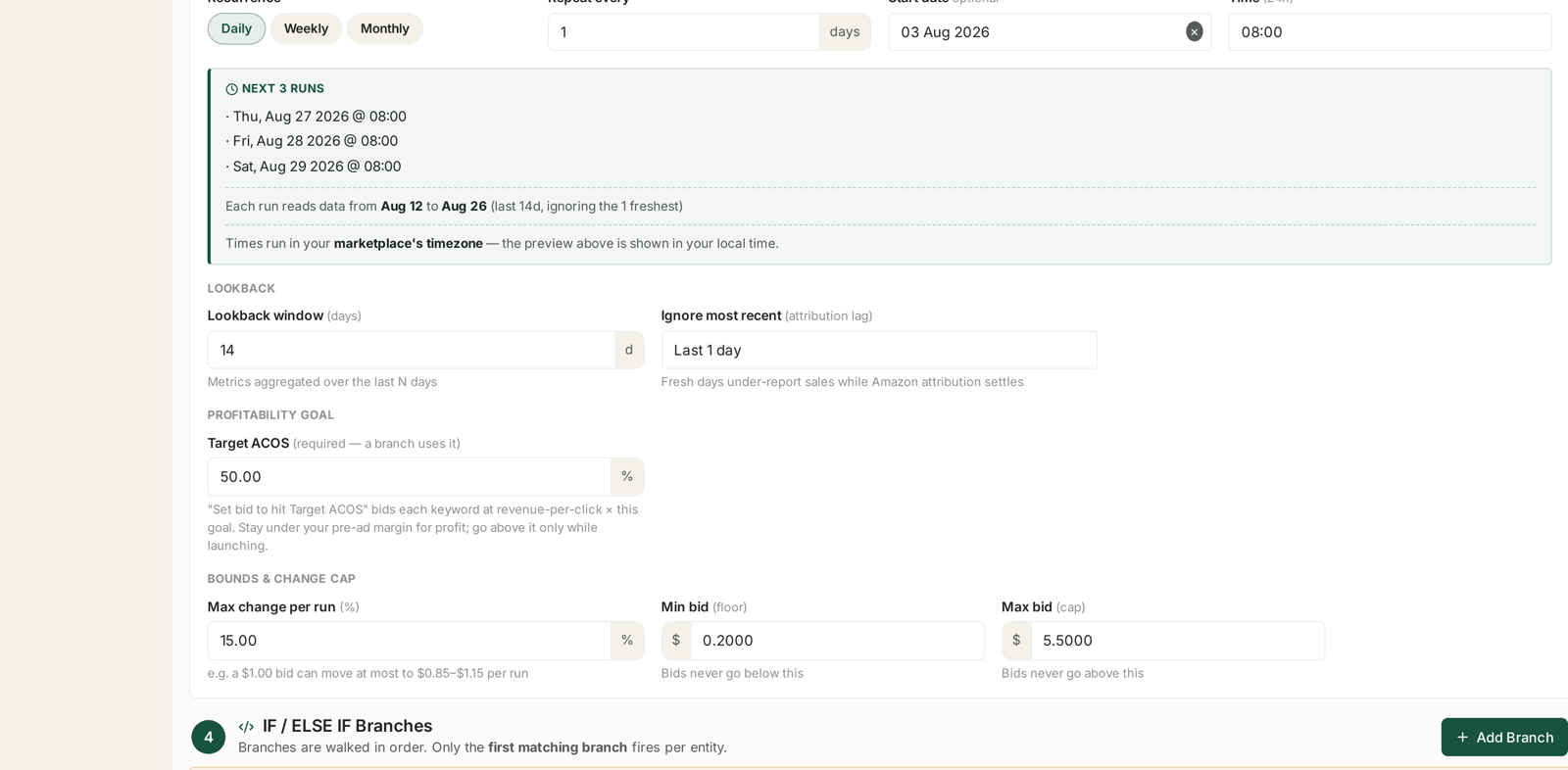
Look-back window (days) is how far back each run reads. Metrics aggregated over the last N days.
It is a trade between evidence and freshness:
| Window | Sees | Costs you |
|---|---|---|
| 7 days | recent behaviour, reacts fast | thin data; weekday/weekend skew |
| 14 days | two full weeks, both weekends | a fortnight to notice a change |
| 30 days | stable, well-evidenced | very slow to react; averages away a real shift |
14 days is the sensible default for bid rules, and it is what the demo account uses throughout. It contains two complete weekly cycles, which matters more than it sounds: a 7-day window that happens to start on a Wednesday weights the weekend differently from one that starts on a Monday, and your rule inherits that wobble.
Go to 30 days for low-traffic targets where 14 days produces single-digit click counts. Go to 7 days only when you are actively managing a launch and want the rule to keep up.
Ignore most recent — the setting people miss
Ignore most recent (attribution lag) drops the freshest N days from the window. The helper text says why:
Fresh days under-report sales while Amazon attribution settles.
This is not a cosmetic option. Amazon attributes a sale to the click that led to it, and that click may have happened up to 7 days earlier for Sponsored Products, or 14 for Sponsored Brands, Sponsored Display and DSP. Yesterday's spend is complete; yesterday's sales are not.
A rule reading right up to yesterday therefore sees the newest days as spend with no orders attached — and a rule whose job is to pause things with no orders will happily pause a target that is converting perfectly well. It just has not been credited yet.
Set this to at least 1 day. For rules that pause on zero orders, 2 days is safer. The cost is a day of latency; the alternative is a rule that systematically punishes recency.
The Next 3 runs panel shows the resolved effect, so you never have to work it out:
Each run reads data from Aug 12 to Aug 26 (last 14d, ignoring the 1 freshest)
Adjustment frequency
Recurrence — Daily, Weekly or Monthly — with Repeat every N, plus a Time and an optional Start date. Four presets cover the usual choices: Daily · 9 AM, Mon–Fri · 9 AM, Weekly · Mon 9 AM, Monthly · 1st 9 AM.
Times run in your marketplace's timezone, not yours. The preview is shown in your local time, so the two can look different by design — trust the label, not the clock on your wall.
How the two interact
This is the part worth getting right, and it has a simple rule of thumb:
A daily rule on a 14-day window re-reads 13 days it has already acted on.
Each run sees almost exactly what the last run saw, plus one new day. So the same evidence drives an adjustment again, and again, and again. Over a fortnight a 15% daily nudge compounds into something far larger than 15% — not because the data changed, but because you kept counting it.
That is why Max change per run exists, and why it should be modest when adjustment is frequent:
| Frequency | Window | Max change per run |
|---|---|---|
| Daily | 14 days | 10–15% |
| Weekly | 14 days | 20–25% |
| Weekly | 30 days | 25–30% |
The principle: the more the windows overlap, the smaller each step should be. A weekly rule on a 7-day window sees fresh data every time and can afford a bigger move; a daily rule on a 30-day window is mostly re-reacting to old news and should barely move at all.
Pausing is the exception. A pause is not cumulative — it happens once — so pause branches are safe to run daily as long as their thresholds require real evidence. See Building a Rule from Scratch.
Picking a pair
Bid rules on a mature account — 14-day window, ignore 1 day, daily, 10–15% cap. Steady, and it will not chase noise.
Budget rules — 14 or 30 days, weekly. Budgets move real money in larger steps and rarely need daily attention.
Launches — 7-day window, daily. You are deliberately trading stability for responsiveness, and you should be watching it.
Low-traffic long tail — 30-day window, weekly. Anything faster fires on noise.
What not to do
Do not run daily on a 30-day window with a large cap. Every run re-reacts to the same month of data, and the changes compound on evidence that has not moved.
Do not set the look-back shorter than the conversion cycle. If shoppers typically take five days to buy, a 7-day window with 1 day ignored leaves six days of signal — barely one cycle.
Do not change both settings at once. When a rule misbehaves, move one, watch a week, then move the other. See Scheduling: Last Run, Next Run and Run History for reading what actually happened.
Related
- Building a Rule from Scratch — the branches these settings feed.
- Guardrails to Set Before You Automate Anything — the change cap and bid bounds.
- Scheduling: Last Run, Next Run and Run History — confirming when a rule ran and what it did.
- Why SP, SB and SD Numbers Don't Add Up — the attribution behaviour behind the lag setting.