

Most reporting tools make you know where the answer lives before you can find it. Aria removes that step: you ask the question, and it goes and gets the answer.
Prefer to watch? Eighty seconds on asking a question and saving the answer.
What you actually get
Three things that a normal report does not give you:
- The answer, not the data. Aria draws the chart and tells you what it shows.
- No navigation. You do not need to know which screen holds the number.
- Reuse. A question worth asking weekly becomes a Studio you never ask again.
Asking a question
Open Aria → Chat in the sidebar and type into the message box.
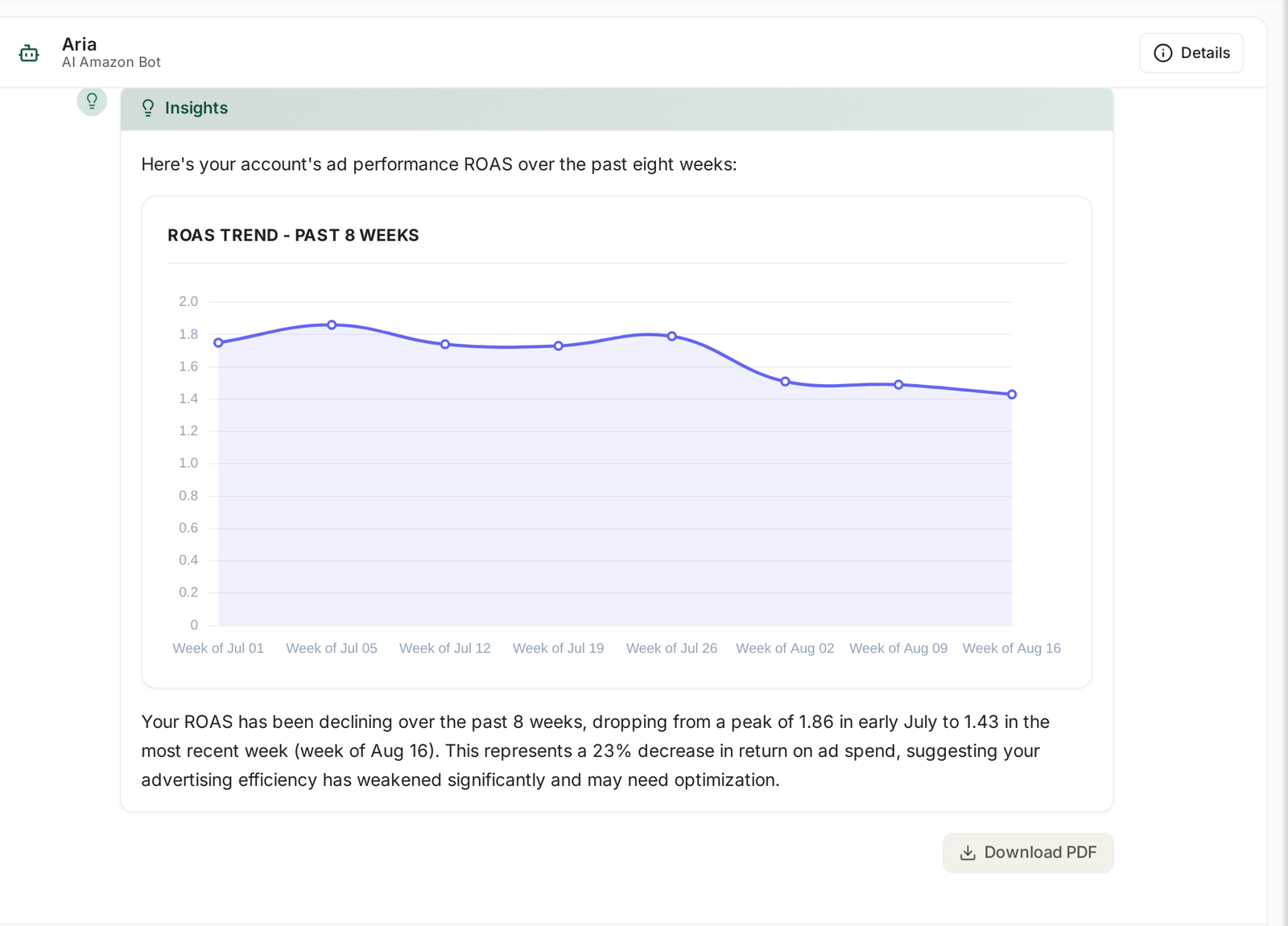

Here is what a real answer looks like. Aria restates the question, draws the chart, and then — the part that matters — reads it back to you:
Your ROAS has been declining over the past 8 weeks, dropping from a peak of 1.86 in early July to 1.43 in the most recent week. This represents a 23% decrease in return on ad spend, suggesting your advertising efficiency has weakened significantly and may need optimization.
That is the difference between a chart and an answer. The chart shows a line going down; the sentence tells you it is 23% and that it needs attention.
Every answer carries a Download PDF button, and a Details control that opens the work behind it — useful when you want to check what Aria actually queried before you act on the number.
Choosing the shape of the answer

Beneath the message box, the VISUALS row decides how the answer is presented:
| Option | Use when |
|---|---|
| Auto | you do not care — Aria picks. The right default. |
| None | you want the number in a sentence, nothing else. |
| Charts | you are looking for a trend or a shape. |
| Tables | you want to sort, scan or copy the figures out. |
| Mixed | both. |
| Dashboard | several related answers laid out together. |
| Studio | you want this saved as a permanent, refreshing report. |
Most of the time leave it on Auto. Reach for Tables when you intend to export, and Studio when you know you will ask this again.
Writing a question that gets a good answer
Aria is querying real data, so the more precisely you frame the question, the less it has to guess. A good question names three things:
- the metric — ROAS, ACoS, units, sessions
- the period — last 8 weeks, this month, since 1 July
- the comparison — by week, by product, versus the previous period
Weak: how are my ads doing?
Strong: show me ROAS by week for the past 8 weeks, and tell me which ad type moved most.
The second one produced the answer above.
Studios: when a question is worth keeping
A Studio is a dashboard Aria built because you asked for it.
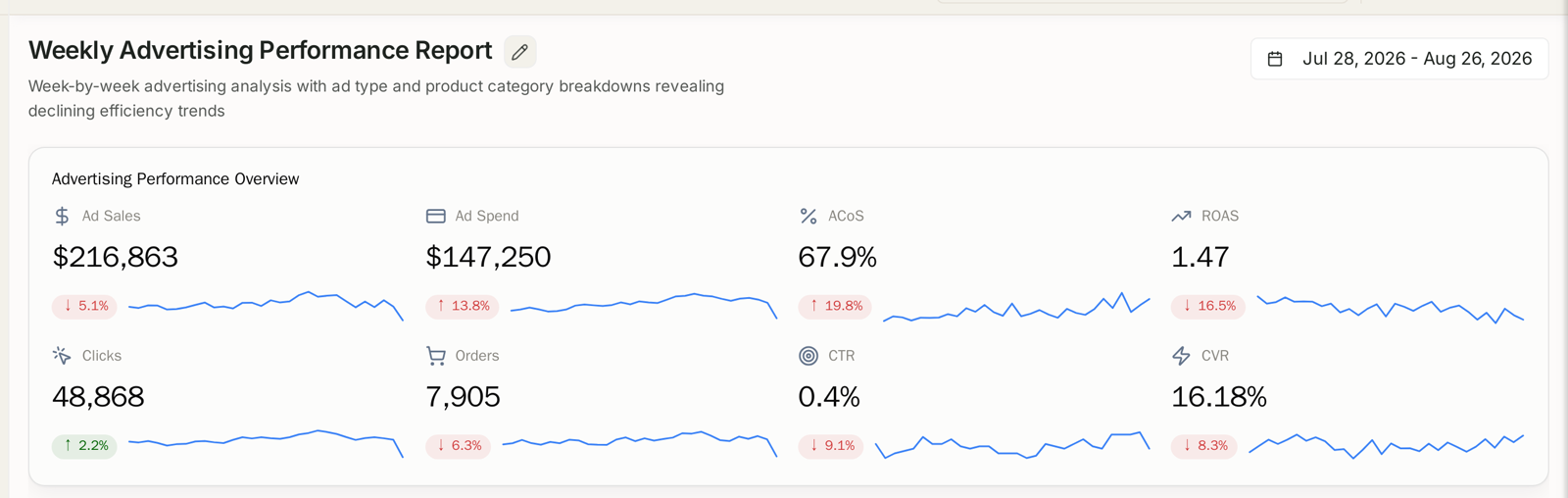
It keeps a title and description, its own date range, and headline metrics with their trend and change — so opening it next week gives you next week's numbers, not a snapshot of the day you made it.
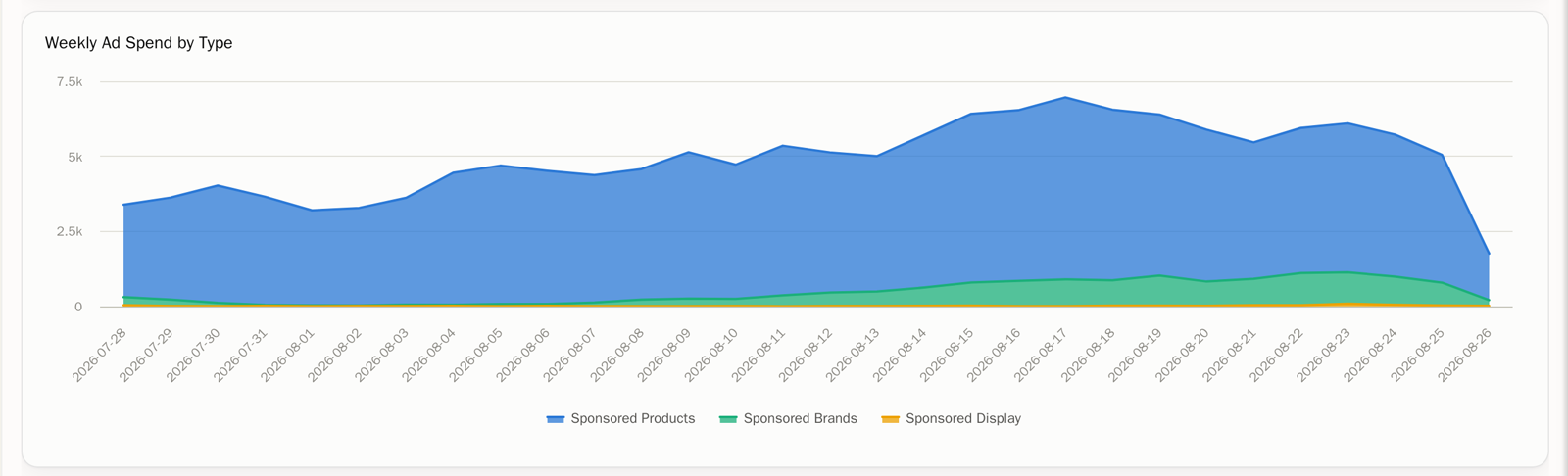
Underneath, the breakdowns: spend over time by ad type, and a comparison table per channel.

Studios live under Aria → Studios, and you can rename one from its title.
When to make one: any question you have now asked twice. A weekly advertising review, a monthly category check, the three numbers you report upward. Ask it once properly, save it as a Studio, and the asking is done forever.
Finding past conversations
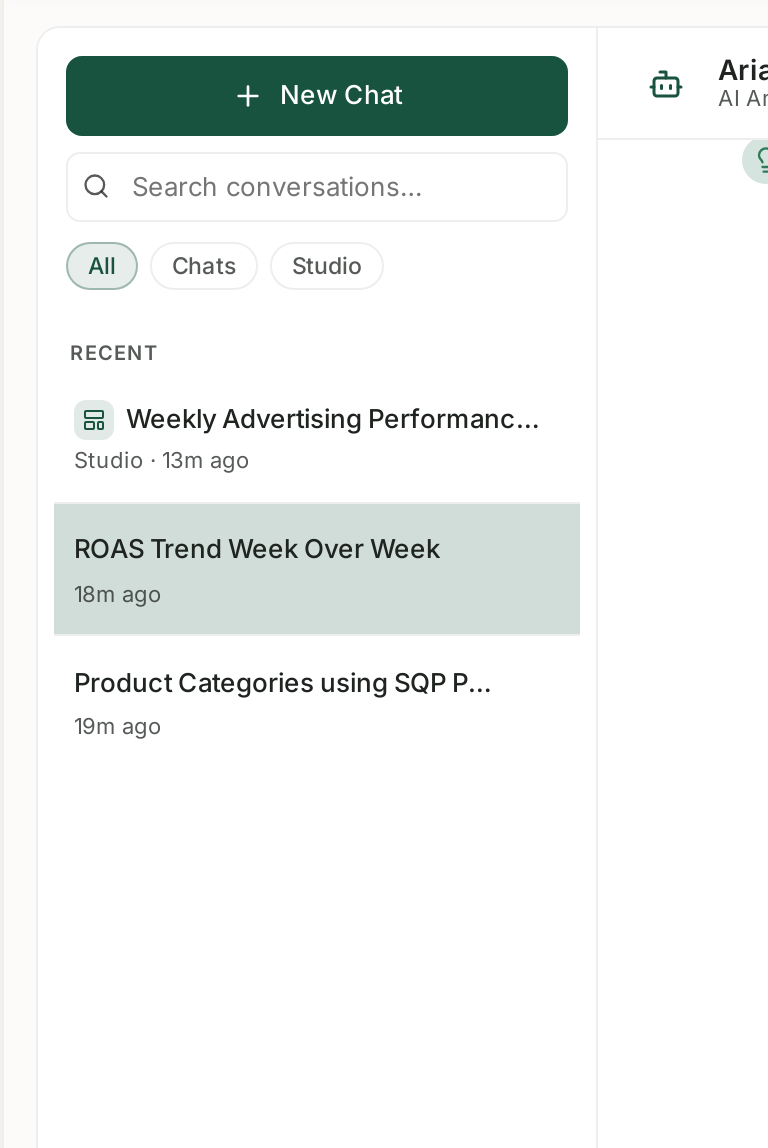
The left panel keeps every conversation, with a search box and All / Chats / Studio filters. Answers are not throwaway — when you need last month's reasoning, it is still there.
Checking Aria's work
Aria queries your live data, but it is still interpreting a question. Two habits worth keeping:
Details opens the work behind the answer — what Aria actually queried to produce it.
Open Details on anything surprising. It shows what was actually queried. A number that looks wrong is usually a question that was read differently from how you meant it.
Watch the date range. “Last month” and “the last 30 days” are different questions, and some data has its own cadence — Search Query Performance is weekly, AMC is monthly. If the period in the answer is not the period you meant, ask again with explicit dates.
Where to start
Ask one real question you actually need answered this week. Name the metric, the period, and what you want it compared against. If the answer is useful, save it as a Studio.
Related
- Asking Aria a Good Question — the single biggest lever on answer quality.
- What Aria Can and Cannot Answer — the boundaries, stated plainly.
- Visuals: Auto, None, Charts, Tables, Mixed, Dashboard and Studio — Auto, None, Charts, Tables, Mixed, Dashboard, Studio.
- Studios: Building a Dashboard by Asking for It — building a dashboard by asking for it.
- Managing Chats: Recent, Search and the All/Chats/Studio Filter — Recent, search, and the Details drawer.
- Reading Aria's Plan and Data Queries — the working it shows under every answer.
- Checking Aria's Work When an Answer Looks Wrong — when an answer looks wrong.
- Aria Prompt Library: 40 Questions Worth Asking — 40 questions worth asking.
- Chatting With Aria in Slack — the same Aria, where your team already works.