

Two different things get reported as “a rule didn't run”, and they need opposite fixes:
It did not execute. Nothing happened at the scheduled time.
It executed and changed nothing. It ran, evaluated, and decided no action was warranted — which is usually correct behaviour.
Telling them apart takes about ten seconds.
Prefer to watch? Sixty-nine seconds on telling the two problems apart in ten seconds.
Step 1: read Last run
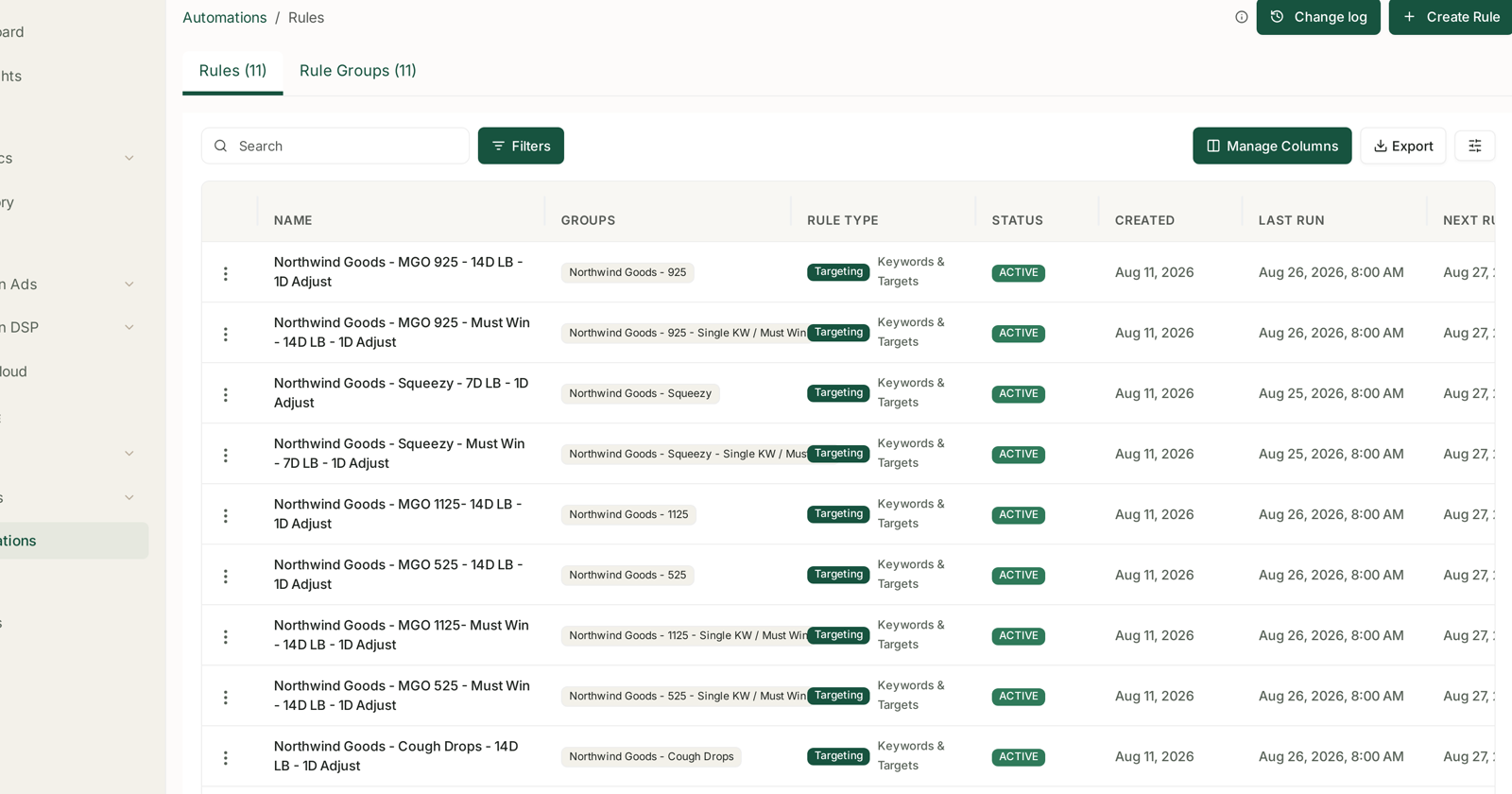
Automations → Rules. Find the rule and read Last run and Next run.
| What you see | Which problem you have |
|---|---|
| Last run is recent | it ran — go to step 2 |
| Last run is old or empty | it did not run — go to step 3 |
| Next run is empty | it is not scheduled — step 3 |
Do this before anything else. Half of these reports end here, because the rule ran perfectly and simply had nothing to do.
Step 2: it ran but changed nothing
Open the Change log and filter to the rule. No rows for that run means it evaluated and found nothing meeting its conditions.
That is usually the right answer. A trim-waste rule with nothing to trim is a rule doing its job on a good day.
It becomes a problem when it is always silent. Three causes, in order of likelihood:
Thresholds too strict. “ACoS over 40% and clicks ≥ 50 and zero orders” may match nothing in your account. Loosen one clause at a time, not all three.
The look-back window is too short to accumulate evidence. A 7-day window on a low-volume target may never reach the click threshold. Widen the window before loosening the threshold — it is the safer change.
The group is wrong. Check the rule group's campaign count, and check the campaigns in it are the ones you meant. A rule pointed at a group of six quiet campaigns will be quiet. See Rule Groups.
Step 3: it did not execute
Work down this list.
Is the rule ACTIVE? The status column says so. A rule that is not active is not scheduled.
Is Next run set? An empty Next run means nothing is queued.
Has the connection expired? A rule needs live advertising data to evaluate. If the ADS source stopped syncing, the rule has nothing current to judge. Check Settings → Connections — the symptom is a last-synced time that stops advancing, with no error. See Fixing a Broken or Expired Amazon Connection.
That third one is the cause people find last and should check first, because it explains a rule going quiet on a date rather than gradually.
Does the group still contain campaigns? A group emptied by campaign archiving leaves the rule with nothing to act on.
Did somebody change it? Rules are account-level. A colleague can pause one.
The case that looks like a failure and is not
A rule that paused everything it could pause has nothing left to do.
A pause rule that fired on twenty targets last week and nothing this week is not broken — it already dealt with them. Paused entities vanish from the default table view, so the account can look untouched.
Check the Change log for last week rather than yesterday before concluding anything.
When a rule runs but the change does not stick
Rare, and it points outward rather than inward.
Something else changed it back. Two rules on the same group will fight — the Change log shows a bid moving up on one day and down the next. Fix by scoping to different groups, or using one recipe that adjusts in both directions. See Targeting Rules.
Somebody changed it by hand, in TrackIQ or in Amazon's console. Manual changes do not appear in the Change log, so a change with no matching row was made by a person.
Amazon rejected it. A bid below Amazon's minimum, or a campaign archived at Amazon's end, cannot be set.
The check that prevents most of this
Read the Change log the day after switching on a new rule.
Volume, direction, repetition. A rule that has done something visible and sensible on day one is a rule you can leave alone — and if it did nothing, you find out immediately rather than in a month.
See The Change Log and Guardrails to Set Before You Automate Anything.
Related
- Scheduling: Last Run, Next Run and Run History — last run, next run and history.
- Turning Brand Sync On and Off — a rule scoped to an inactive brand finds nothing.